SSW .NET Toolkit
>
User Guide

Client Side Validation using Extended Providers
SSWValidator provides a simple form validation control
that solves the rule
Do you use Validator controls?
What is an extended provider?
An extended provider is a component that is dropped on
your forms and the purpose of the extended provider is
to add more properties to your controls. A good example
of an extended provider is the ErrorProvider control
that comes with Visual Studio.NET. What the
ErrorProvider does is to add some properties to an
existing control (e.g. a textbox) which allows error
messages to be displayed on that textbox.

Figure: A textbox with the ErrorProvider attached to
it
SSW WinValidator is an extended provider. When dropped
on the form from the toolbox, it attaches additional
properties to textboxes to provide field validation.
How to use the SSW Validator
-
Right-Click on the toolbox tab and click Add/Remove
Items... (It might be a good idea to add a tab to
the Toolbox to hosts your custom controls)
- Browse to our DLL and click on OK
-
You should see these new components in your toolbox
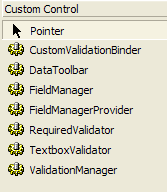
Figure: The WinValidator components added to
your control toolbox.
-
Drop the components that you will need your forms,
including the ErrorProvider Control that comes with
Visual Studio.NET. When you do that, you will see
these fields added to your textbox properties.
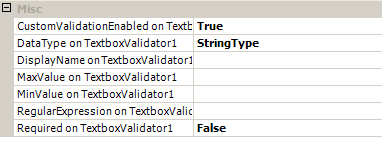
Figure: Additional Properties added to a textbox
-
On the validation Properties window of the Validation
Manager, set the setting as per the figure below
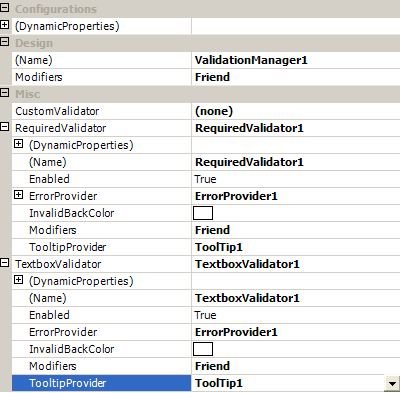
Figure: Validation Manager Properties to be
modified
-
Use these to enable fields validation on your
textboxes.
Custom Controls
Another way to achieve a similar result is by creating
custom controls. This can be done by creating a new
control which inherits the base control and then adding
the properties required for validation to the new
control.
Public Class mySelfValidatingTextbox
Inherits System.Windows.Forms.TextBox
'// Implementation code goes here
End Class
|
Figure: Sample Self Validating Textbox
Custom controls are good because they:
- can be coded neatly,
- can be customised as needed,
- are easy to implement.
Although custom controls have some benefits, they are
vulnerable to certain pitfalls that extended providers
are not. For instance, on a form that has several
textboxes, in order to use a customised textbox,
substantial code modification would be required. It
would be necessary to:
-
replace every textbox that requires customisation with
the newly created custom textbox
-
make sure that each new textbox has the same name as
the one it replaced and re-add the event handler to
the existing code behind that textbox (if any)
-
ensure that each custom control is positioned in the
same place on the form.
This tedious procedure makes it clear as to why Extended
Providers are the better choice for adding properties to
controls.