-
Linking Tables to XML Files
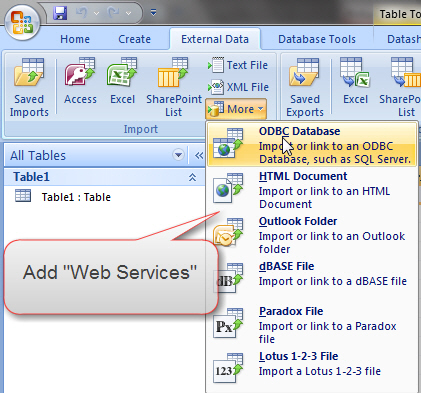
Microsoft Access will support the ability to use an XML file as a linked table,
just like it supports linking a table to a SQL backend.
Further, if they include an XML parser it would be easy to implement a web service
linked table.
For example, a supplier may publish their pricelist as a DataSet returned from a
WebService. By entering the path to the WebService then selecting the function,
Access could then import this as a linked table.

Figure: Access supports links to many data sources, but not XML.
-
Access will have an easy way to resolve Reference problems
At the moment when there is a bad reference you get an unhelpful error message " Compile Error Can't find project
or library" and the code will break
on a line containing the LEFT function.
-
Access applications will be easily deployed
You will be able to put the runtime in the folder of the MDE and xcopy it to another
machine and it will work.
-
Access needs a Search View
At the moment there are the Form and Continuous views. Access needs another view
that doesn't have the navigation buttons at the bottom but instead will have a
search form that is bound to table. This allows for easier and more intuitive navigation
of large data sources.
We know there is existing functionality to search fields, but the interface is not
intuitive and robust enough.
-
-
Figure: Access' built in Find Dialog - Not intuitive (Bad)
-
-
Figure: A Search Form to view data from a Table - Allows for better queries (Good)
-
Access will disconnect gracefully from SQL Server
If your Access front-end is linked to a SQL backend, you will encounter a large
number of errors and unsightly message boxes if the SQL Server connection is closed
for whatever reason. Access will be able to recover gracefully from this common
problem, rather than bombard the user with dialogs. Read
more information about this issue.
-
Forms will have a Trace property
The form designer will have a property to turn tracing on, similar to ASP.NET
2 (see figure below). Tracing will log all the methods that are called as well as
the time taken by each method. This is particularly useful identifying the causes
of slow loading forms.

Figure: Turn tracing on through the properties window
-
Convert to Windows .NET Application
On the Forms you want to have an option that allows you to convert to a One Click
Windows .NET Form (which turns the Access form into a .NET Windows Form) and have
people use that through the browser. This allows a Skilled access developer to deploy
a basic data entry form to the browser, and have the enterprise entering data. We
know that the conversion progress may be complicated and that every piece of functionality
will not be available, so if you want this function you will be able to set a
property on the form that says ".NET Compatible" (i.e. disables some of
the features in access to increase compatibility)
-
Easy way to convert Reports to Reporting Services reports
Access will have a button to deploy a report to reporting services, that turns
it into an RDL file, deploys and opens it in a browser. We know that the conversion
progress may be complicated and that every piece of functionality will not be available,
so if you want this function you will be able to set a property on the form that
says "Reporting Services Compatible" (i.e. disables some of the features
in access to increase compatibility)
-
File Explorer needs to open the correct version of Access every time
Currently it opens the last version of Access that was opened! This is not a solution.
It gets worse when the user has Access 2007 installed + a Access 2003 Runtime version. After using the runtime, double clicking on an .mdb makes it try to open a 2007 version in 2003.
-
Access 2003 Runtime and Windows Update
When you have an Access 2003 Runtime installed (only) + using Office 2007, Windows Updates recommends (aka gives end users grief) patching Word 2003 etc (which they don't even have).
PS: Times like this I wish Access was not tied in with Office.
-
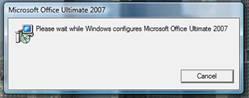
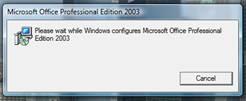
The 'Configuring' message is unacceptable (it will be a one time event - not every time you open a different Access version)
When you have Access 2003 and 2007 you get a very long 'Configuring' message when you open them alternatively.
This is not good, but I can live with it as a developer.
It really impacts our customers, when we give them a runtime in 2003, and they use Access 2007. Those customers are getting this message all day long.
-

-
Figures: This long message is caused only because they launched the Microsoft Access 2003 runtime prior
-

-
Figures: If they exit Access 2007, then they open the Access 2003 runtime app, the penalty is the long message again
-
Combo box with lookup button
One of the problems that Access developers have when they design in a bound environment
is that they put combo boxes on forms which show a big list. This is not only hard
to navigate once you start showing hundreds of records, it also causes the form
to take longer to load, especially when you upsize to SQL Server.
A better option is to include next to the combo box an ellipsis button "..." which
pops up a lookup form.
-

- Figure: Developers
typically return all records for a data bound combobox field, which can increase
form load time and put unnecessary strain on the database
-
Access needs a GetFileDialog and GetFolderDialog
Access needs to have a built in File and Folder dialog so that it doesn't need to
be calling the Office API as it requires a lot of work. It will be as simple as
one would use it in Visual Studio.
Dim MyOpenFileDialog As System.Windows.Forms.OpenFileDialog
MyOpenFileDialog.InitialDirectory = "C:\"
MyOpenFileDialog.OpenFile()
-
Object Sizes
There will be a column in the Form designer that tells you the size of each object.
-
Decompile in the Compare and Compact menu
Access will automatically build and decompile when the user selects the Compact
and Repair menu.
-
Snapshot Viewer
Microsoft's Access Snapshot Viewer is a useful tool for viewing and printing Snapshot
files (*.snp). While we can use its graphical interface, it would be good if the
program could also be operated using command-line switches, such as '/openfile'
or '/print'.
-
Access will support a test harness like NUnit
Encourage the use of writing Unit Tests.
Change Northwind to have a class of Unit Tests.
Make a way of calling nUnit as its test harness.
-
Access will give a log of all statements that SQL Server could not process
If you call
SELECT * FROM Customers WHERE CustomVBA_BusinessDays(DateStart,
DateEnd) > 200
This would be slower than
SELECT * FROM Customers WHERE CustomerID='BOLID'
Please log to a log table (or a trace file in the current directory).
-
What has happened to Data Analyzer?
I think it was a great tool I know it was discontinued I think it will reappear
in Access!
Users will be used to "discover" data... and only afterwards, go into Excel or
Reporting Services.
If the cube is decent (Levels / AVG's, MAX's, etc), it's a really cool thing. I
find it shocking that we don't promote it as real world tool for execs and I hope
MS keeps upgrading it.
Note: I am not saying to show any MDX that is advanced and MDX can be done manually
or in Proclarity (not Panorama).
Maybe OLAP data is a bit of a move away from core stuff but then again so is Sharepoint
integration in Access 12 and that does not seem to be a bad thing.
-
Full Text Indexes in Jet 5.0 please
As per http://www.joelonsoftware.com/items/2005/10/17.html
-
Links
-
Better SQL Server Migration Assistant for Access (SSMA Access)
This Microsoft utility is not ready
SQL Server Migration Assistant Wizard for Access
-
Compile to hide tables and queries
Microsoft Access will support the ability to compile an Access Database to an
EXE so that the end user cannot see the tables and queries.
-
Improve the "Find and Replace"
The "Find and Replace" can be improved a little by:
- Change these dialogs to default to expanding the search
- Move the dialog if it is covering the found text
- Change the message box to say:
- 0 records found in the field 'SupplierID' for exactly 'Olive'. Would you like to
expand the search to try "like 'Olive'"? [Yes] [No]
- 0 records found in the field SupplierID? Would you like to expand the search to
all fields? [Yes] [No]

Figure: The "Find and Replace" window
-
Access 2003 Runtime - Error messages after running Access 2003 Runtime for the first time (when not an Adminstrator)
You install the Access 2003 runtime as an administrator, then:
-
Running the Access 2003 runtime (for the first time and thereafter) as an Administrator is fine.
-
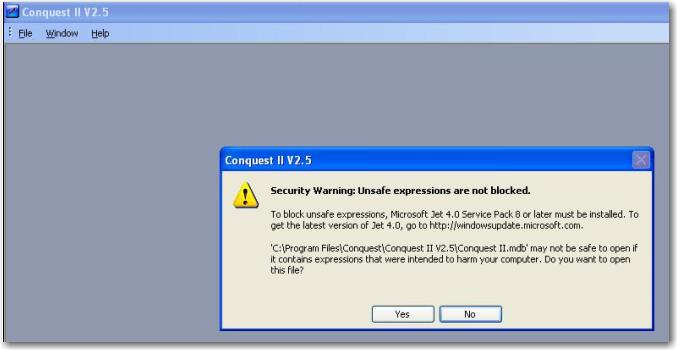
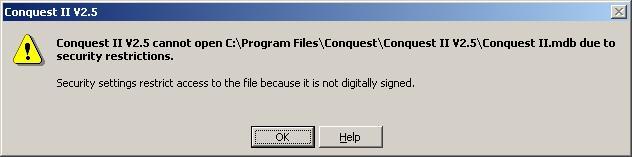
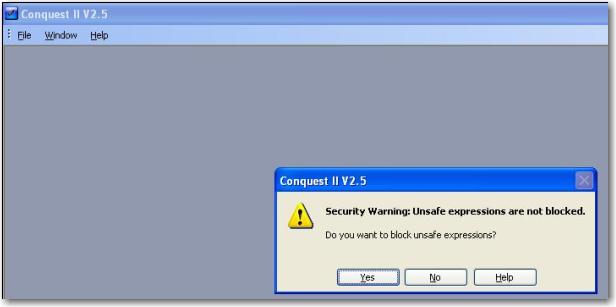
Running the Access 2003 runtime as an Non Administrator gives 3 error messages (only for the first time). Subsequent times are fine. This is a terrible first impression.
-

-
Figure: Error message #1
-

-
Figure: Error message #2
-

-
Figures: Error message #3. Unacceptable warning message after installing Access 2003 runtime as a non administrator
Note: None of this rubbish happened with the Access 97 runtime.
Note: This is a little harsh. Unfortunately the world of security requirements has dramatically changed since Access 97. You don't get these prompts if the file is digitally signed. That is how you work around this for Access 2003. Digitally sign a file or macro project
Note: In Access 2007 this has been fixed (as it now uses Trusted Folders)... however the above bug with the runtime will be fixed.
-
Access 2003 Runtime and the Commandbars
When the user moves the location of the commandbar (aka Toolbar), the location is not saved when in runtime mode.
This is a bug.
Note: Access 2007 solves this by using a ribbon and the user cannot move them
-
Access 2003 Runtime and changing References
When you delete a reference it actually doesn't release the reference. You can see the reference is still there when you loop through the references in VBA.
The problem is Access crashes happen after this (this is not consistent and we are fairly sure this is the issue).
-
File Associations will not continually change
Currently Microsoft makes this decision based on what was the last copy of Access opened. This is a mistake.
A mdb will open in the version it was designed for.
Note: A bootstapper application is needed (this is what the Visual Studio Team did).