-
Inherit base template between multiple WISE projects
Often we have common dialogs and scripts that is shared between multiple setup.
Currently these dialogs and scripts are defined in the common template that all our project are based on.
Problem occurs when these common dialogs or scripts are changed
in the base template, then we need to go through 20+ setup file to update their dialogs or scripts. This can become painful and time consuming.
If only WISE can support some kind of inheritance with its
base template, then any update to the base template will be
propagated to all other projects when they're rebuild.
Please Note:
The forms with the top image cannot have a background color of
white, only grey. The reason for this is because the Wise for Windows
Installer's designer is limited in its capability of having background
images with controls such as check boxes and group boxes on top of the
image. They do not have the capability of being transparent, and there
is no "Send to Front" option.
-
When uninstalling an explorer window should be opened underneath
I think that when uninstalling an explorer window should be opened underneath (or add a control under the status bar).
And as it is uninstalling it is showing the files removing.
At the end if there are still some left it should say "There are files remaining. You should review then delete them."
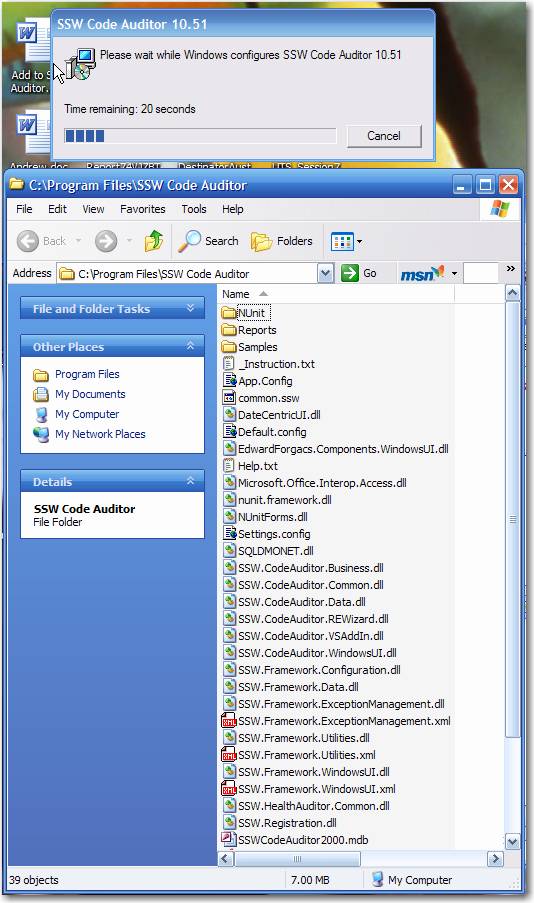
Figure: An explorer window should be opened so users can see the files are removing.
-
Wise should provide users a better "Browse..." window
The "Browse..." window Wise installer provided by default has an ugly and non-standard interface.
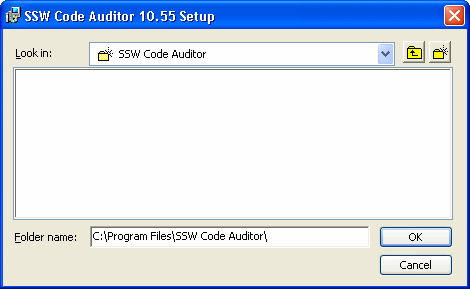
Figure: An Ugly and non-standard interface, with wrong icons and borders for items.
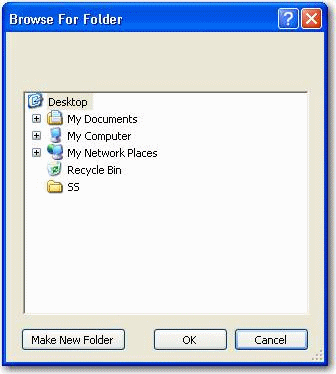
Figure: An example of good and standardised "Browse..." interface.
-
Wise should have better support for designer controls
There are many limitations to the design controls.
The most significant limitation is the number of available controls.
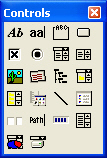
Figure: Only a handful of controls are available for use. Certain Industry
standards require such controls like e.g. the Link Button.
When dealing with the controls that are available, there are also limitations to the
property of each control.
One clear example is the inconsistent use of the transparency property.
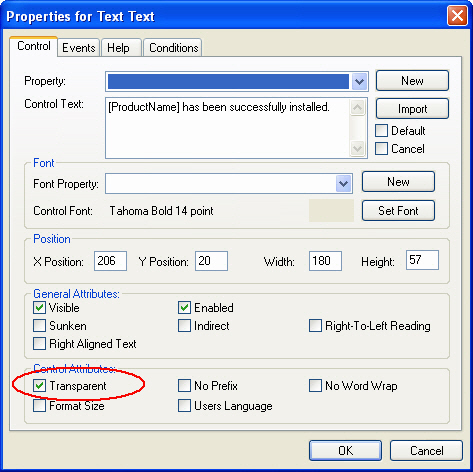
Figure: Label properties include transparency. This way it is possible to
have text boxes over background images.
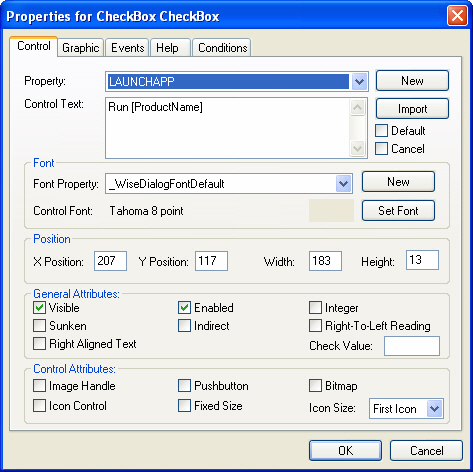
Figure: Checkbox properties do not have transparency. They will look ugly
with a background image that has a color other than grey.
This limitation found in the checkbox could only provide a work-around i.e. having a
checkbox without text, and providing a transparent label adjacent to the
checkbox control.
However this led to another serious issue with the designer; the checkbox would
appear behind the background image, and sometimes (even when simply
performing a mouse-over the checkbox control) it would appear in front of the
image.

Figure: Wise gets confused with which controls to "send to front" or "send to
back" i.e. the white image is in front of the checkbox. Also note the lack
of transparency on checkbox controls.

Figure: A simple mouse-over will perform a "send-to-front". This occurs during
runtime of the installation package and not in the designer.
Suggestions:
- Provide transparency on all controls,
- the ability to "send-to-front"/"send-to-back" for all controls
in the designer,
- and provide
more variety of controls e.g. Link Button.
-
Wise should allow multiple calls to System Search so that the prerequisite status can be refreshed
The Installation Prerequisites Dialog is necessary to help the user download any required software for the product as shown below:

-
- Figure: If there are items that are not installed, the user has the ability to download the software by clicking the "Download" button.
-
Most likely, the user will keep the Wise Installation wizard open in the background while they go ahead and install the required software.
The problem occurs when the software has been successfully installed, and the user would like to refresh the status of the prerequisites by clicking a "Refresh" button.
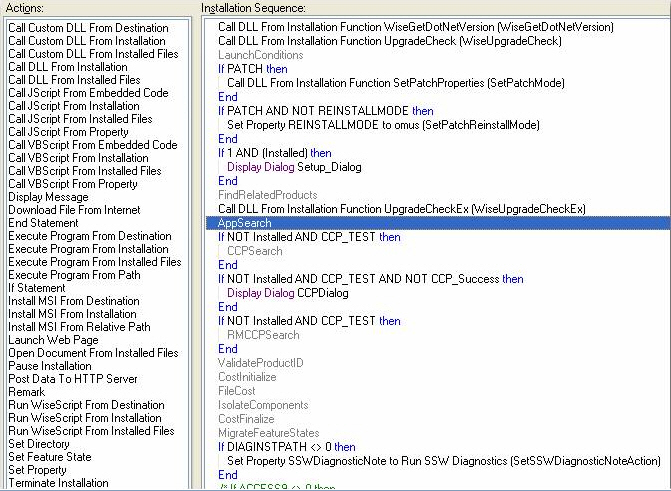
Having a "Refresh" button in the Wise Installer would require the "AppSearch" action to be called just as it is called on the load of the Installer as shown below in the MSI Script:
-
- Figure: AppSearch Step being called in the MSI Script when the Wise Installer loads for the first time.
-
Wise does not respond to the "AppSearch" call unless it is called from the above step.
Suggestion:
Wise should allow custom calls to the "AppSearch" step to allow developers to add a "Refresh" button that would raise an event to call the "AppSearch" action again.
Critical problems about IIS and ASP.NET
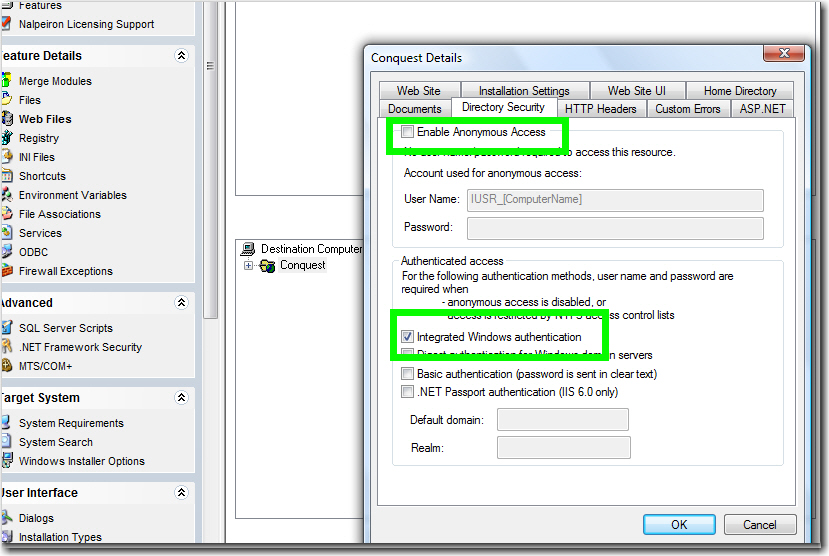
There are two critical problems we found in Wise (Wise Installation Studio 7 sp1 ) about packaging a web application:
#1 IIS configuration doesn't work well
-
- Figure: IIS settings in Wise
-
-
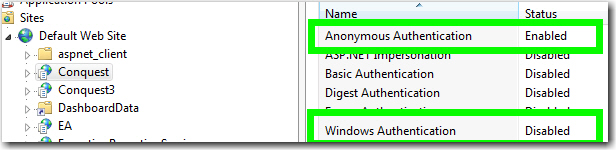
- Figure: IIS configuration after installation
-
#2 Wise modifies web.config unexpectedly

-
- Figure: unexpected lines added in web.config after installation
-