This product is no longer supported.
Is Microsoft Exchange Server an integral part of your
organization? If so, SSW Exchange Reporter provides the
tools and reports you need to efficiently analyze your
organizations email usage. Built in Exchange reports
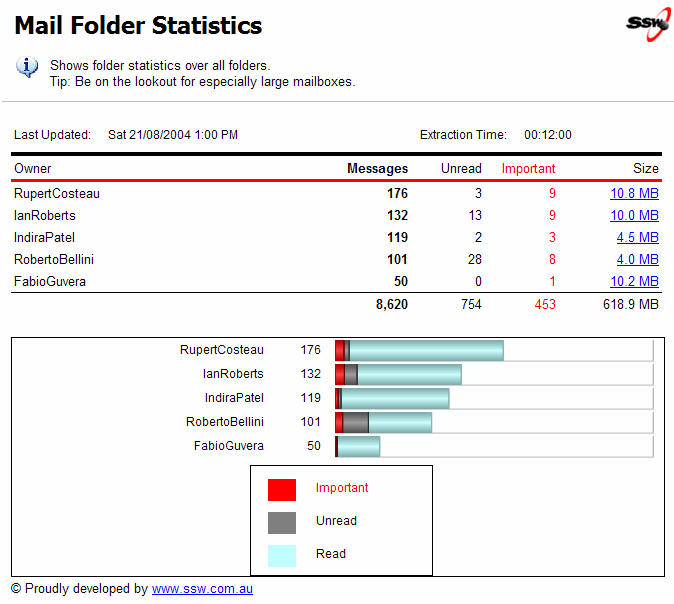
range from who is sending the most emails, to who has
the largest mailbox.
As new emails are sent and received, to and from your
exchange server, our lightweight windows service
seamlessly extracts email messages and folder statistics
to your fast SQL Server backend. By taking advantage of
SQL Servers Reporting Services, the generated reports
can easily be customized and extended while being viewed
securely from anywhere. That is why experts say that SSW
Exchange Reporter is the most powerful and the only
flexible solution to understanding your organizations
communications.
Question:
How can I test it without having Exchange Server?
Answer:
During the installation, if there is no Exchange Server
detected, Exchange Reporter will ask if you want to
install the sample database provided. The sample
database will be installed by our leading database
upgrading product
SSW SQL Deploy
Key Features & Benefits
Some key features of Exchange Reporter are:
-
Scheduling of data extractions from Exchange Server
-
Caching of Exchange data into a SQL Server database
-
Report on cached exchange data for easy analysis
-
Ability to create your own reports for all your
analysis needs
Exchange Reporter also allows to you:
-
Analyze generated reports on your email system in
order to answer vital questions such as:
-
How many emails each Exchange user has sent
internally, externally or to clients?
-
Who is sending the most emails in your
organization?
- Who is using email the most effectively?
-
What amount of time is being spent on email by our
staff?
-
How many emails were sent to a particular client?
-
Screen email subjects and body content for
inappropriate content?
-
Are our staff following organization standards?
(see our
Rules To Better Email
for our email standards!)
-
Integrate Exchange data with your database of client
contacts
- Monitor your email system for inappropriate use
-
Save mail items in public folder stores, for easy
indexing and querying
-
Receive reports directly to your email inbox in
numerous document formats including PDF, HTML, Excel,
TIFF, and more
-
-
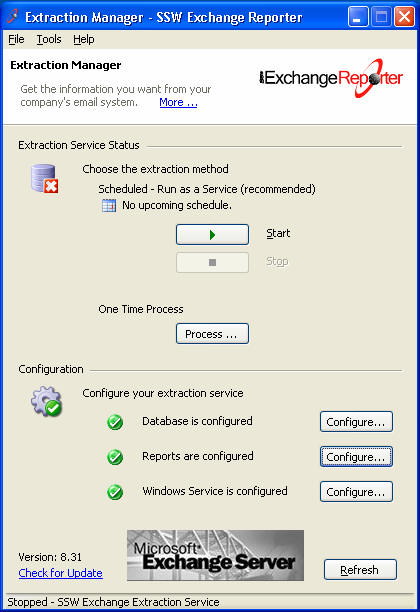
Figure 1: Extraction Service Manager
-
-
Figure 2: Sample Report
More screen shots in the
User Guide
.
Upcoming Features
- Add Outlook COM Addin
-
Add Notification Web Services in Exchange 2007 (was
Event Sinks in Exchange 2003)
- Calendar items reports
- OLAP reports
How it Works
SSW Exchange Reporter runs as a Windows Service in the
background on your Exchange Server and periodically
retrieves data from users' mailboxes and stores it in a
SQL Server database for fast and efficient report
generation.
Reports are hosted by SQL Reporting Services and can be
viewed by any user with a web browser. Reports can also
be configured to automatically 'push' themselves to
users' mailboxes according to a schedule, ensuring that
all the necessary people in your organization are kept
up to date with the latest statistics.
Sample Exchange Reports
We have included a number of sample reports that will
run with your SSW Exchange Reporter database. These can
be seen in the following link:
SSW Exchange Reporter (Samples)
 . This 'Online Reports Demo' includes all reports screen
shot.
. This 'Online Reports Demo' includes all reports screen
shot.
SSW can assist in the creation and customization of
Exchange Reporter reports. To find out about our
consulting services at competitive rates and high
quality development standards, please don't hesitate to
contact us
.
System Requirements:
-
.NET Framework 2.0 or higher
-
Microsoft Windows Server 2000, 2003 or 2008
(recommended)
-
Microsoft Exchange Server 2000, 2003 or 2007 (English
version recommended,
KB-
Q1623825
)
(Note: As Exchange Reporter uses
ExOLEDB
provider to access Exchange Store, Exchange Reporter
must be installed on the machine where the store is
located. )
-
Microsoft Outlook 2000, 2003 or 2007 (English version
only,
KB-
Q1623825
) for client computers
-
Microsoft SQL Server 2005 or 2008 with
Reporting Services
(Note: This can be installed on a network machine; SQL
Server Service Pack 3a and Reporting Services Service
Pack 1 recommended)
-
MDAC 2.8
What does the unregistered version give me?
In respect to the unregistered version we know you want
to see it working before you buy it. We aim for that.
Note: we also give free version targeted to the little
guys
More details see
http://www.ssw.com.au/ssw/KB/KB.aspx?KBID=Q658302
SSW provides free phone and email support to answer
queries on registered products.
Getting Support:
If you can't find what you are looking for in the
product documentation then check our
knowledge base
for further information and tips about this product.
Please send us
bug reports
and
feedback
so that we can evolve our software into a product that
matches your requirements. We guarantee a response.
Links
Q
: How do I get access to all the mailboxes in Exchange
2003?
A
: How to Assign Service Account Access to All Mailboxes
in Exchange Server
Microsoft Knowledge Base Article - 821897
 .
.
I'm Sold... What's next?
Microsoft and the Office logo are trademarks or registered
trademarks of Microsoft Corporation in the United States
and/or other countries.