|
SSW Merge PRO! Tutorial
|

|
SSW Merge RPO! is great utility that merges two different
databases into one. The two databases can have different format
i.e. MS Access, SQL Server and even have different structure i.e.
different table names and different field names.
Merge RPO! use an user defined duplicate criteria to decide which
records are duplicates. It is designed to work with any popular
database, but currently has only been tested extensively on Access
and SQL Server. If you are interested to try out on other
database(s),
let us know
!
When two databases are mergered, all records in the source
database will be indicated how many duplicates may exist in the
destination database, based on the user defined duplicate
criteria. the user can then decide whether to add the source
record into the destination database.
This screenshot below shows the result of merging Northwind with
another SQL Server database.
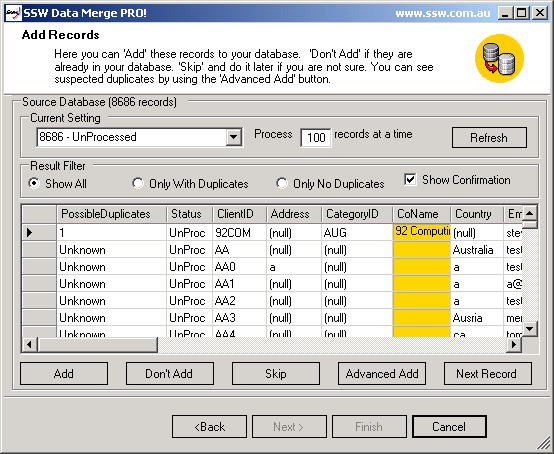
With the merge result, the user can decide what to do with the
source data:
- Add to the destination withought any change.
- Don't Add to the destination database.
-
Compare with the destination data first and modify before adding
to destination database.
To learn more about how to use SSW Merge PRO! Please read SSW
Merge PRO!
Tutoria
-
User Defined Duplicate Criteria: Decide which records are
duplicates based on same field value.
-
Deduplicate Field Mapping: not allowing a destination field
being mapped to more than one source field.
- Loading All fields with same field name.
-
Editing destination database: When you see an error in the
destination database, you can correct it directly.
-
UDL wizard: Launch an UDL wizard to construct connection string.
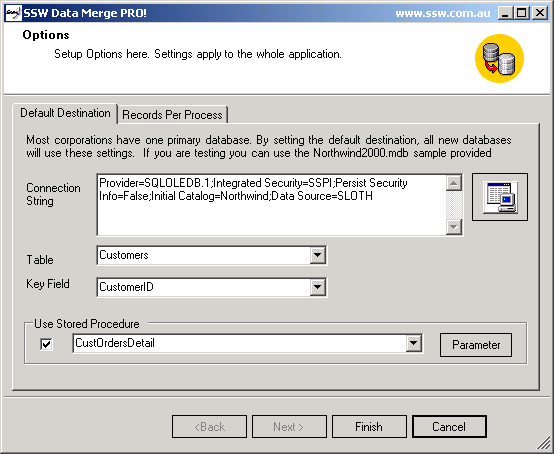
Merge PRO! allows you to set a default destination database, so that
when a new merge is created, it loads all default destination
database information. Merge PRO! also allows you to set how many
records to process on each processing.
.NET frame work. You may download .Net Frame work for free from
Microsoft (17.8MB).

When you run the install exe there is a simple wizard interface to
guide you thru the setup process. All you have to do is select which
directory you want SSW Merge PRO! to be installed into.
If you can't find it in the product documentation then check our
knowledge base
for further information and tips about this product.
|
Download the 30 day trial:
|
Click here to download SSW Merge PRO!.

Please send us
bug reports
and
feedback
so that we can evolve SSW Merge PRO! into a product that matches
your requirements.
Information on purchasing SSW Merge PRO! and other SSW products
. Merge PRO! has a volume pricing strategy, please refer to this
pricing page.

|