-
Enable a super cheap license (say $1 month per user) when using
CRM as an XRM platform (if hosted on Azure)
I get the value of CRM when a customer uses it out of the box (you
get a full Customer Relationship solution to improve your
sales)... But what about when you are using it to build a custom
solution?
I don't think many developers know that using CRM (as xRM) gives
you a nice GUI for creating tables, that automatically give you a
basic editing form and services to program against.
Make it easy for developers in VS to choose to build a solution on
either:
- ASP.NET and SQL Server
- ASP.NET and xRM on Azure (empty $1 per month per user)
-
ASP.NET and CRM on Azure (everything - normal $100 per month per
user)
My logic is that Microsoft wants Azure to be huge, and this is a
step in that direction.
-
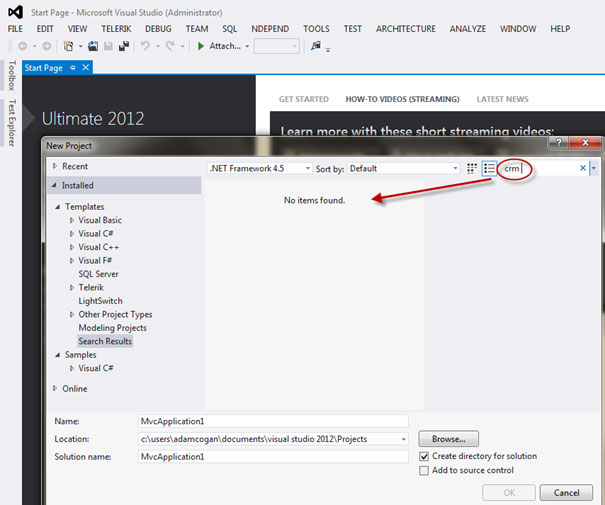
-
Figure: The VS 2012 out of the box experience is missing any
encouragement to use CRM (or XRM)
-
User Experience - Help me have a consistent User Experience with
SharePoint, CRM and TFSWA Web UI
Make Dynamics CRM and SharePoint and TFS (Web Access) consistent
to end users. Please.
Remember the early days of Microsoft Office when an end user got
used to Excel, and we could show them that the switch from
WordPerfect to Word would be fine.
e.g. "See Mary, it has the same File Menu and look at the toolbar,
and the Tools | Options is the same place."
Well today I have bosses who love SharePoint, but I get no loyalty
from them or their end users, when evaluating CRM4 vs Salesforce
for their CRM. There is no loyalty because knowing SharePoint,
does not help you know CRM.
The first thing they want to do is change a few things... add a
few fields.... so start with making the customizing consistent...
e.g.
- Modifying a list in SharePoint
- Modifying an entity in MS CRM
- Modifying a work item in TFS
Should all be the same experience.
For a gold star, we need to take more inspiration from Facebook.
It is the standard UI.
I want to sign in to each of those 3 portals (see red icon I am
used to seeing at the top now) and see if I have stuff that has
happened while I was away.
e.g.
-
In SharePoint someone made a comment about one of my documents
-
In CRM someone made a comment about one of the customers I am
the Account Manager of
-
In TFS someone made a comment about one of the work items I
authored.
-
Web Client - Help me have CRM work on Firefox and Chrome
UNBELIEVABLE - Not Fixed In CRM 2011.
It is not just Firefox and Chrome... Actually it is more important
that we can offer a solution that support the Apple Mac clients
– which most organizations have these days.
I should not have to deal with this error message
    Unsupported Browser Version
    Microsoft Dynamics CRM requires Microsoft Internet Explorer 6 SP1 or later, running on a computer with Microsoft Windows XP, Microsoft Windows 2000,
    or Microsoft Windows Server 2003.

    Upgrade your browser and try again.
-
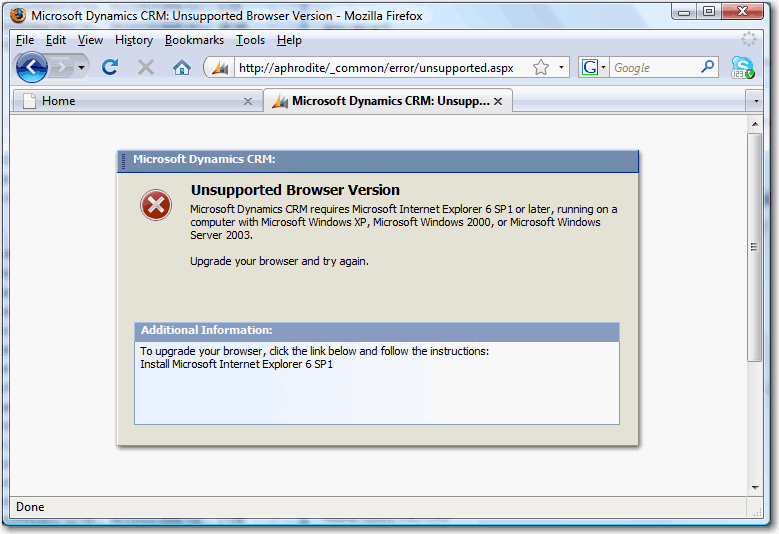
- Figure: I want to use CRM 2011 with my favorite browser
-
General UI - Help me see how many items in each list
Show me count in left hand navigation like Outlook.
-
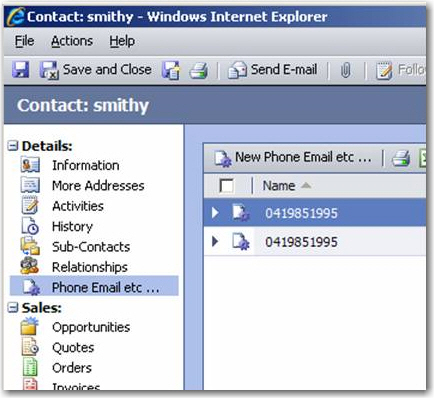
- Figure: Bad Example - Left hand navigation
-
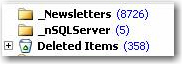
- Figure: Good Example - Count in Outlook
We have a rule about this -
Data Layout - Do you have nodes count like Outlook?
Tip #1: Use AJAX lazy loading for better performance.
Tip #2: Allow me to grab an add-in from a 3rd party vendor. But it
must be as easy to get as using the Visual Studio 2012 Extension
Manager.
-
Server - Help me edit CSS file for each organization
User Story: As a CRM power user, I want to change the background
color of the Test Organization to Blue, so that users don't enter
a lot of data into the test CRM server by mistake.
In CRM 2011, power users should be able to edit CSS on their CRM
Website and this CSS should be per organization instead of per CRM
web application.
In addition you should provide 4 out of the box templates for
Dev, Test, Staging and Production
.
Tip #1: If I know how to do this in SharePoint, it should be the
same for CRM. Right?
So I would love to see it be consistent with the SharePoint
experience (it uses the click once app, SharePoint Designer)
Tip #2: The TFS Web Access Team need to do this too for
TFSPreview, in a consistent manner so I can leverage my existing
knowledge from using SharePoint.
-
User Experience - Help me make the URL friendly
Please compile CRM 2011 in .NET 4 - then I can use
System.Web.Routing and do it myself.
URL in CRM is hard to understand, for example:
-
http://CRMServer/SSW/sfa/conts/edit.aspx?id={1F914A6F-C320-DD11-926D-00155D012229}
- Figure: Bad URL - it's not clear and easy to remember
It looks much better if the URL changes to:
-
http://CRMServer/SSW/Contacts/edit.aspx?id={1F914A6F-C320-DD11-926D-00155D012229}
- Figure: Good URL - this looks simple clear
See our SharePoint suggestion:
Give me nice URLs
.
-
User Experience - No white screens in the browser - Help me have a
rich client application
(It must work on an iPad, so don't solve using Click Once or
Silverlight).
The web application is not responsive enough when your whole job
is to use it all day long.
Remember OWA is great, but most people choose to use Outlook all
day long.
Experienced Sales Force users say that they find CRM slower to
use. I believe this is because they use more AJAX/jQuery
Strive to use as much AJAX as Facebook.
Tip #1: The Outlook Toolbar is OK, but needs an alternative
Tip #2: Need offline support
Tip #3: Remember OWA is great, but most people choose to use
Outlook all day long.
-
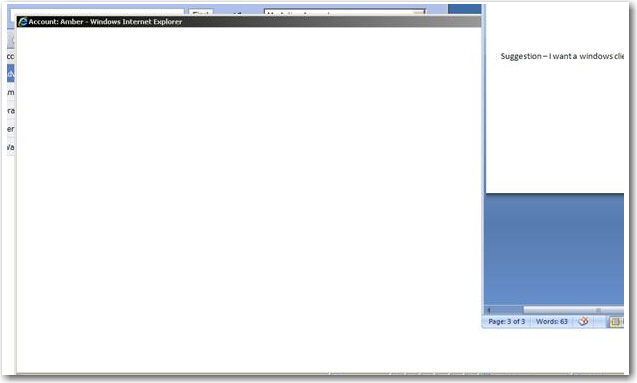
-
Figure: Ouch... a white screen again. I don't ever want to see a
blank screen like this - Either add some more AJAX or create a
click once application (using SQL Compact for Offline)... Now
this would make it more responsive than Sales Force!!!
-
User Experience - Help me find the current version (rollup name)
Number #1 of course is Windows Update.
After that these things would be nice.
-
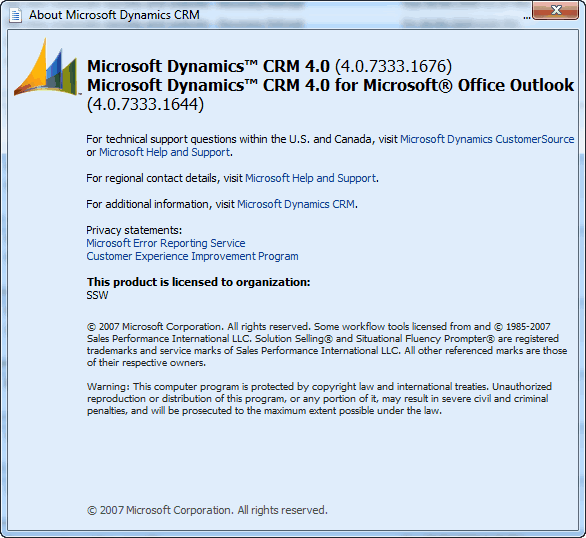
-
Figure: The version number is not enough... e.g. I want to see
Rollup 5 has been installed on this PC.
-
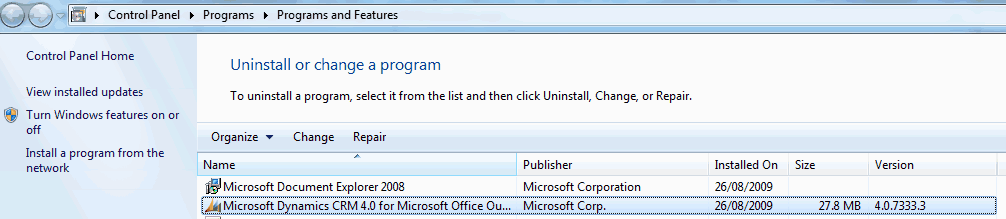
-
Figure: When I install a Rollup - this version number does not
change.
-
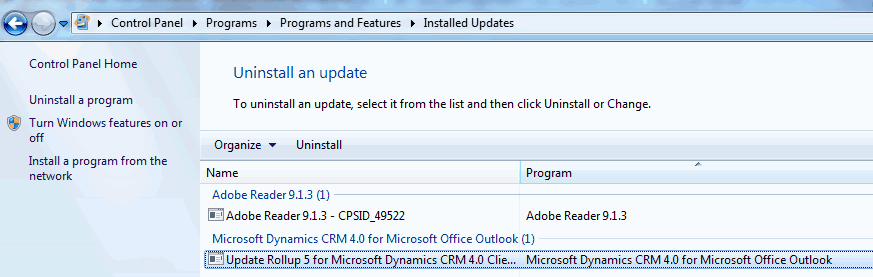
-
Figure: I should not have to click "View Installed Updates" to
find that Rollup 5 has been installed (Does anyone like that
updates are hidden under here).
-
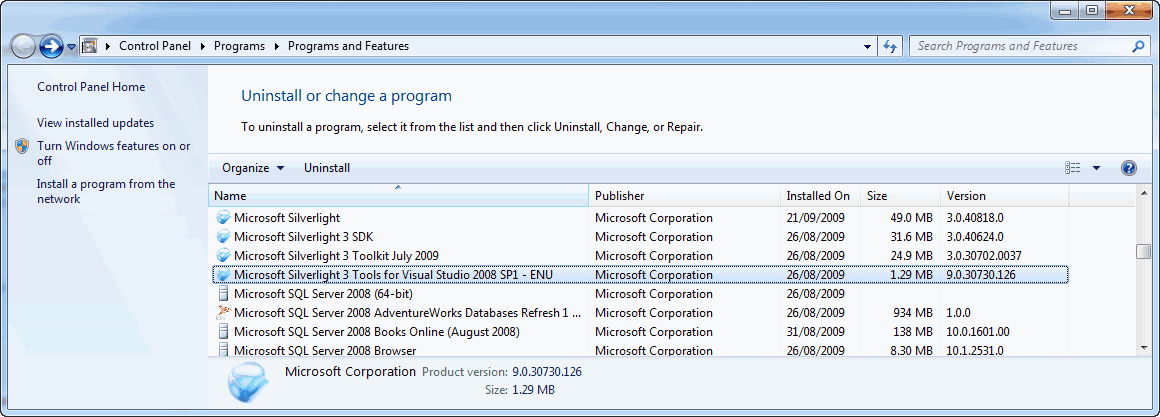
-
Figure: I much prefer being able to see SP1 here like this.
-
User Experience - Help me have a follow up flag the same as
Outlook
Update: Apparently Fixed in CRM 2011... to be confirmed.
Apparently, inside Outlook you now get a rich client experience
since it was re-coded to use MAPI, instead of using the old Web UI
inside Outlook
CRM should have a consistent process of creating follow up for an
email between CRM and Outlook.
The process in CRM:
-
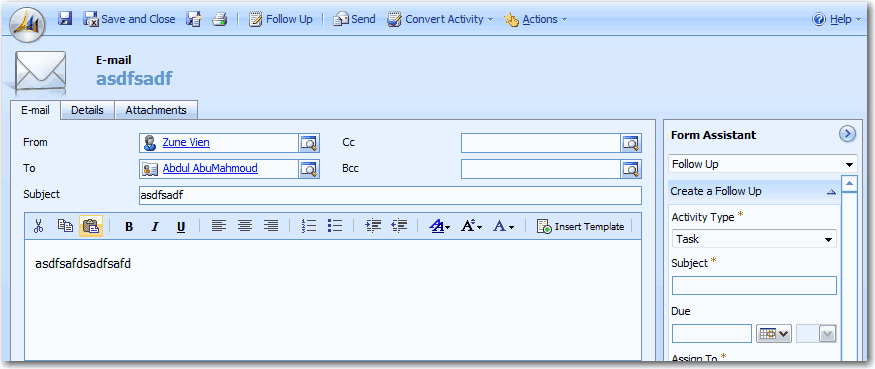
- Figure: Create follow up from an email in CRM
- Draft email
- Save email activity
- Create follow up
- Save follow up activity
- Send email
The process in Outlook:
-
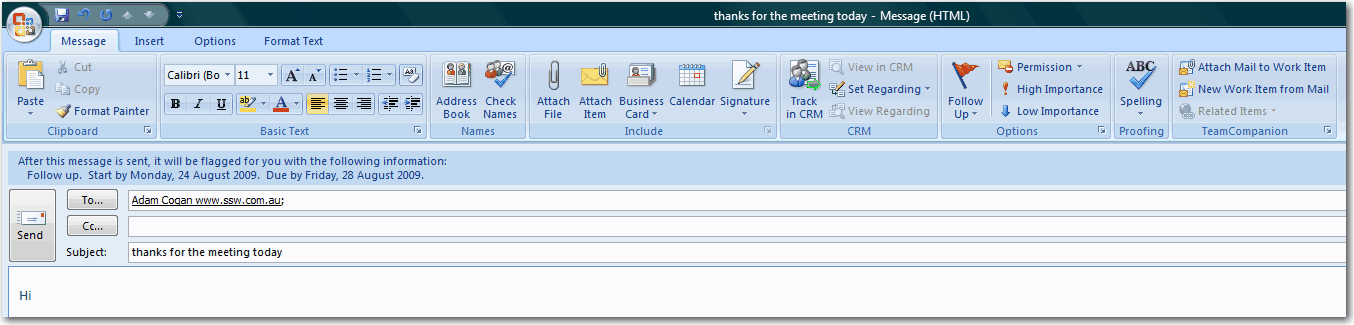
- Figure: Create follow up from an email in Outlook
- Draft email
- Hit "Follow up" flag
- Choose "next week"
- Send email
-
User Experience - Help me know when to click or double-click
intuitively
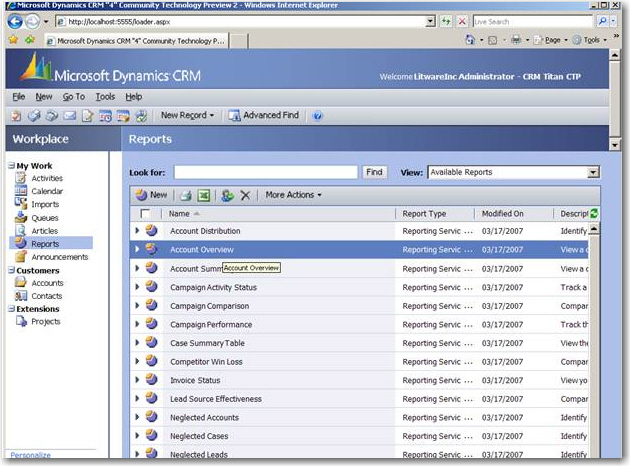
The reason they have done this - I assume - is to allow the user
to select a record, and choose a different option from the menu. A
better way would be to hyperlink the report name, and include a
hover effect on the rest of the record
like used on this training page
.
There are very few web pages if any, where you *have* to double
click to open.
- Either change the report to a hyperlink
- or add to the tooltip "(double click to preview)"
-
-
Figure: Single click to expand, double click to open record is
confusing
-
Outlook Client - Help me get latest version (including rollups)
-
-
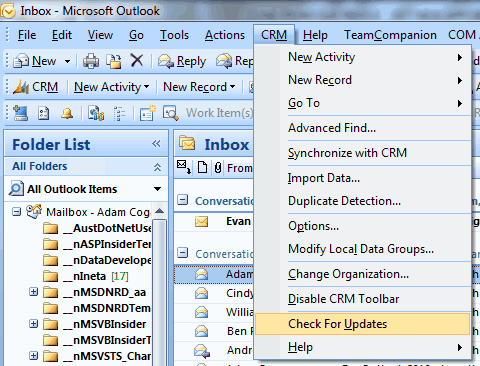
Figure: The "Check For Updates" button should give me an option
to also check for Rollups
Today I have learnt about changing Registry Entry to enable
CRM Client AutoUpdate
.
-
    Check For Updates on:

        (o) Microsoft Servers

            [x]Check for Rollups (not recommended)

        (o) Your CRM Server
-
Figure: The "Check For Updates" should invoke a form with these
steps
A message box is not good enough. I want to continue on and get
the update.
-
Outlook Client - Help me know the current organization
UPDATE: To be confirmed. CRAIG AND GEORGE say this is fixed in the
2011 UI - multiple orgs are fine.
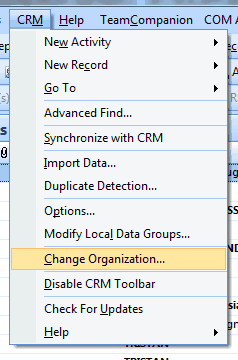
Add a form that can show the current organization... with a button
"Change".
-
-
Figure: How can I know the current organization I am using?
Change this option to pop a form
-
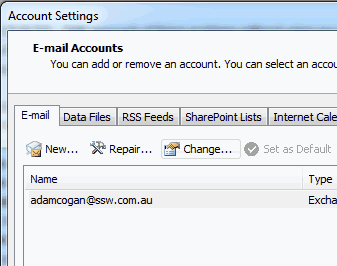
- Figure: A similar "Change" option is here in Outlook
PS: I should not have to close Outlook to see this.
-
Outlook Client - Help me send emails without them getting stuck
in outbox
-
* Fixed in Microsoft in CRM 4.0 *
After the CRM Outlook Client is installed, you will find that
emails will sit in your Outbox without a send date (they change
from italics to non-italics). This happens whenever you navigate
to the outbox folder in Outlook and an item is selected.
-
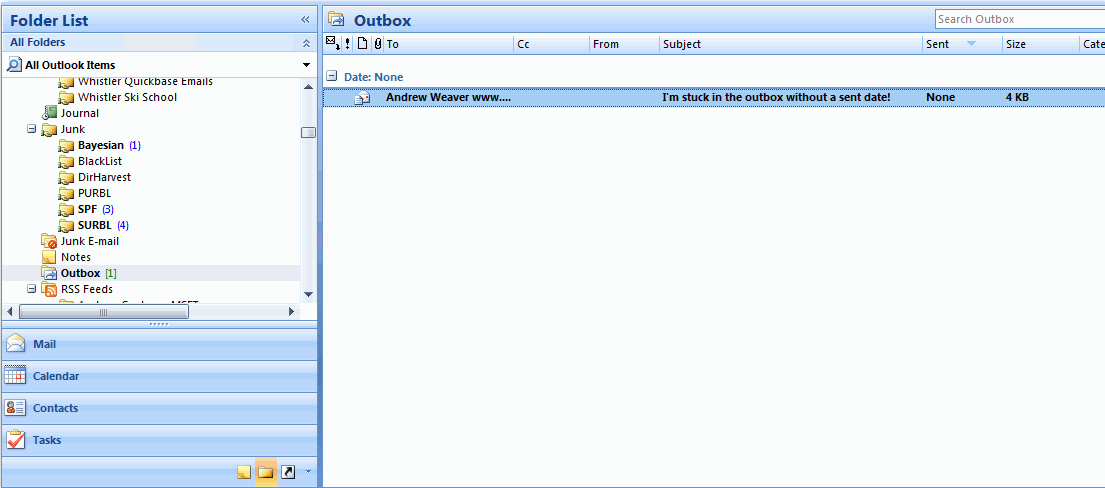
- BUG - Email is stuck without a sent date
Note: There is a work-around to send the un-sent emails - You open
the item, switch back to Outlook and change folders out of the
outbox. Then click send on the mail item and do not navigate back
to the outbox until you've send/received.
-
Outlook Client - Help me have a UI to change CRM Server
-
* Fixed in Microsoft in CRM 4.0 *
When the CRM Outlook Client is installed, you cannot change the
CRM server that you specified when you first installed it. We need
a UI to change the server, like Exchange:
-
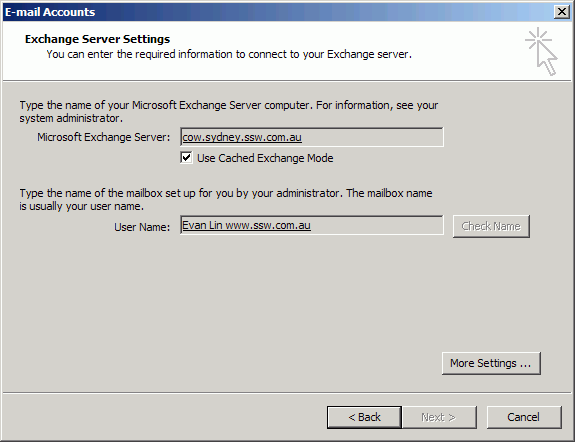
- Figure: UI to change the Exchange Server
At the moment, the only way to change the server url is through
the registry at:
"HKEY_CURRENT_USER\Software\Microsoft\MSCRMClient\ServerUrl".
-
Outlook Client - Help me have a stable Outlook COM add in
-
* FIXED IN CRM 4 ROLLUP 7 *
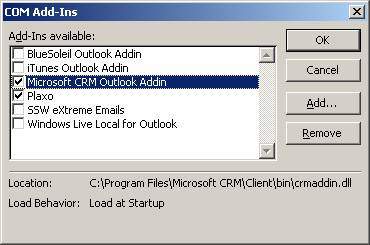
The quality of the add in is not good enough - the CRM team should
install the Outlook add in from
www.plaxo.com
and aspire to that quality and integration.
The worst thing is it is buggy and causes outlook to crash.
I thought I was dreaming first time - but now I know it's a
persistent little bugger - this should NOT happen.
-
-
Figure: When you turn off the outlook COM add-in it should not
come back magically some time later
-
Help me not get a BIG surprise by my contacts syncing
automatically
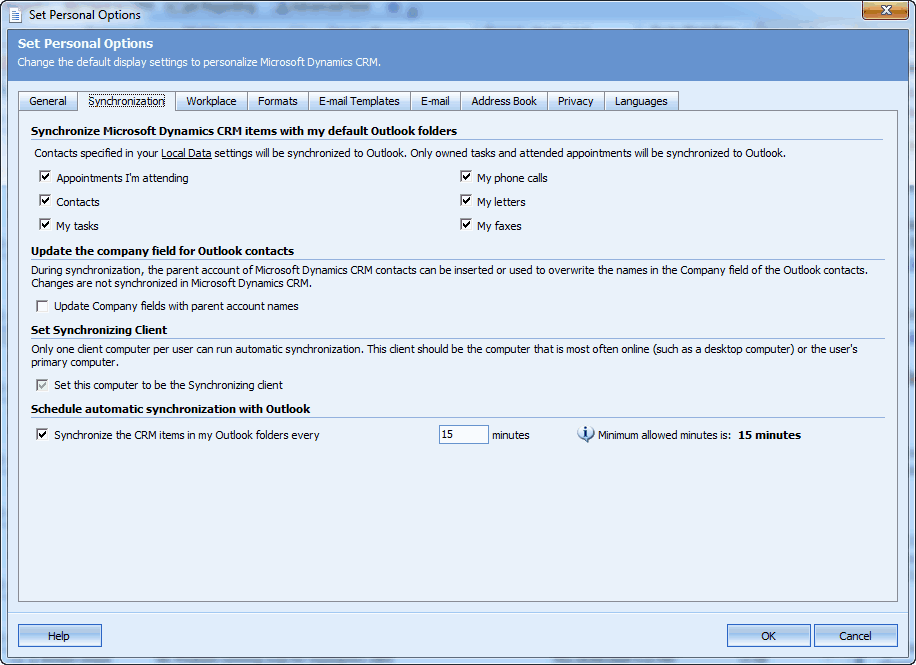
I Install CRM Outlook Client and I open up Outlook and it syncs
10,000+ contacts from CRM to my outlook contacts.
Is CRM crazy? Why would it not tell me this?
Suggestion:
-
Before doing that action, please give me a warning with how many
you will sync.
- Show me some of the sample data, in a grid.
-
Better still have a wizard that include the settings on below
image.
-
Also educate me - my current contacts will not end up in CRM.
-
-
Figure: These options should not be checked by default. And they
should include the Count, so I can know how many will sync
Bottom line is you can't sync my stuff without asking me (and tell
me the number).
-
Outlook Client - Help me avoid the 'Unable to connect' balloon
every 2 minutes
-
* FIXED IN CRM 4 ROLLUP 7 *
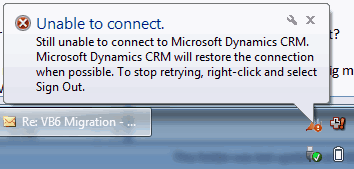
Losing an Internet connection should be a seamless experience.
Testing 'Work Offline' is important.
-
-
Figure: I should not have to see this message every 2 minutes
when I lose Internet connection
-
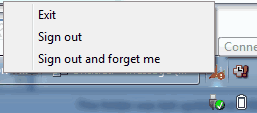
-
Figure: Add a 'Work Offline' option and automatically enable it
when...
-
-
Figure: When I click 'Work Offline' I expect CRM to take
advantage of it
Note: By the way Firefox doesn't even ask me to 'Work Offline'
-
Web UI - Help me improve Message Box
-
* Fixed in Microsoft in CRM 4.0 *
Remove the non standard separating dashes and improve the Message
Box.
-
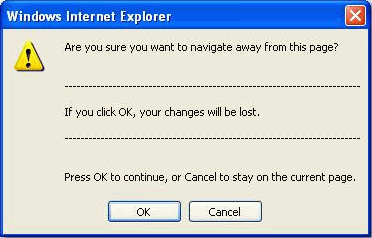
- Figure: Non standard separating dashes
-
General UI - Help me have a better UI for CRM Environment
Diagnostics Wizard
-
* Fixed in by adding Diagnostics menu in CRM 4.0 Outlook Client*
Allow this form to be expanded so you can see all in one - or send
a screen capture to someone else:
-
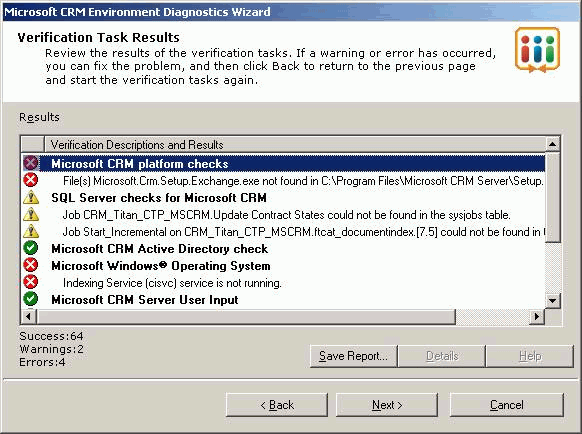
- Figure: CRM Environment Diagnostics Wizard Form
Call this "CRM Configuration Manager" to be consistent with
"Reporting Service Configuration Manager":
-
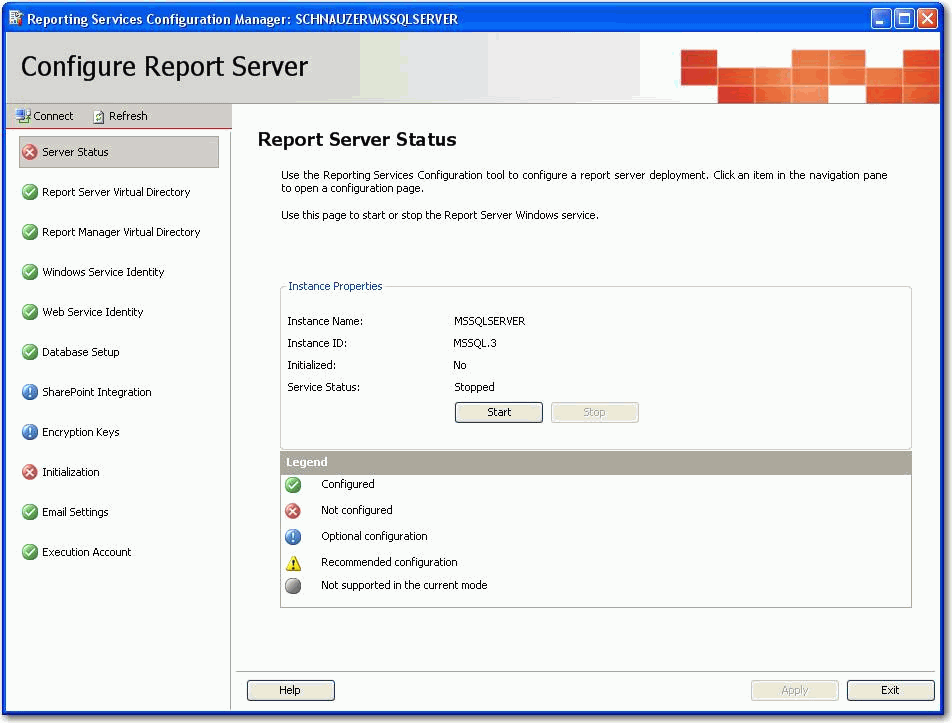
- Figure: Reporting Services Configuration Manager
-
Web UI - Help me know which related records will be deleted
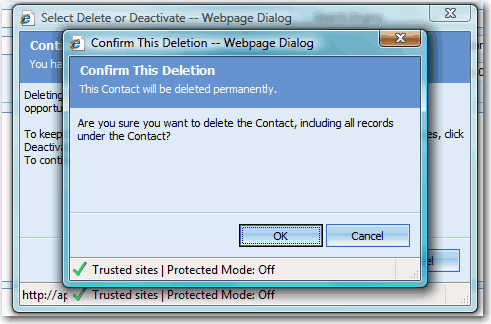
If the deletion will also delete some related records, it would be
better to look up and show them in this "Deletion Confirm Dialog":
-
-
Figure: Needs more deletion information in the Confirm Dialog
-
General UI - Help me have some Bing Maps integration and reports
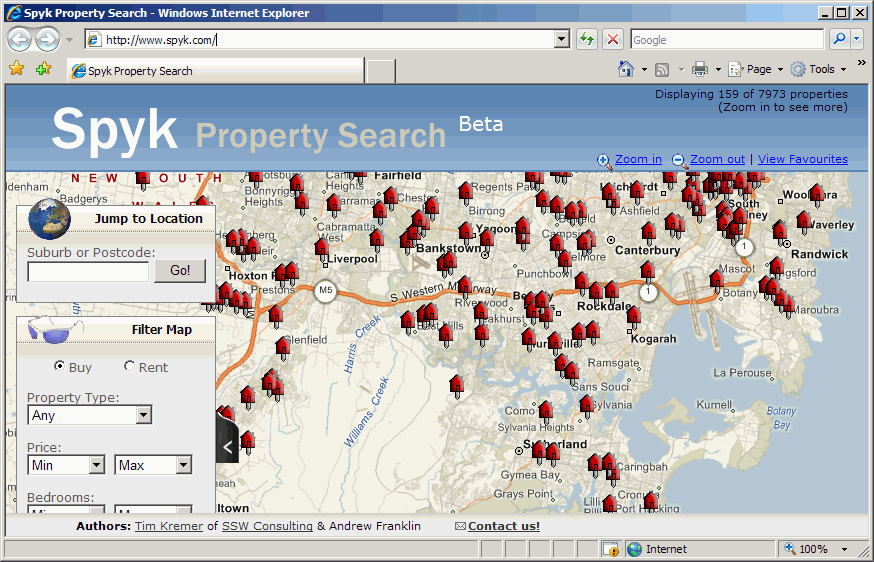
I want nice out of the box experience for nice demos to customers.
So add some Bing Maps integration and reports.
-
-
Figure: Have some out of the box Bing Maps (was Virtual Earth)
Integration
-
Web UI - Help me have more info on "Record Is Unavailable" error
This is a general one. The errors in CRM seem too generic, too
often.
If user has just installed it and gets the following error
message:
-
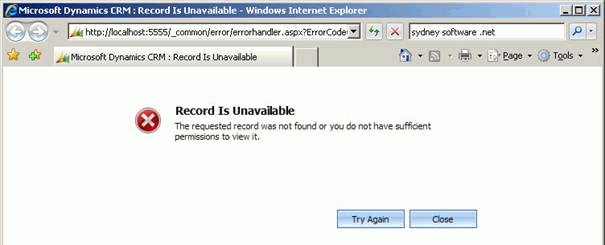
- Figure: Error message of "Record Is Unavailable"
Tip #1: It would be better if user can get more info than this.
E.g. If there are no databases on the server, the following info
should be included:
"There are no databases on this SQL Server. Please use the
'Deployment Manager' and create an organization."
Tip #2: Don't show the generic soap errors.
Tip #3: Make the errors link to the error log file
* TODO: Mehmet and Zune: Find the most common errors and pain from
others blog posts to use as an example *
-
Form Design - Help me have disabled fields indicate how to modify
them
* TODO: Adam to clarify the reason. I believe the reason is
because you need to be aware that if it was created from lead...
you need to go back to the lead to change it. *
Note: if they added an opportunity directly... there is no source
lead... so you can update it.
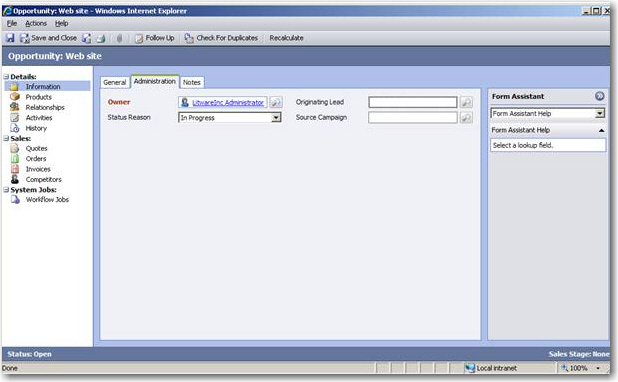
"Originating Lead" - is disabled - fields should always indicate
what you need to do to un-disable them.
In this case once an opportunity is saved then the lead is locked
into read-only mode.
A tooltip indicating that the lead cannot be changed or how to
change should be provided on the read-only field.
-
-
Figure: Originating Lead is disabled after saving the
opportunity - this means poor users can't change it after saving
- as a minimum give a tooltip how to unlock it
UPDATE: NOT FIXED IN CRM 2011
-
General UI - Help me have a sorted view by more than one field
* TODO: Adam to establish if there is a workaround by exporting
the data to Excel *
NOTE: THE WORK AROUND IS TO HOLD DOWN SHIFT AND SORT COLUMNS -
OR USE COMPOSITE COLUMNS
* TODO: Adam to establish if the same issue exists in SharePoint
*
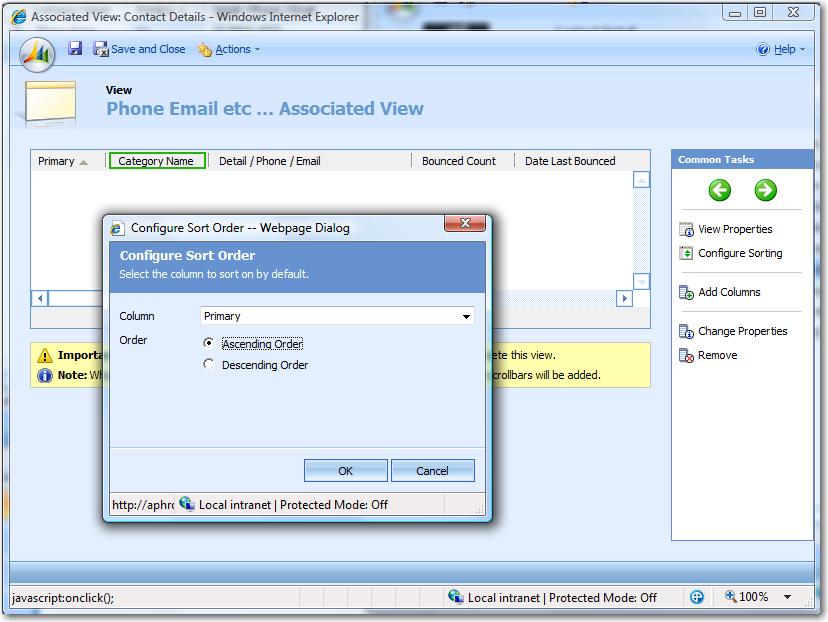
In CRM4 it only allows a user to sort by one field like below, but
we need sort by more than one field:
-
-
Figure: CRM4 Customizations only allows you to sort by one field
-
General UI - Help me have the sorted field visible from this UI
In CRM4 there should be some sort ability in below UI:
-
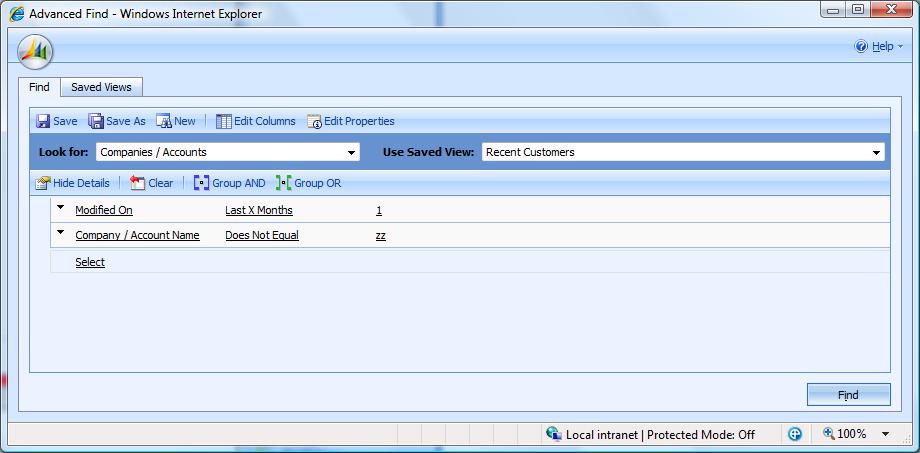
- Figure: There should be some sort ability in this UI
Note: Actually if you can click on 'Edit columns' to do this...
Not very obvious.
* TODO: Adam to compare how it is done in SharePoint *
-
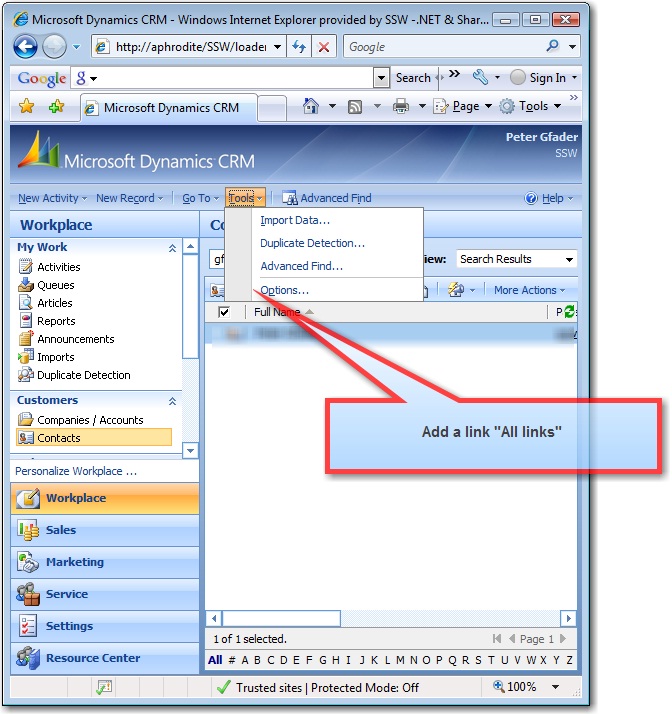
General UI - Help me learn what all the possible URLs are by
adding a "All URLs" option into the "Tools" menu
UPDATE: This was fixed in CRM 4. To be confirmed
Where you link to a help page about: How to link to different
views on the various entities? Like
Entity Type Codes
-
-
Figure: The "All links" link would be helpful, on creation of
Shortcuts on the Windows desktop
-
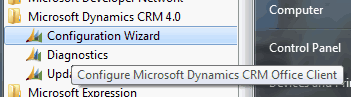
Start Menu - Help me find the CRM programs
-
-
Figure: These 3 options should start with 'CRM' because it
doesn't work when you use the Windows 7 and Windows 8 searching
In addition I wouldn't mind an extra menu 'xRM' – and just a
link for them to send to their Visual Studio developers.
-
Options - Help me know what's going on in the Workplace tab
-
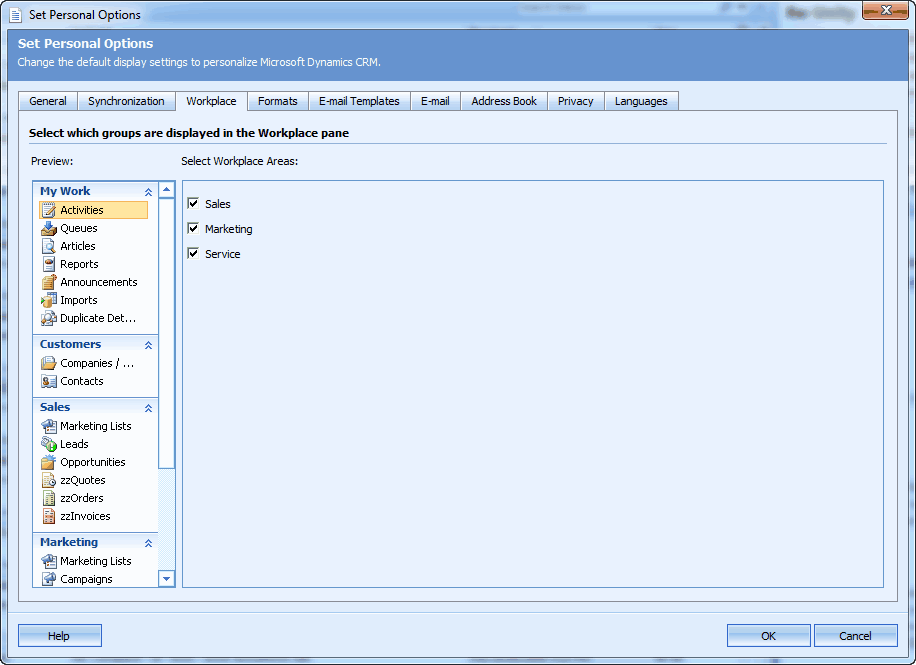
- Figure: Horrible UI - I don't know where to start
-
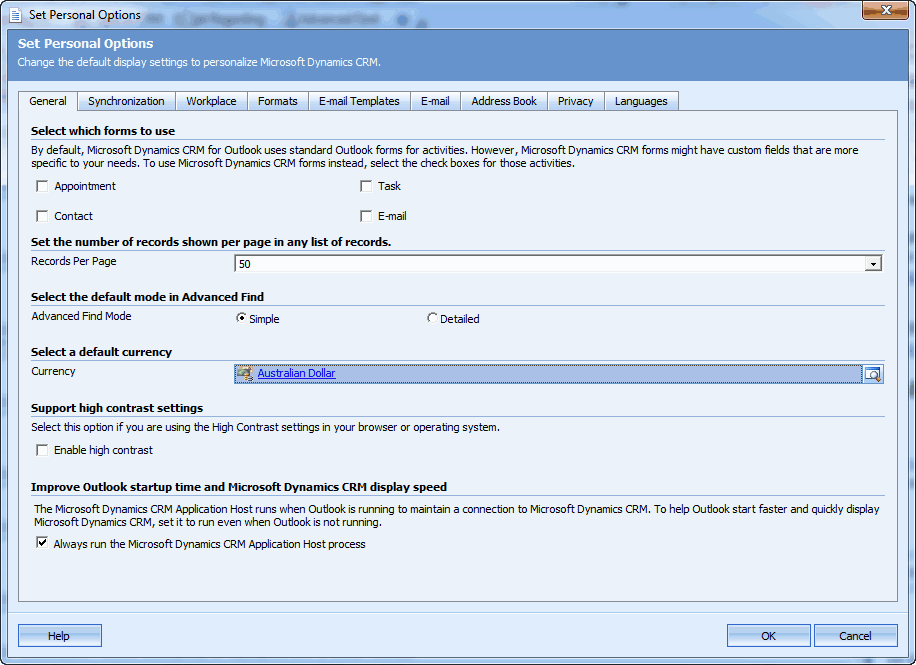
Options - Help me by having a nice UI on the "General" tab
-
-
Figure: CRM 4.0 - The "General" tab, needs many things fixed on
the UI
This is just poor design:
-
User - Help me have a "Check Names" button
Microsoft CRM needs a "Check Names" button to work the same as
Outlook - so you can add a user by only knowing a few characters
of their name.
-
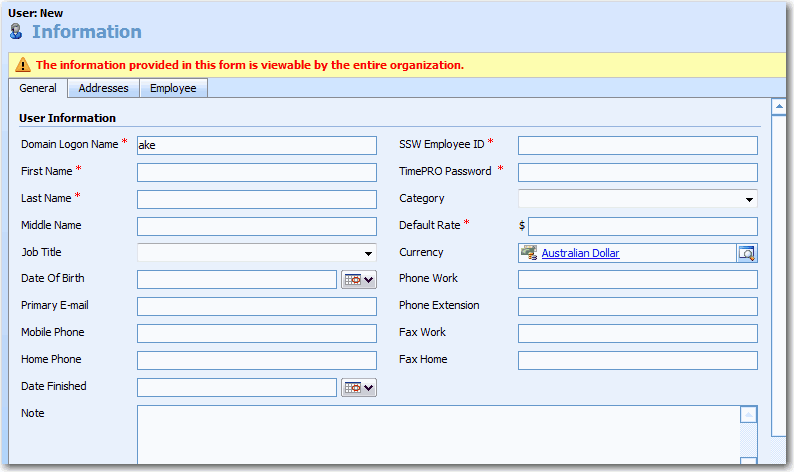
- Figure: Need a "Check Names" button
Microsoft teams should share code. I'd like to see the same
control reused from the SharePoint team.
Add a tooltip "Use Control + K"
IMPORTANT FOR HOSTED CRM
Change 'Domain Logon Name' to 'Logon Name'
e.g. The first field should be able to resolve by ID eg. Their
email address, live ID or domain credentials.
-
User - Help me delete user Active Directory account
Update: Maybe fixed in CRM 2011. To be confirmed.
I should not have to keep all my old employees' and contractors'
accounts in Active Directory and I should be able to edit their
information.
Currently I have to have a crazy CRM rule to 'NEVER DELETE AN AD
ACCOUNT' **TODO Find that rule
BOTTOM LINE. NETWORK GUYS SHOULD NOT BREAK A BUSINESS APP
-
Contact - Help me know Primary Contact on the Contac form
Currently you need to go to the Account (Client) to change the
primary contact.
To Repro:
- Go to a Account with contacts
-
You can observer who is the primary contact in the XX field
- Double click on the primary contact
-
Observer there is no way to know this is the primary contact
Suggestion:
- Underneath the "Parent Customer"
- If Stephen is the primary contact
- Add a checkbox "Primary Contact" [x]
-
If this guy is not the primary contact and you want to make him
that. Check the checkbox and get a message to confirm.
MORE INFO:
THE PRIMARY CONTACT IS DEFINED BY A LINK NOT A FIELD.
THE PROBLEM IS YOU CAN BE A CONTACT FOR MORE THAN ONE COMPANY (to
be confirmed)
TODO: in CRM 2011 get a screen capture of the grid
-
-
Figure: Contact information without exposing primary contact
-
Contact - Help me have a consistency with CRM and Outlook with
regards to Addresses
Currently, CRM only allows making address single line which is not
appropriate, because address might contain much information that
one line is not enough. It's much better to support both single
line and multi-line for users to input their addresses.
-
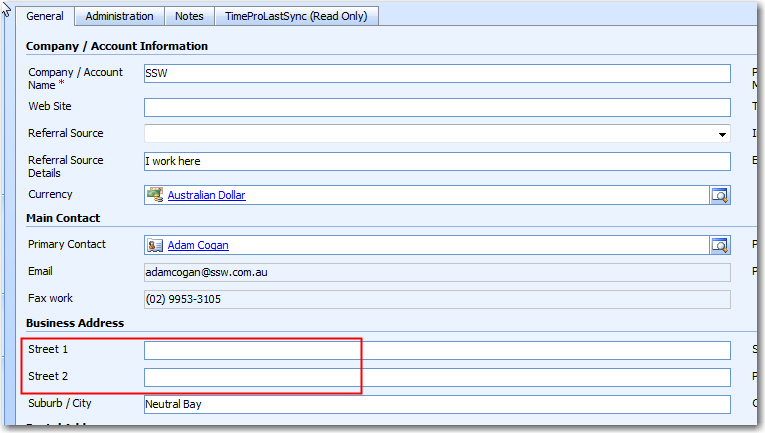
- Figure: Street Address in CRM
-
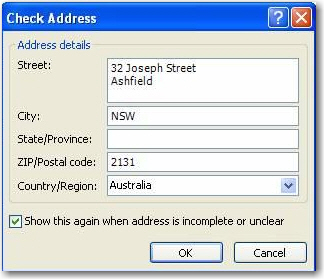
- Figure: Street Address in Outlook
CRM should be the same as Outlook? Or as a minimum, give us an
option in Customization to have "have all addresses on 1 multiple
line field".
Tips:
-
You can change this easily - by making Address 2 and Address 3
invisible and make Address 1 multi-line.
-
If you hate how CRM deals with addresses, then fill all
addresses in Outlook - it does synchronize back to CRM.
This issue hasn't been changed in CRM4. We have a rule about this
at
Do you have consistent way to store a same field?
-
Add Microsoft Live Maps integration for contact and account
addresses
Add a new tab to contact and account entities called location.
This tab should have an HTML iframe to Microsoft Live maps showing
the address of the contact/account highlighted:
-
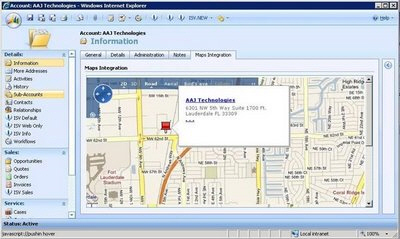
- Figure: a CRM Account record with the address highlighted
Note #1 : This one is the right idea, but is missing the steps to
follow.
http://community.dynamics.com/blogs/crminogic/archive/2009/04/27/maps-integration-for-dynamics-crm-4.aspx
Note #2: Richard has blogged a solution that shows the map on
SharePoint (not CRM like we suggest).
http://www.dynamicscrmtrickbag.com/2009/04/14/search_accelerator_part2/
-
Developer - Help me have a Month/Year Date control
Currently the only option a user has when inputting a date are:
- Date only
- Date/Time only
There is a need for a Month/Year control. For example this is
needed when trying to report on a projected income on a monthly
basis.
-
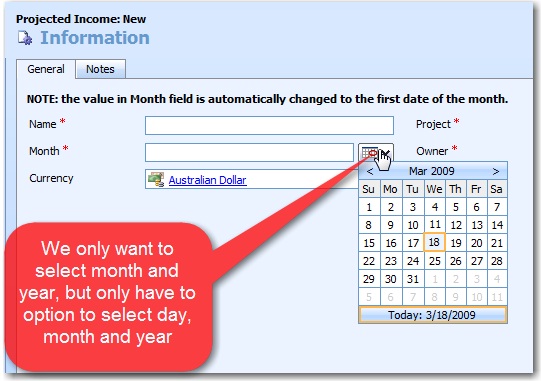
- Figure: CRM should include a date control
TODO: See if KendoUI have a control for this
-
Developer - Help me have config files to store settings instead of
the windows registry
The connection string for CRM is actually stored in the windows
registry under HKEY_LM\Software\Microsoft\MSCRM.
This makes it very difficult to find and it would be more
intuitive to store it in a config file in the CRM folder.
-
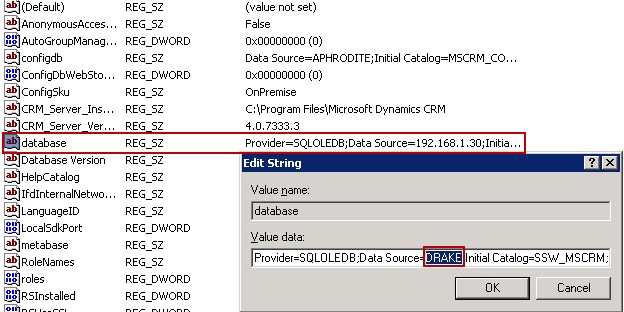
- Figure: CRM config setting save in registry
-
Developer - Help me see original email message and support a
plugin message of promoting outlook email to CRM
Ideally, in order to properly integrate email with CRM, the
developer should be able to see the original email message and
hook in the process of promoting an email to CRM.
For example, an invoice tracking email might need its custom
attributes to track it's type/category etc. We can store this
value in the email custom header, but we cannot pass this value to
a custom attribute in CRM.
TODO: You need some structure in the body of an email.
TODO: Investigate with George
N.B. This is not an issue if using the CRM web form to send the
email, only if using CRM Outlook client, which is not
customizable.
-
Form Design - Help me resize fields on form without using
JavaScript
Form Designer - field widths
Field widths indicate to a user, what data will go in it. E.g.
State will be able to accept say 6 characters - not 100
characters.
You will be able to change the width of fields in the form
designer (without needing JavaScript).
-
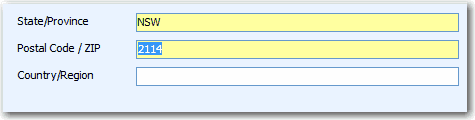
-
Figure: Bad - The form designer only gives you this by default
-
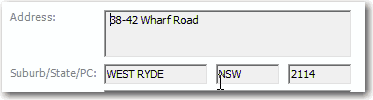
-
Figure: Good - The form designer should allow you to get to
something like this eg. resize the width of fields
See
Do you follow the control size and spacing standards?
-
Workflow - Help me have a better "Status Reason" Message
* TODO: Zune to add repro steps with Adam *
See the 6th and 7th record (yellow parts) below, it would be
better to change the "Status Reason" message from "Waiting For
Resources" to "Waiting For Resources - Check the service
'Microsoft CRM Asynchronous Processing Service' is running".
Because it took too long to work out:
-
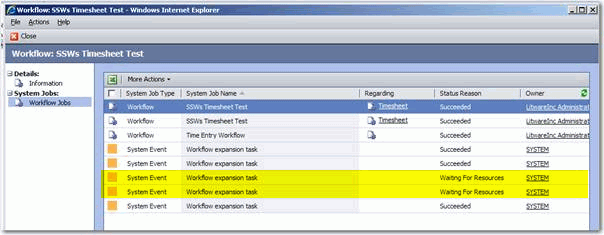
-
Figure: The message "Waiting For Resources" took too long to
work out
-
CRM Laptop Client Installer - Help me have an option to use local
SQL Server (if already installed)
PCs already run slow enough. And installing SQL Server Express
2005 is a heavy thing and if it can be avoided, it should. The
installer should have an option to point it at your current SQL
Server (if installed), rather than installing a new instance.
-
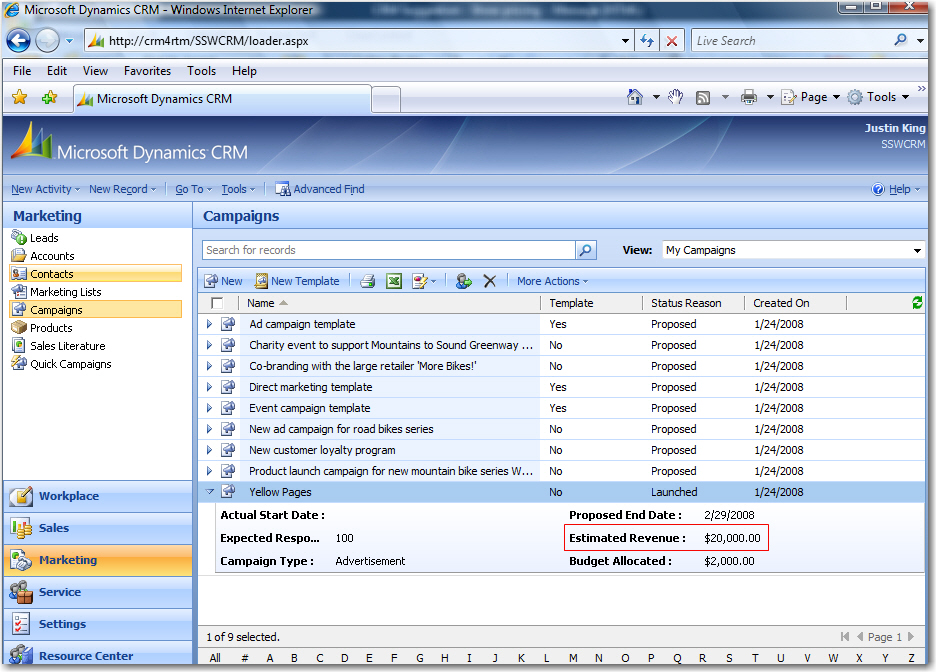
Campaign - Help me have campaign estimated revenue in default view
In default view for Campaigns you cannot easily see all the
estimate revenue for all campaigns.
Estimated revenue is available after expanding the campaign but on
a section by section basis.
It would be better to show this as an extra column as well as
showing all campaigns estimated revenue, you can then sort from
highest to lowest.
-
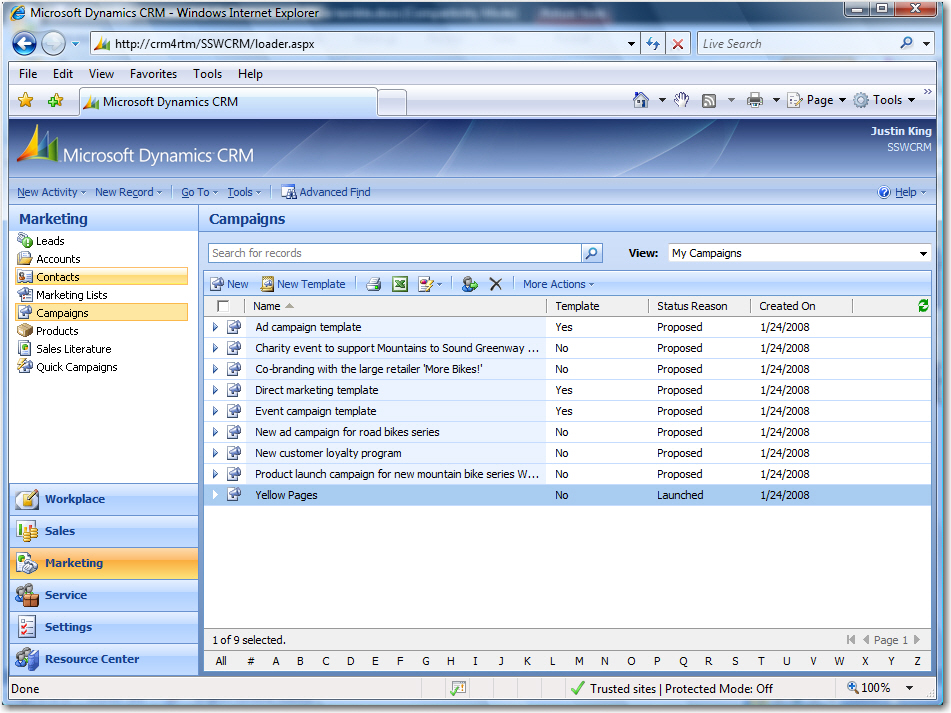
- Figure: Estimated revenue not shown in default view
-
-
Figure: Estimated revenue hidden in expansion (but you can't
sort on it down here)
Tip: Use the kendo grid from Telerik - it does this
-
Campaign - Help me have sales stage to be displayed on the form
and have a predefined probability value
It's understood that different organizations have different sales
stage regarding their opportunities. However the sales stage field
should be shown on the form by default make users aware of this
attribute and avoid them creating a custom attribute. Each sales
stage should have a predefined probability value that is
configurable via CRM UI not by hard-coding these values in
JavaScript.
-
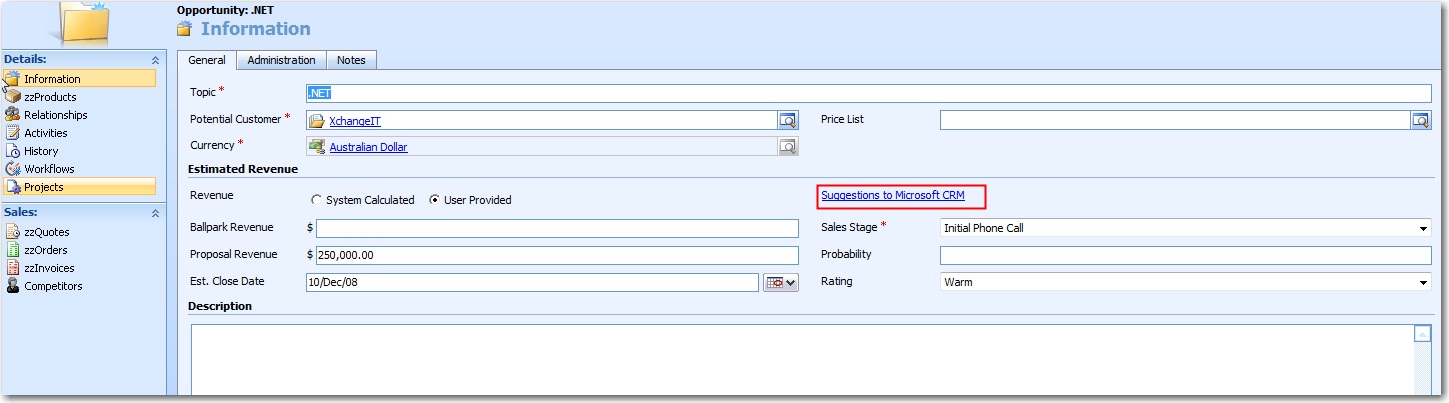
- Figure: Custom opportunity in CRM
TODO: ADAM Fix image by cleaning thread 'RE: Please enable Sales
Stage field in SSW CRM'
TODO: Adam check the Breadcrumbs in the process
-
Report - Help me select a template to choose my companies colors
There is a workaround for this problem, where you can:
- Export the .rdl to desk top from CRM, then
- Open In VS.NET
- Add header, footer and logo
- Come back to CRM and re-upload it
However this is not enough. It should be like the email template
and mail merge template. Then it is used for everything...
Any report which is created by the CRM Report Designer has a
standard CRM look and feel. It would be better if there was a
template that we could choose from while designing the report.
-
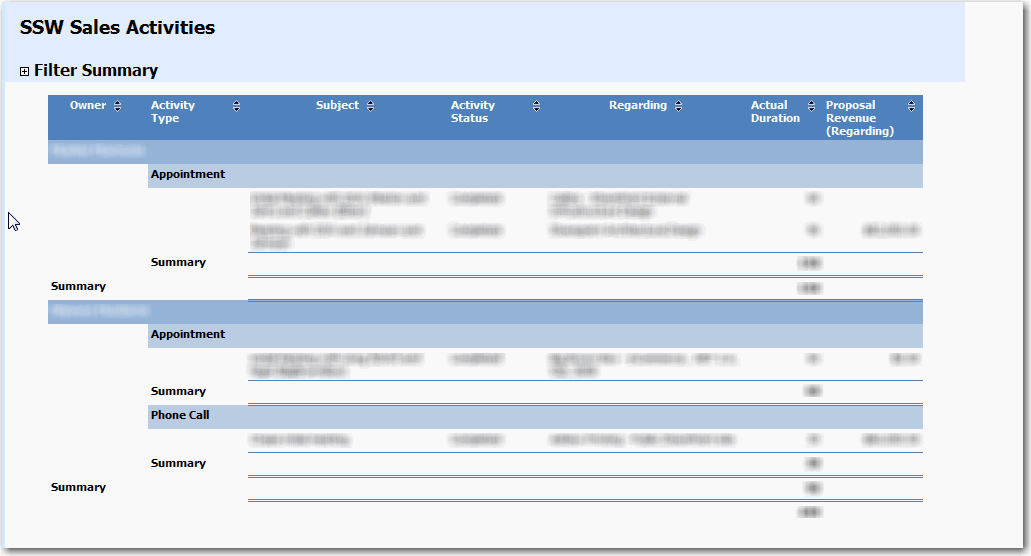
- Figure: CRM report layout from Report Designer
TODO: Check the instructions
-
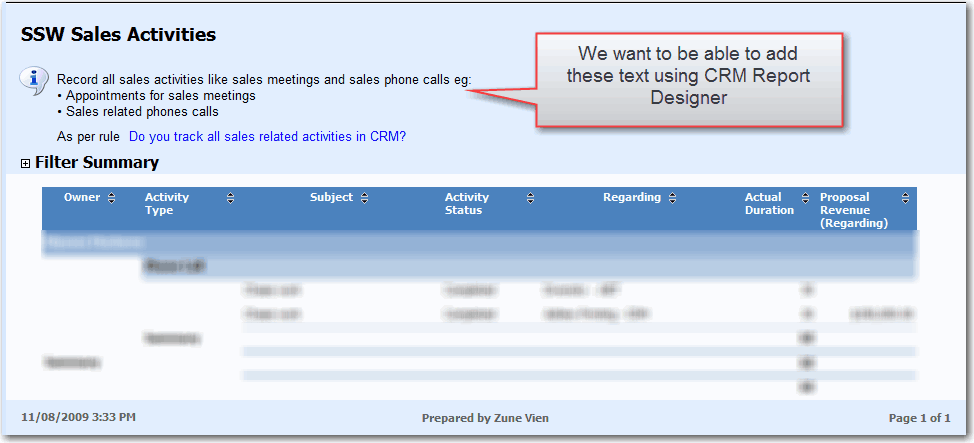
Report - Help me add text at the top of a report
The CRM Report Designer should allow a user to add text at the top
of a report.
-
-
Figure: We have to download the report and edit it using Report
Builder 2.0 to add some text on top of the report.
-
Web Service - Help me remove an attribute on the form
* TODO: Adam to record a demo *
The CRM Web Service does not have a method which removes the
attribute from the form. You have to do it manually through CRM
Web UI:
- If attribute is not a required field then go to step 3.
- Set attribute to be not required field
- Save and publish the changes
- Remove attribute from the form
- Save and publish the changes
- Remove attribute from the entity
- Save and publish the changes
-
Scheduler - Help me create recurring appointments
Microsoft Dynamics CRM 4 allows you to create an appointment:
- Via the Web UI (New Activity | Appointment)
- Via the Web UI (Service Calendar | New Service Activity)
- Via Outlook (New Appointment | Track In CRM)
To reproduce the problem, create a recurring appointment by:
- Create an appointment in Outlook
- Click "Recurrence"
- Enter recurring time and pattern
- Click "Track in CRM"
- Click "Send"
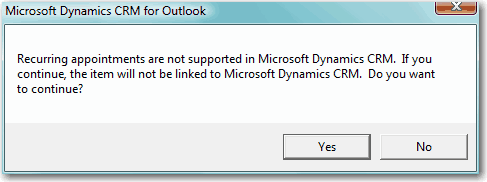
You will get the following error message from CRM 4.0 outlook add
in:
-
-
Figure: Please remove this error message in Outlook and support
recurring appointments
-
Recurring appointments are not supported in Microsoft Dynamics CRM. If you continue, then the item will not be linked to Microsoft Dynamics CRM. Do you want to continue?
-
Figure: Adding the above message box as text for Google to see
-
Customizations - Help me read Customization file
In the customizations file:
- Format the XML correctly.
-
List the customizations that were done in comments at the top.
E.g.
There are 2 Customizations:
- Custom Entity 'Timesheet'
- Custom Entity 'Work Item'
-
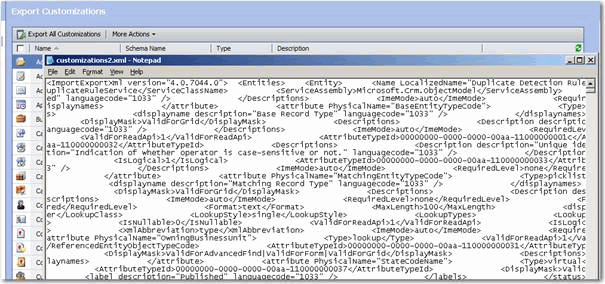
- Figure: Customizations file is unreadable
TODO: This may have been fixed in CRM 2011
TODO: DIMAZ HAS A CODE PLEX TOOL
-
Security - Help me have Cardspace and WCF support
Cardspace will only start being implemented by sites when
customers are demanding it. The more products and services that
support Cardspace the greater the potential it has to become
mainstream/popular.
Currently CRM 4.0:
- Use standard 2.0 Web Services
- Support Live ID
The CRM team will issue 4.1 with support for:
-
Out of the box - Help me change option group to checkbox
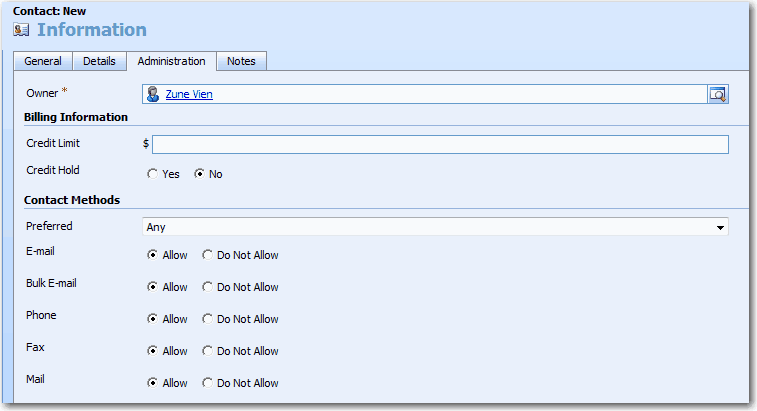
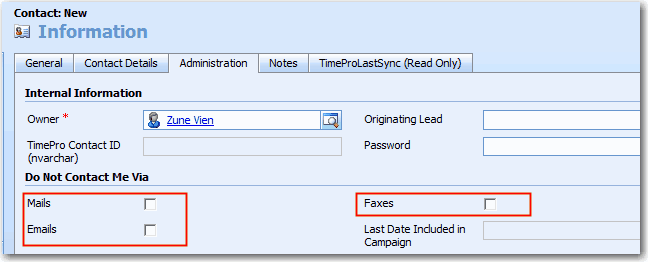
It is better to use checkboxes for contact methods instead of
option group.
-
-
Figure: Bad Example - By default CRM uses option group for
contact methods which is bad design.
-
-
Figure: Good Example - Using checkboxes provides a clear and
simple interface.
See our rule
Do you change contact method options from default option group
to checkboxes?
for instructions on how to change from option group to checkboxes.
-
Email - Help me have an option for specifying a path to a .html
file for an email template
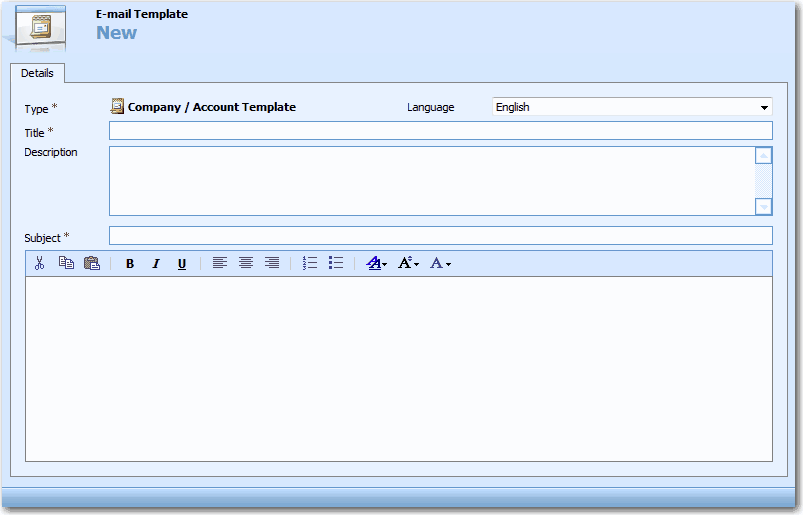
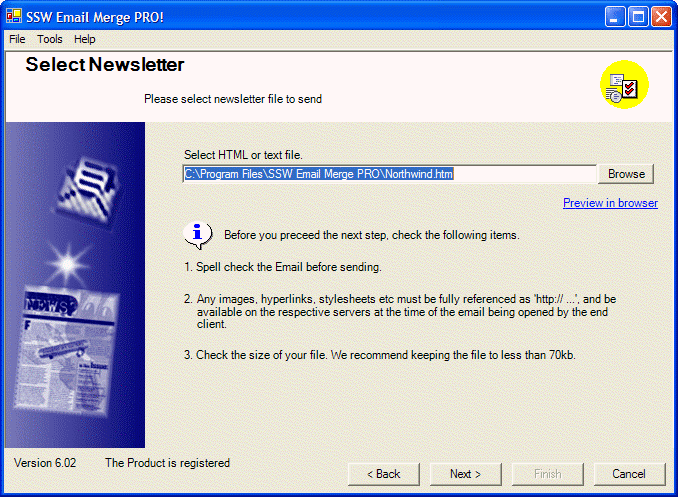
CRM 4's email template needs to give an option to use a HTML file.
This .html file would be used for the email body, because for
professional newsletters you need to tweak the actual HTML.
For example, you need to check that your newsletter will be
rendered nicely in Gmail - this means tweaking HTML manually
-
-
Figure: Bad Example - The CRM 4.0 template does not allow you to
specify a path to a HTML file
-
-
Figure: Good Example - You can specify a path to a HTML file in
Email Merge PRO
-
Out of the box - Help me edit a completed task
-
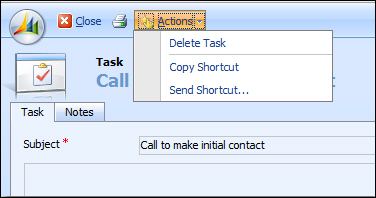
- Figure: Need another option Action | Edit Task
-
SharePoint Integration - Add a custom Search Results page as part
of the CRM Search Accelerator
Either add a new custom Search Results page for use within
SharePoint, or provide instructions as to how to customize an
exist page with the following functionality:
- Change icon for a CRM search result to a CRM icon
-
The link provided to the search result item should open the CRM
page itself
-
There should be a link next to the CRM link that says Cached
Result (like Google) and opens a page with the cached results
hosted within SharePoint
-

-
Figure: Bad Example - There isn't a CRM icon and a link which
links to the CRM page itself.
- Contact shows an IE icon
-
Search item links to the SharePoint hosted cached results only
-
Exchange - Help me have OWA integration with CRM 4
Please work with the Exchange Team to solve this.
CRM 4.0 provides an Outlook add-in which enables users to access
and modify CRM data via Outlook. However there is no add-in to
integrate Outlook Web Access with CRM 4.0. This means that:
-
Any changes to appointments, tasks, email... being made via
Outlook Web Access won't be synchronized with CRM data.
-
Since CRM 4.0 Outlook add-in only works with default profile.
You cannot use CRM 4.0 via Outlook as another user until you log
off that computer and sign in as another user.
-
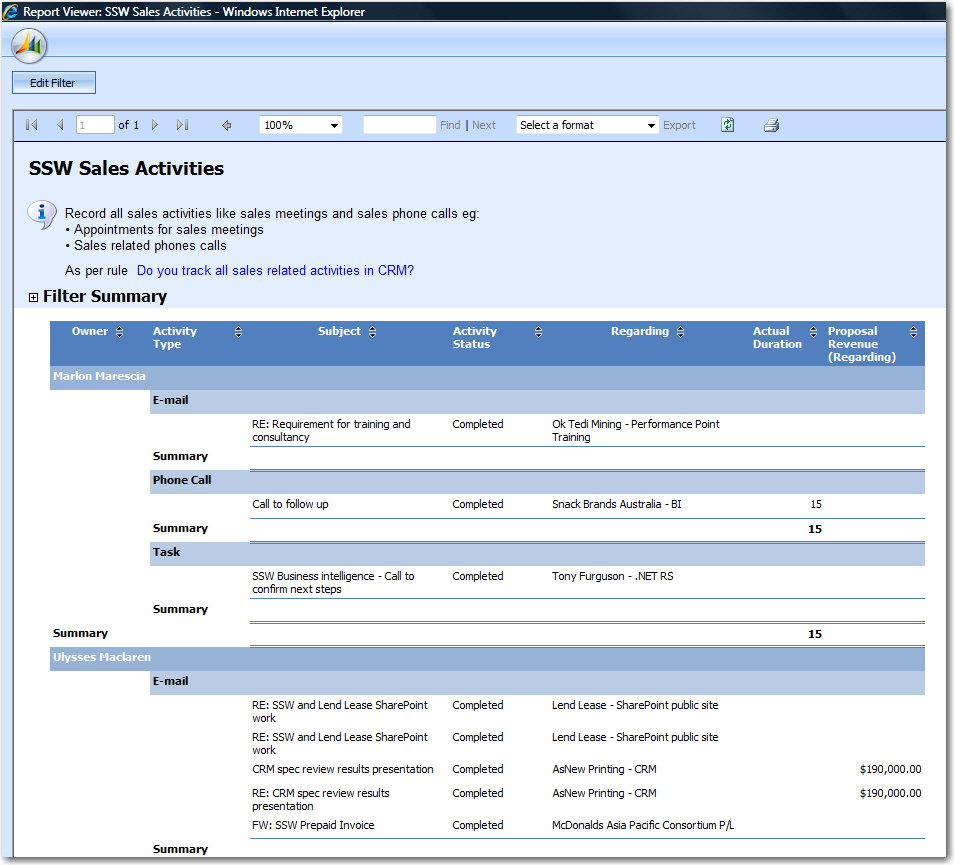
Give URLs for reports
Allow me to copy the reports URL, so I can IM it to someone
-
-
Figure: Bad Example - Report Viewer don't have an URL for
copying.
-
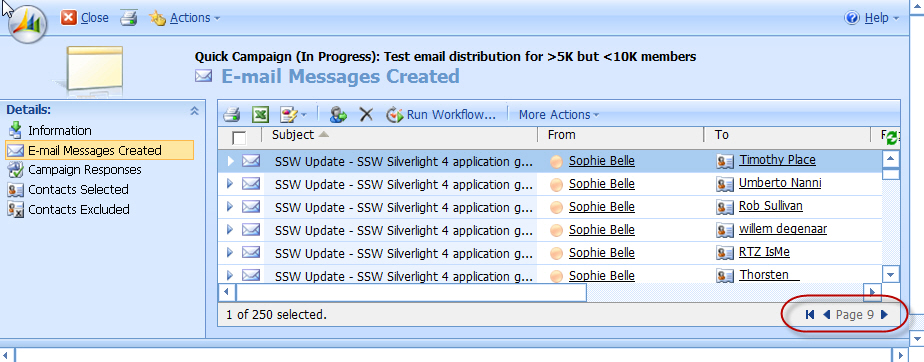
Campaigns - Help me have some idea how many records or pages
(This applies to all lists in CRM)
We are moving our email newsletter to CRM 4 and have found that
lists could work better. As an example if you are creating a quick
campaign with 40,000 recipients, you want to know where it is up
to while it is processing.
-
-
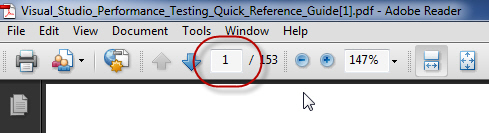
Figure: A text box to enter the page you want to go to, is the
best page navigation UI
The out of the box experience should be better. I suggest changing
the Footer to:
-
"1 - 250 of 45,000 (5 selected)" *Fixed
in CRM 2011 ?thank you
-
"Page 9 of xx"
*Not Fixed in CRM 2011*
-
Having a text box like Adobe reader does
*Not Fixed in CRM 2011*
Note: There is a
nice albeit funny workaround by Andriy Butenko that adds an
extra record to the first line with this information
-
-
Figure: Help me get to the last page quickly... give us "Page 9
of xx"
-
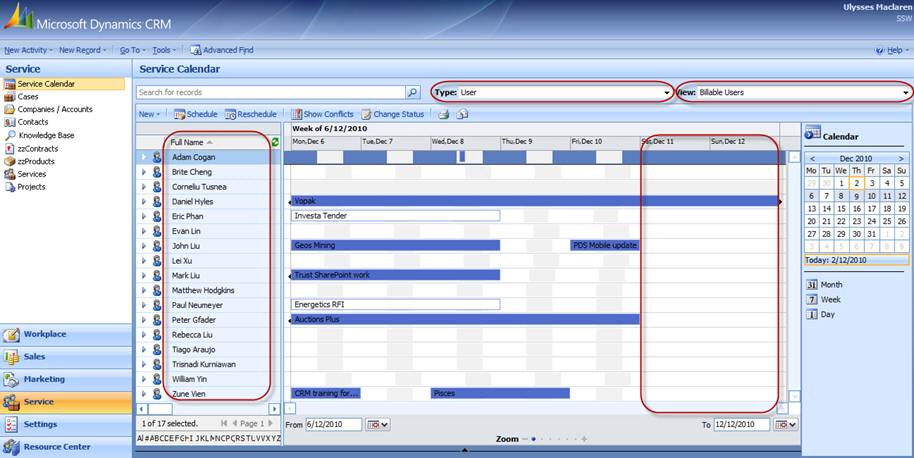
Improvements for the service calendar
The service calendar is a great way to schedule resources and keep
track of what everyone is working on, however, there are a couple
of things that would make it even more usable:
-
The Resources should be able to be grouped by site or employee
type as default (instead of having to manually sort each time)
-
You should be able to select a default type and view (instead of
having to navigate to it each time)
-
Weekends should not be displayed if they're empty, only if
there's something scheduled on them
-
-
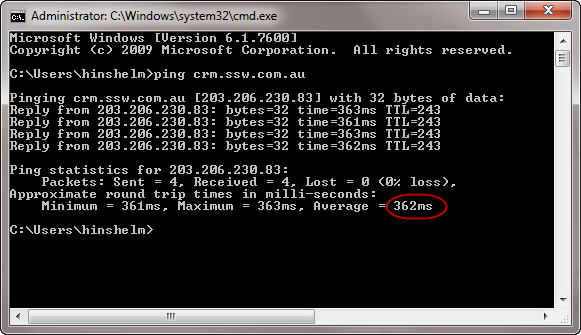
Add support for High Latency!
When working on CRM from remote locations there is often high
latency.
-
-
Figure: Good latency from UK to Aus during the night in Aus
This causes CRM to disconnect and for Outlook to freeze when
connecting. CRM should have a proper threading model in its
application so it does not make the user wait for extended periods
of time.
-
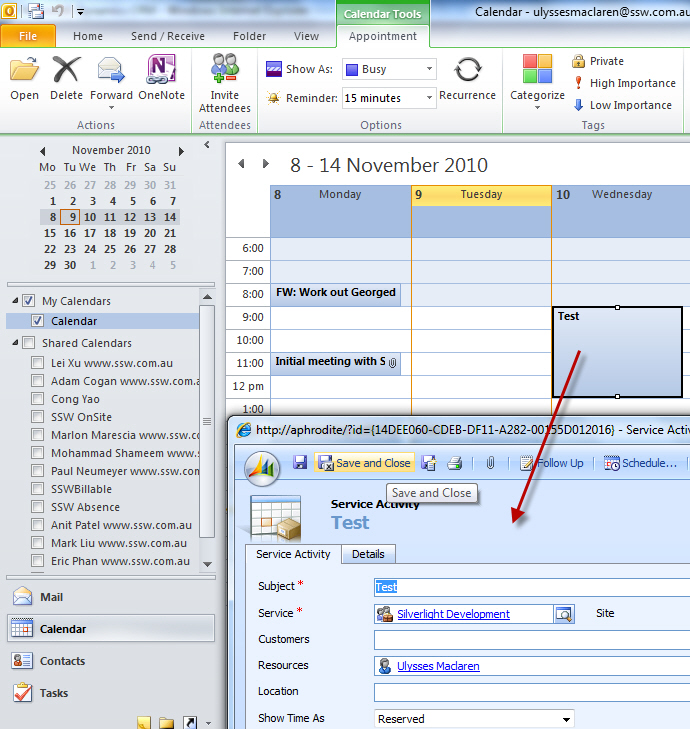
Help me be able to use 'Service Activities' as native Outlook
Appointments
-
-
Figure: Double clicking does not open an Outlook Appointment
(like other entities do)
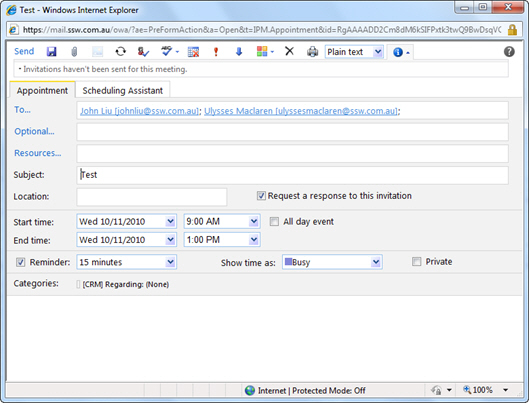
In Outlook 2010 with the CRM Add-in a service activity can be
synchronized to your calendar. Great. But when you double click
it, it opens in the CRM web application.
This should open as an appointment natively in the Outlook client,
rather than just a short-cut. It should only open the CRM service
activity if we click "View in CRM".
-
-
Figure: The appointment actually opens as expected in Outlook
Web Access
For more info see
xxxxxOTHER RULE YOU JUST CREATED WITH OTHER SUBJECTx
-
CRM 4 - Use full footer
When this report prints, it should show the date it was printed
and the report name in the footer.
-
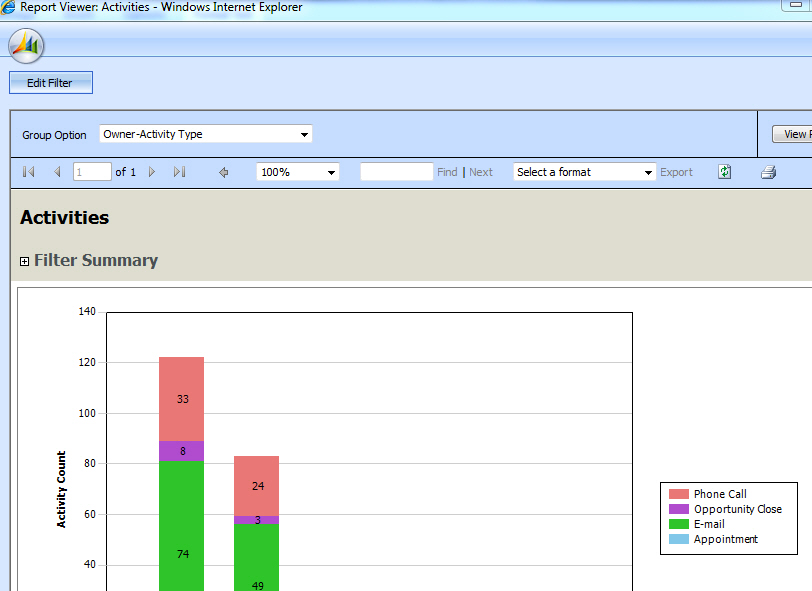
It should be the same as this:
http://www.ssw.com.au/ssw/standards/rules/rulestobetterSQlreportingservices.aspx#UsefulFooter
-
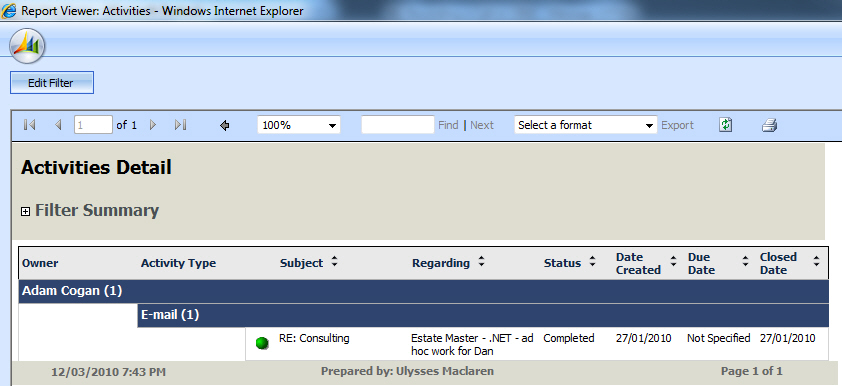
CRM 4 drill down not working in Activities report
-
-
Figure: The hyperlink "RE: Consulting" is not underlined and the
drill down report that it links to does not show any records
When using the "Activities" report and drilled down to a
particular user's email and it opened to a blank webpage when I
clicked on that email.
In summary:
- All hyperlinks should be underlined
-
The link currently goes to a blank page. This should be fixed.