There was an error displaying the testimonials. Please
report this error
to SSW and include the following text:
- A network-related or instance-specific error occurred while
establishing a connection to SQL Server. The server was not found or
was not accessible. Verify that the instance name is correct and
that SQL Server is configured to allow remote connections.
(provider: Named Pipes Provider, error: 40 - Could not open a
connection to SQL Server)
.NET Object Naming Standard
This standard outlines our standards on naming objects within
VS.NET. Use these standards when naming any object or if you find
another object that doesn't follow these standards within SSW. For
the 'Other style' naming, we have tried to keep the length of any
prefix to 3. However there may be some with a length of 4 or 5.
Ideally we dont want to use Hungarian notation anymore, except user
interfaces. It is nice and neat when you implement them in code.
Do you agree with them all? Are we missing some?
Let us know
what you think.
-
User Interface Syntax and Object/Code Syntax
| User Interface Syntax |
Recommended Style |
Other Style |
Notes |
| Button |
btnCustomer |
customerButton |
|
| Label |
lblCustomer |
customerLabel |
|
| TextBox |
txtCustomer |
customerTextBox |
|
| ComboBox |
cboCustomer |
customerComboBox |
|
| ListBox |
lstCustomer |
customerListBox |
|
| For all other controls |
ctlCustomer |
ctlCustomer |
|
|
|
|
|
| Form |
OrdersForm |
frmOrders |
|
| Report |
CustomerReport |
rptCustomer |
|
| Calendar |
ctlCustomer |
cldCustomer; dueDate |
|
| AdRotator |
ctlCustomer |
artCustomer; customerRotator |
|
| CheckBox |
ctlCustomer |
chkCustomer; wantsMailouts |
|
| CheckBoxList |
ctlCustomer |
chkLCustomer; activeCustomers |
|
| CompareValidator |
ctlCustomer |
cmvCustomer; stateCorrect |
|
| CrystalReportViewer |
ctlCustomer |
crvCustomer; eomCustomerReport
|
|
| CustomValidator |
ctlCustomer |
ctvCustomer; detailsCorrect |
|
| DropDownList |
ctlCustomer |
ddlCustomer; currentCustomer |
|
| GroupBox |
ctlCustomer |
grpCustomer; customerDetails |
|
| HyperLink |
ctlCustomer |
hypCustomer; customerLink |
|
| Image |
ctlCustomer |
imgCustomer; currentPhoto |
|
| ImageButton |
ctlCustomer |
ibtnCustomer; proceed |
|
| LinkButton |
ctlCustomer |
lbtnCustomer; customerOrders |
|
| LinkLabel |
ctlCustomer |
llblCustomer; customerOrders |
|
| ListBox |
ctlCustomers |
lstCustomer; currentCustomers |
|
| Panel |
ctlCustomer |
pnlCustomer; customerDetails |
|
| Picture |
ctlCustomer |
picCustomer; wife |
|
| ProgressBar |
ctlCustomer |
prgCustomer; progress |
|
| RadioButton/OptionButton |
ctlCustomer |
optCustomer; wantsPhonecalls |
|
| RadioButtonList |
ctlCustomer |
rbtnlCustomer; contactOptions |
|
| RangeValidator |
ctlCustomer |
rgvCustomer; costCorrect |
|
| RegularExpressionValidator |
ctlCustomer |
revCustomer; emailAppropriate |
|
| Repeater |
ctlCustomer |
repCustomer; detailsList |
rpt is used for reports |
|
| RequiredFieldValidator |
ctlCustomer |
rfvCustomer; emailCorrect |
|
| TabControl |
ctlCustomer |
tabCustomer; pages |
|
| ValidationSummary |
ctlCustomer |
vsmCustomer; allCorrect |
|
| Code Syntax |
Recommended Style |
Other Style |
Notes |
| ArrayList |
customerList |
aylCustomer |
|
| DataGrid |
orderItems |
dgdCustomer |
|
| DataList |
orderItems |
dlsCustomer |
|
| DataRowView |
orderItem |
drvCustomer |
|
| DataSet |
dailyOrders |
dstCustomer |
|
| DataTable |
orderItems |
dtbCustomer |
|
| DataRow |
orderItem |
drwCustomer |
|
| DataColumn |
taxAmount |
dclCustomer |
|
| DataView |
currentOrder |
dvwCustomer |
|
| Hashtable |
securityCode |
htbCustomer |
|
| Literal |
customerName |
litCustomer |
|
| PlaceHolder |
setting |
plhCustomer |
|
| Table |
orders |
tblCustomer |
|
| TableCell |
gstAmount |
tdCustomer |
Consistent with HTML |
| TableRow |
customer |
trCustomer |
Consistent with HTML |
| Xml |
detailsXml |
XmlCustomer |
| Object Syntax |
Recommended Style |
Other Style |
Notes |
|
DataColumn
|
column
|
dc
|
|
DataRow
|
row
|
dr
|
|
SqlConnection
|
connection
|
cnn
|
|
SqlCommand
|
command
|
cmd
|
|
SqlDataAdapter
|
dataAdapter
|
adp
|
| SqlParameter |
parameter
|
prm |
|
SqlDataReader
|
reader
|
drd
|
|
OleDbConnection
|
connection
|
cnn
|
|
OleDbCommand
|
command
|
cmd
|
|
OleDbDataAdapter
|
dataAdapter
|
adp
|
| OleDbDataReader |
reader
|
drd |
| OleDbParameter |
parameter
|
prm |
| SQL String |
sqlString
|
sql |
We have a program called
SSW Code Auditor
to check for this rule.
-
Constants
Try to name your constants using Pascal Case (e.g.
ConnectionString) instead of using UPPER CASE.
-
private const string CONNECTION_STRING = "server=tuna;uid=sa;database=LiveStats";
- Figure: Bad example
-
private const string ConnectionString = "server=tuna;uid=sa;database=LiveStats";
- Figure: Good example
-
DataAdapter
Try to stick to the IDataAdapter naming conventions. That means
to start naming your methods with "Fill" or "Update".
You could use "Select", "Load" or whatever, but we think it is
better and more efficient to stick to the .NET naming
conventions.
-
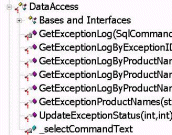
- Figure: Bad example
-
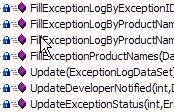
- Figure: Good example
-
Class declaration
Class structure should be declare in the following order to
provide a logical flow to reader:
- Variable
- Constructor
- Property
- Events
- Methods
-
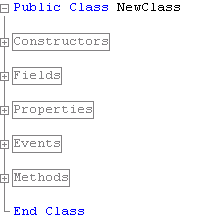
- Figure: Example Declaration of Class Structure
No variable name with the same class name
In C#, do not declare variable name with the same class name (but
different casing). This can confuse other developers, and will
cause problem when porting code to VB.
-
Array array = new Array();
- Figure: Bad Example
-
Array objects = new Array();
- Figure: Good Example
We have a program called
SSW Code Auditor
to check for this rule.
-
Main Form of a Windows Application
There is only one name that should ever be used for the main
form of a Windows Application:
MainForm
. Don't use Main, frmMain, Startup, frmStartup, MenuMain,
frmMenuMain, etc. In the case of a Wizard application, there may
not be a single form in the project - this is fine too. Instead
there will be a class named
WizardPage
which inherits from the template UserControl used by your wizard
framework.
We have a program called
SSW Code Auditor
to check for this rule.
-
Old Com Objects
| Object |
Prefix |
Sample |
| Recordset |
rst |
rstCustomer |
| Connection |
cnn |
cnn |
| Command |
cmd |
cmd |
-
Do you use a standard naming convention for class level
variables in C# and VB .NET?
Class level variables should have a prefix so that you can see
at a glance what the scope of the variable is eg mMyInt,
m_MyInt. I like
m
for member/instance variables,
p
for parameter variables, and no prefix for locally declared
variables. Some dont like the specific use of the underscore
because of the difficulty typing it eg m_MyInt.
Using a prefix is a naming convention that can be used in both
VB.NET and C#.
Note: Some teams use "_" to prefix private member variables,
others "m_" and some are just using camel case.
Often teams don't have a personal preference so you should make
sure that you are consistent in your team/solution.
-
public class MyClass
{
    private int myInt;

    public MyClass(int myInt)
    {
        this.myInt = myInt;
    }

    public int MyInt
    {
        get { return this.myInt; }
    }
}
-
Figure: Bad Example - Can only be used in C# because C# is
case sensitive
-
public class MyClass
{
    private int mMyInt;

    public MyClass(int pMyInt)
    {
        mMyInt = pMyInt;
    }

    public int MyInt
    {
        get { return mMyInt; }
    }
}
- Figure: Good Example - Can be used in VB.NET and C#
-
Other Links
Microsoft's Naming Guidelines (for VB 6)

Microsoft's Standard for naming objects (for VB 6)
Microsoft's Naming Guidelines (for the .NET Framework)
Microsoft's Standard for naming objects (for the .NET Framework)
Naming Conventions for VB
Object Hungarian Notation Naming Conventions for VB (Q173738)
Changes to Naming Conventions for VB.NET
FMS Inc Naming Conventions
Microsoft's Object Naming Conventions for VB6/Access
Microsoft's Old Standard for naming objects. This is deprecated,
but you should still follow these conventions for VB6/Access
projects.