 Home > SSW Standards > Rules > SSW - Rules to Better Exchange Server
-
Do you enable the search?
If search is not enabled you will get this message in OWA:
"Search results may take a long time to appear because Microsoft Exchange Search is unavailable. Results will not include matches in the email body."
There is an Microsoft KB regarding this error: http://support.microsoft.com/kb/945077
This is how you fix it:
To diagnose Exchange Search issues
- Is the MSExchangeSearch service started on the Mailbox server? If Yes, go to
Step 2. If No, use the Services MMC snap-in to verify that the MSExchangeSearch
service is running:
- Click Start, and then click Control Panel
- In Control Panel, double-click Administrative Tools
- In Administrative Tools, double-click Services
- Verify that the Microsoft Exchange Search Indexer service is started
- Is the IndexEnabled parameter configure to true for the mailbox database of the user?
Run the following command in the Exchange Management Shell to verify that the IndexEnabled
flag is configure to true: Get-MailboxDatabase |ft Name,IndexEnabled
- Run the Test-ExchangeSearch command for the user: Test-ExchangeSearch -Identity ericphan[at]ssw.com.au
- Check Event Viewer for search-related error messages. Check the Source: MSExchangeSearch Indexer and msftesql-Exchange events. For more information, follow the link on the event log.
To Rebuild the Full-Text Index Catalog Using the ResetSearchIndex.ps1 Script
- Start the Exchange Management Shell.
- ResetSearchIndex.ps1 -force -all
Wait a couple of minutes to the index be created
- Run the command to verify if the index was created
GetSearchIndexForDatabase -All
-
Do you customise Outlook Web Access (OWA)?
It is possible to customise OWA, for example you can add change the colouring and add your company logo to the OWA logon page.
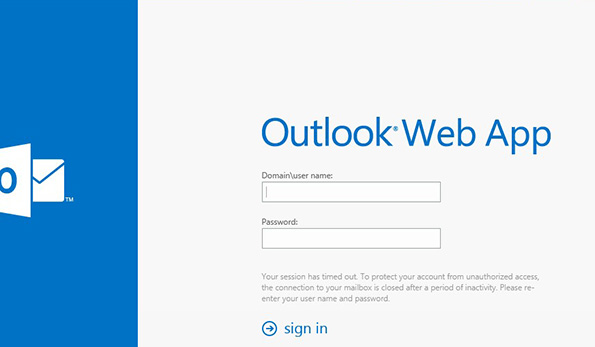
- Figure: Bad Example - OWA logon page doesn't clearly show it's from SSW
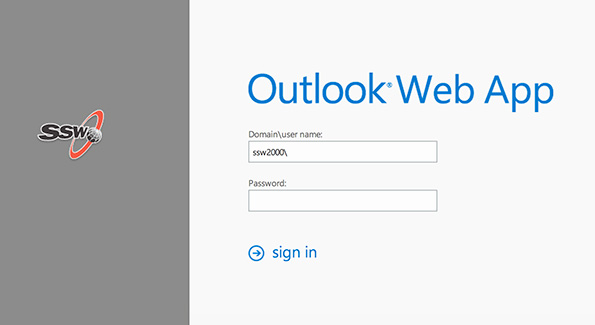
- Figure: Good Example - SSW OWA logon page with custom logo
The following Microsoft article explains how to customise OWA: Customize the Outlook Web App Sign-In, Language Selection, and Error Pages.
-
Do you configure redirection to HTTPS (OWA)?
Users like to access Outlook Web App (OWA) using well known address e.g. mail.ssw.com.au. Since OWA is running under a different URL they will face a 403 error. In such case it is good to redirect them to HTTPS address where OWA is actually running. E.g.
From http://mail.ssw.com.au
To https://mail.ssw.com.au/owa
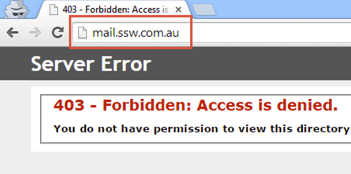
- Figure: Bad example - 403 error is thrown where redirect is a better option
The following Microsoft articles explains how to configure redirection to HTTPS for OWA:
Acknowledgements
Adam Cogan