


SSW XPDM delivers functional, value-adding software - faster


Software must help business become more efficient and build better relationships with their Clients. This means that software must also be cost-effective and quick to market. Traditionally, software has been slow to build and difficult to change.
SSW's Development Method XPDM, built on eXtreme Programming, allows businesses to address their most important challenges first, and respond quickly to a changing commercial environment. We prefer to work on-site, in close consultation with you and your business users, becoming an integrated part of your team.
SSW XPDM delivers functional, value-adding software -
faster.
eXtreme Programming
There are four key values of XP: Communication, Simplicity, Feedback and Courage.
SSW XPDM Supports
|
These values keep the project alive through continual review and adjustment of the project goals. They emphasise continuous interaction between architects, developers, project managers, business managers and end users throughout the entire development life cycle. By continuous interaction between the team players, XP allows, for example:
- Software Architects to determine the requirements fast with Business Managers (" Client Stories " and " Release Plans ")
- Project Managers to keep a schedule of Mini Releases only 1 - 3 days in length (" Mini Release Plans ")
- Developers to write and review code continuously (" Pair Programming ")
- End Users to test and provide feedback on versions of the software on a regular basis (" Release Plan Review "), and
- Business Managers to review and change the priorities as the business requirements move
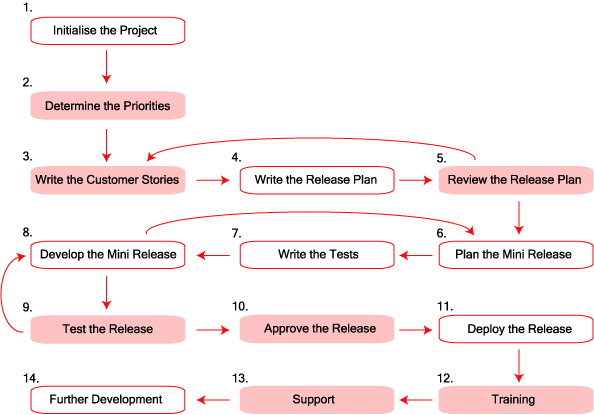
SSW eXtreme Programming Development Method
|
| Figure: Phases in block colour are done with the Client |
-
Initialise the Project
We give the first meeting for free. During this time we spend about 1-2 hours with a client and try to give as much advice and value as we can. That way, even if you don’t end up using SSW, you get some valuable information. The purpose of this meeting is to:Does SSW use Microsoft Project? Yes, because some clients tell us to use it, however we don't love Microsoft Project. Simply because a job will become more expensive with the extra layer of administration.
We prefer to keep costs down, so we use SSW eXtreme Emails! - this tool was developed for the eXtreme Programming approach.
- Assess the overall scope of your project
- Determine the best technology to use
- Introduce the SSW team
- Explain our development method
- Discuss our Consulting Order Form and Terms & Conditions . This document is vital to ensure our contract with you is understood.
During the Initial Meeting, it may be determined to commence work straight away - depending upon the size and scale of the project. If this is decided, we will sign-off the Terms & Conditions and Consulting Order Form and commence billable work.
-
Determine the Priorities
Does XP exclude the Big Picture? No! SSW XPDM encourages you to look at a whole system at the beginning, but it prevents you from getting bogged down in future details before you have to. This way, we always keep focused on delivering the most important things.
If the client chooses to go forward, then he commits to one full day to work together. The first step in any software project, once the contract has been signed, is to determine the Priorities. We speak to you about your business. We start at a very high level, and then drill down into the highest priorities (set by the Client) first. SSW and the Client together write "Client Stories". A mockup is then done and a release plan (in priority order) is put together. This work is chargeable.
- Write the Client Stories
- Manage customers
- Enter orders
- Manage products
- Would like an automated method of transferring order into courier companies like DHL, UPS and FedEx. This would save filling out the forms and faxing the information by the accounts staff
- Secure for users
- Secure login customers to check status of their orders
- Write the Release Plan
- Review the Release Plan
-
Plan the Mini Release
A Mini Release is a technical description of the Release Plan, broken down into 1 - 3 day programming tasks. Remember, the Release Plan is a series of functional requirements in an order agreed upon by the Client and SSW. These tasks are broken down into Testing and Development, in that order!
- Write the Tests
- Develop the Mini Release
- Test the Release
- Approve the Release (Debrief)
- Deploy the Release
- Training
- Support
- Further Development
|
Scenario
These are the initial stories that have come out of a meeting between Mr. Northwind and SSW Project Manager and SSW Developer: |
If a story is going to take more then three days it will be cut down so it becomes 1 to 3 days. If the Client requests "A system to manage customers", this will take longer then 3 days. So we break the work down into the smallest units possible. In this case the above request to "manage customers" may be broken down into "add/edit/delete customers" and "searching customers."
At SSW instead of using cards we manage our releases using emails. The emails pertaining to a release are stored in a public folder - each folder will usually contain about 2 weeks worth of development work.
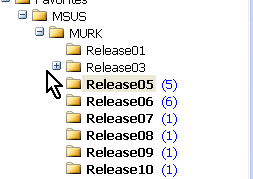
Figure: We use public folders to manage our releases.
The Client Stories are pieced together into a Release Plan.
A Release Plan covers tasks that will be performed over 1 - 3 week period. It lists what functionality will be delivered, and the time and cost estimates associated with those tasks. Each Release Plan is treated as a separate proposal and must be signed off after review by the Client.
At SSW we use an application we built called eXtreme Emails! to manage our releases. This makes constructing a release plan as easy as clicking a button!
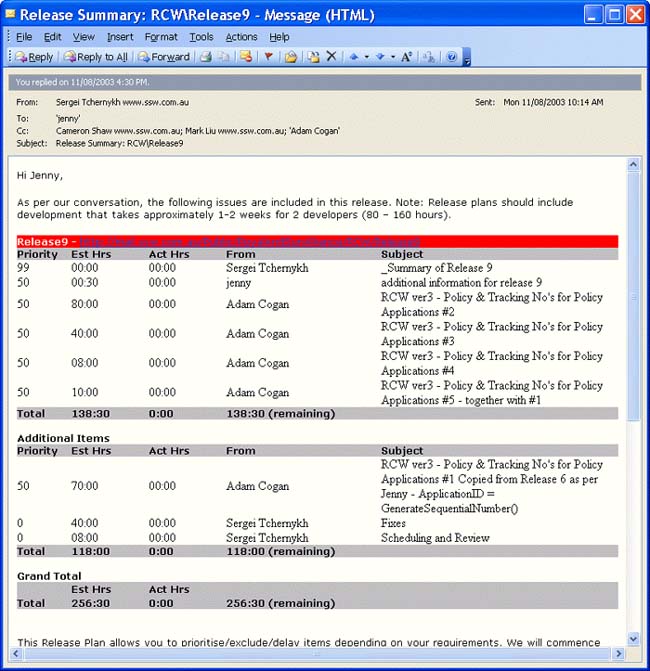
Figure: Releases are created with one click of the mouse
with SSW eXtreme Emails!
The Release Plan is agreed to by the Client and the Developers, ensuring that both sides are happy with what is expected for the next Release. Keeping Release Plans to 1 - 3 weeks means that priorities must be agreed, so that the core components of the software are delivered first.
According to XP, Tests are written before Development takes place. This means that ALL development that occurs must run according to the rules set down. This is an efficient way of catching and fixing bugs in code.
The idea here is to plan a set of unit tests that you can run each time you add functionality to an application. This is a great way to ensure that you haven't 'broken' any of your existing functionality when you add new features - if all the tests still pass then you know you're in the clear!
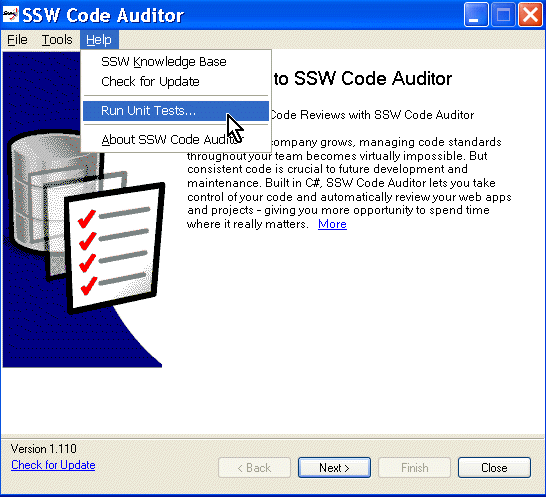
Figure: Running Unit Tests using our in-house
application - SSW Code Auditor
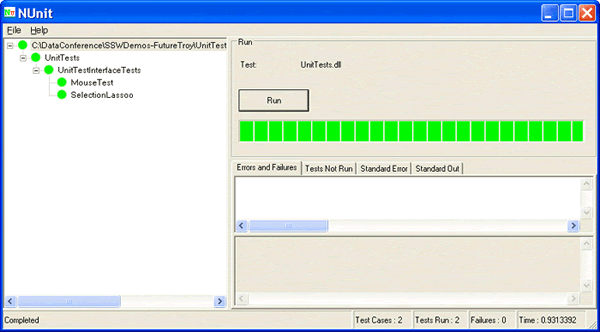
Figure: A successful testing run
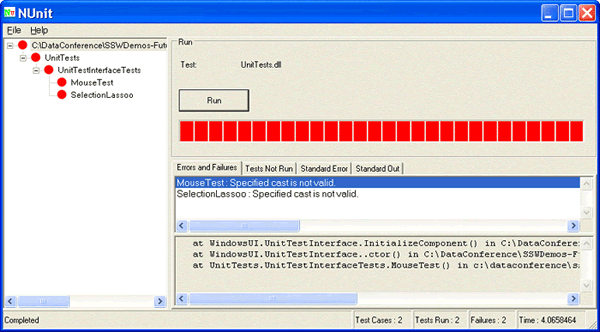
Figure: Test failures catch problems early
The Development Tasks are the names of all the Forms, Functions, Objects, Stored Procedures that will be used in the next 1 - 3 days development. Once the tasks have been agreed, the tests are written and development commences. Progress is reviewed at the end of every Mini Release. SSW prefers to write most production code using our own version of Pair Programming. SSW manages projects and codes according to its own set of standards and rules .
At the end of the Release Plan schedule (1 - 3 weeks) SSW releases a version of the software to the Client for review. The Client reviews the delivered version against the Client Stories created at the first step. Where deficiencies arise, they are fixed before future development takes place (SSW strictly believes in fixing bugs before writing new code ).
When the project comes to the end of the final release, the application goes into final review by the Client. If the project was on a fixed-price basis the 30 day warranty commences. At the end of 30 days the application is signed off by the client. If issues are found subsequent to the 30 day period, the issues are resolved at SSWs standard hourly rates.
When both sides are happy with the version, the application is deployed into production or if required we sit with the Client again and determine the next release by working through the Client Stories once again.
In many instances new applications are built according to the direction of management, and the users are the last ones to actually check out the new system. SSW XPDM traps this at the very beginning, bringing the real business staff into the design process. On top of this, SSW technical staff work directly with your business users to demonstrate and implement the software.
Different Clients need different levels of support. We understand that your needs must be met, for user assistance or high-resource emergencies. Contact us for more information.
We understand that your business continually changes. That's why we use SSW XPDM. Should your business needs require further development, we can begin the process again.
Sounds Interesting - But why this way?
SSW XPDM is about minimising risk and maximising benefit. There is no doubt that Software Development is still an inexact science with a whole gamut of risks and benefits. SSW XPDM ensures that risk is minimised to only a 1 - 3 week period. If either the Client or SSW is completely way off reality after the first Release Plan, it is captured quickly, and design and development can be adjusted accordingly.
SSW XPDM maximises the good things about Software Development (such as reviewing code, and getting feedback). Through this, we hope, better software applications are delivered.
OK, you've sold me - What's the cost?
Following SSW XPDM requires a high level of commitment from both the Client and SSW. The Client becomes an essential ingredient thoughout the project. This means that we need your time, to design and review, regularly, and we'll probably be working alongside you for most of the project.
SSW XPDM DOES allow you to think clearly about what you want, and get that delivered sooner. If this has got you thinking, please free to give us a call .
Managing Software Consultants
SSW developers follow a series of standards to ensure successful projects and good quality code.
But we've also taken some thought and learnt some lessons about what it's like being on the other end of the software development stick. These Rules are there to help you manage your software consultants effectively.
Links
www.eXtremeProgramming.org

www.xprogramming.com
www.refactoring.com
www.c2.com
Acknowledgements
Adam Cogan
Cameron Shaw
| Load Time: 0.0 Seconds |