Home
>
Archive
>
StandardsInternal
>
DeveloperGeneral
>
How to check Link Auditor reports
Why we check SSW Link Auditor reports everyday
SSW Link Auditor
is a powerful tool to maintain our website, it can automatically scan
the website and reports on broken links, warning links, inconsistent
casing links and links which do not follow SSW Link Auditor rules.
We have scan schedules running every night on our internal site, and
the scan result reports will be generated every morning. So we need to
check the reports and fix links everyday.
In order to make sure the scan can be done in one night, we separate
the scan into 4 small scans:
- /ssw/
- /ssw/events/
- /ssw/standards/
- /ssw/standardsInternal/
-

- Figure: SSW Link Auditor scan schedules
And the reports are on GODZILLA:
-
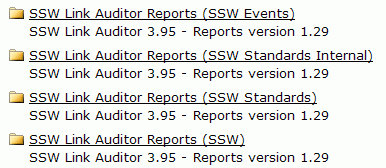
- Figure: SSW Link Auditor scan reports
How to check reports
There are 6 reports in the report folder:
-
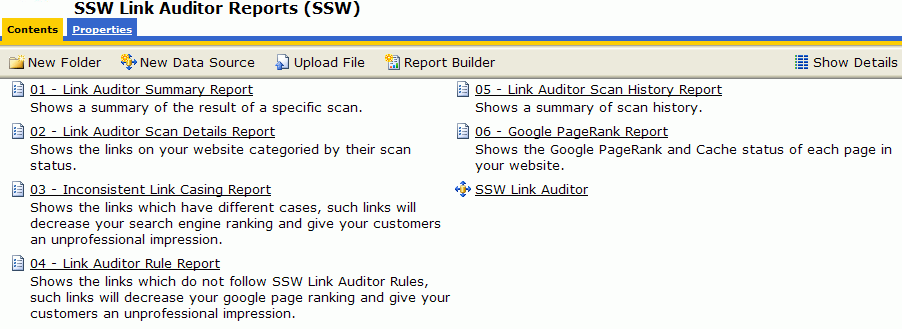
- Figure: SSW Link Auditor reports
-
Open report "01 ?Link Auditor Summary Report" to check the scan
result summary
-
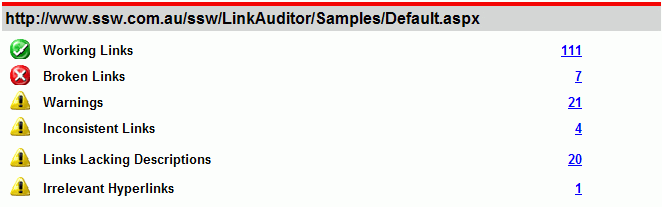
- Figure: SSW Link Auditor report 01
If there are any bad links exist, open their details report by
clicking on the numbers.
-
Open report "02 ?Link Auditor Scan Details Report" to check the
broken and warning links
-

- Figure: SSW Link Auditor report 02
Bad link (pink parts) is reported with details reason (gray parts),
you can locate it in the source page (yellow parts) by the position
provided (blue parts).
-
Open report "03 ?Inconsistent Link Casing Report" to check the
inconsistent casing links
-
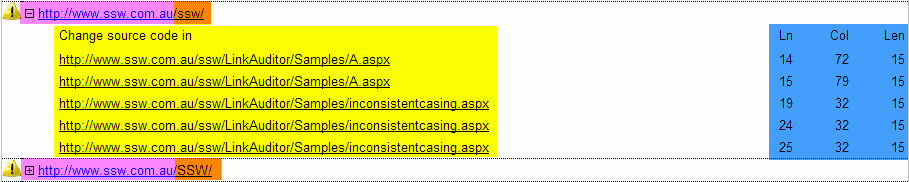
- Figure: SSW Link Auditor report 03
Inconsistent link (pink parts) is reported with groups (same link
with different cases), you can locate it in the source page (yellow
parts) by the position provided (blue parts).
-
Open report "04 ?Link Auditor Rule Report" to check the links which
do not follow SSW Link Auditor rules
-

- Figure: SSW Link Auditor report 04
Violate rules link (pink parts) is reported with details reason
(yellow parts), you can locate it in the source page (pink parts) by
the position provided (blue parts).
Additional Notes
-
After you fix the bad links on the internal server, remember to
check them into TFS and upload them to our external servers.
-
Some links were caused by timeout, if it
doesn�t exists on the report everyday, you can
ignore it.
-
If good links are mistaken reported, or you have any suggestions,
please sent an email with the details information to SSW Link
Auditor manager.
Acknowledgements
Evan Lin