Home
>
Archive
>
SSW Standards
>
Better Software Suggestions
>
SSW Microsoft ActiveSync Suggestions
Microsoft ActiveSync
-
ActiveSync should have an option to not run Outlook silently
ActiveSync should have an option to prevent Outlook from opening
in the background. Outlook is a heavy application and uses lots of
RAM, and often you want to recharge your SmartPhone without
synchronizing data, and everyone agrees that it is incredibly
annoying how ActiveSync automatically and invisibly opens up
Outlook when you plug in a device. This is particularly a problem
if an application such as Virtual PC is running, as your system
can run out of RAM when the phone is plugged in.
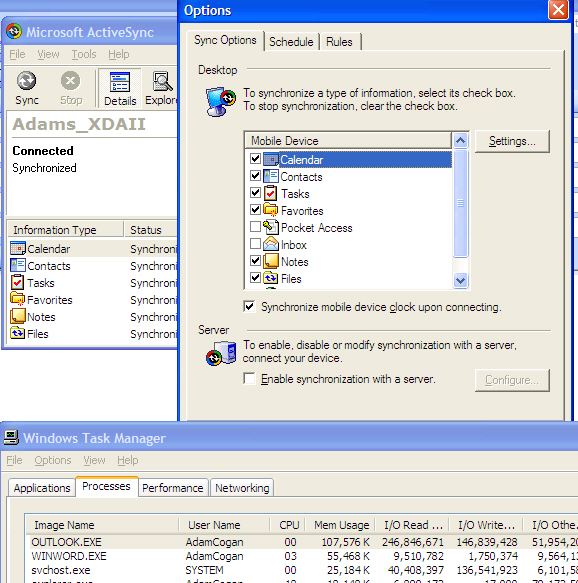
Another example of its annoyance is when I reboot my PC with a
portable device plugged in as Outlook won't shut down cleanly, and
my 4GB Outlook file gets corrupt... I'd probably expect expect a
warning on shutdown like "ActiveSync is keeping Outlook Open.
Please Exit"
As a result, many people change it to sync manually (changing the
setting from "Continuously" to "Manually"), but what you really
need is another option: "
Continuously (Only If Outlook Is Open)
"
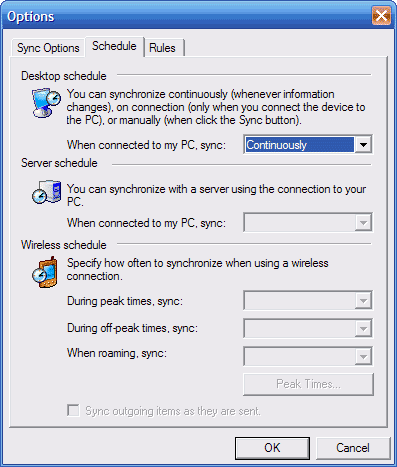
Figure: Add option "Continuously (Only If Outlook Is Open)"
-
Improve this Error Message (I was using Active Sync 4.1 + Jasjar)
---------------------------

Microsoft ActiveSync

---------------------------

ActiveSync encountered a problem on the desktop.


Support Code:85010014

---------------------------

OK

---------------------------
It should say Outlook needs to be in "Online" mode not "Offline"
mode when you are syncing for the first time.
Acknowledgements
Adam Cogan