-
Exchange Server should have an option to use a SQL Backend

We are aware that there are a lot of difficulties in doing this
from all the performance issues of converting a hierarchical
database to a relational one, but the performance issues that need
to be fixed. This allows us to do a few things.
Also, the SQL Database that Exchange Server will use should be
visible. We want to be able to query it and not want to learn a
new API. In fact, you should be able to query Exchange Server
through Query Analyzer.
-
Connect to Exchange Server from SQL Management Studio
We want to be able to use Exchange Server as easily as we use SQL
Server. We want to be able to use a gui to write a query in
Outlook/SQL Management Studio against exchange server to find out
useful data for the company. e.g. How many important items there
are in a users inbox. are in my inbox
-
Record a Script for Deployment
Exchange should be able to record a script to create a folder so
that it can be used to deploy on other computers (like Reporting
Services scripts - using that in SQL Management Studio)
-
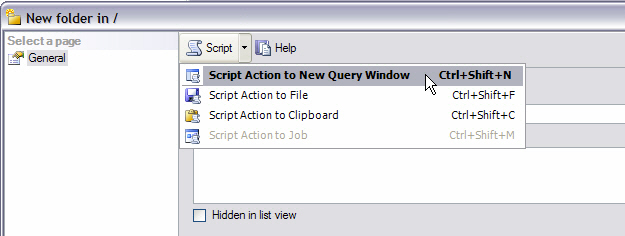
- Figure: SQL Management - Record Script
-
Problems caused by Special Characters
Exchange Server 2000 has a problem when special characters (such
as: !@#$%^&*()") are used in the message subject line. OWA
displays errors such as "Page cannot be found, HTTP 404 error
messages as a result from these special characters.
This problem does not occur with any Outlook clients (2000 or XP),
and only in OWA and only if you have the special characters in the
subject line. If you type the special characters in the body of
the message, you will be able to view the message just fine.
Different versions of IE (5.0-6.0) and Netscape browsers have been
tested, however the same thing happens. The problem has been
encountered by users for some time and the latest service packs
have done nothing to overcome this problem.
-
Exchange Server should allow easier cluster configuration.
I DO MIND having to worry about learning Exchange clustering (and
worrying about hardware) to be able to have some redundancy if one
box goes down.
I have a dream that I can setup the cluster for Exchange as easy
as how it works for SQL Server 2005 SP1. The Wizard is so simple
to follow that my mum could run it. And it doesn't require
specific hardware. So a solution for the Exchange Team is to move
the backend to SQL Server and then you can use SQL Server's
mirroring feature.
Sorry for the repetition, I must have mentioned this many times
over the past 5 years.
-
Please keep public folders
Public Folder is a very useful and cost effective way to share
information on Exchange Server. I really dont concur with the
phasing out of this feature unless there is a very good reason.
This will affect many of my clients who are currently using
SSW eXtremeEmails!
and I think there are many others on the market as well.
-
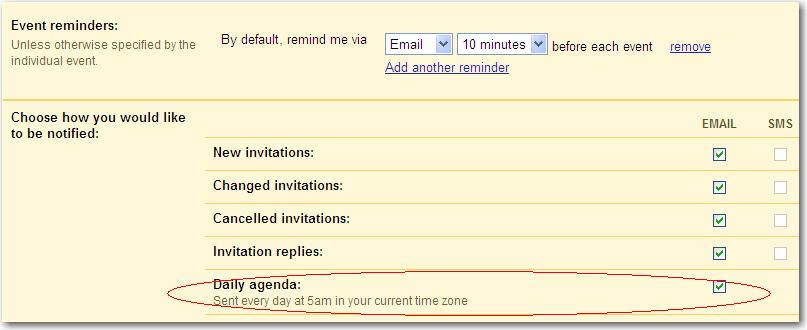
Daily Agenda Email
Google Calendar has a setting where your daily agenda is emailed
to you every morning at 5am. It's a simple feature but extremely
useful.
-
-
Figure: Google Calendar allows you to get your Daily Agenda
emailed to you every morning
SSW will possibly add this feature to
Team Calendar
in the future.
-
Add "Include Subfolders" option to the Search form in OWA
OWA can only search the items in the current folder, but not
including the subfolders. It will be better to add a check
"Include subfolders" to fulfil this common requirement.
-
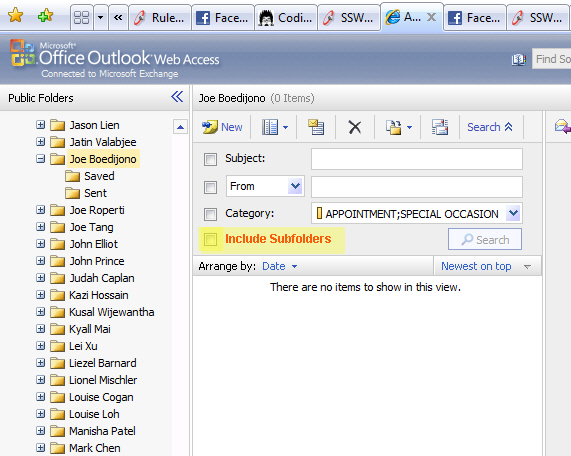
- Figure: This is the option I was expecting
-
Help me get nice URLs
URLs are part of the UI, the Exchange Team should play with MVC
and experience the nice URLs.
To Reproduce:
- Go to your OWA inbox
-
Right click on the "Sent Items" folder and "Open in New Window"
-
https://mail.ssw.com.au/owa/?ae=Folder&t=IPF.Note&id=LgAAAADJ0hRZtBi8QpIgbESL70L1AQBZOBJtTQ9HQbOWNqsTETIFAAADTk8xAAAB
-
Figure: Bad Example - Amazingly this is the Sent Items URL
-
https://mail.ssw.com.au/owa/SentItems
- Figure: Good Example - This should be the URL
Note: We also have a
similar suggestion for the URLs in SharePoint
-
Exchange2010 - OWA can't open a 2nd tab
My first hour on Exchange 2010 was terrible ?I always open a 2nd
tab with Exchange 2007 eg. my calendar.
>You may have already opened your
mailbox on a different browser tab. If you feel you've received
this message in error, try refreshing your browser.
So as you can tell I really love this new OWA "Feature" :-(
-
There is no information on the web about it (or how to turn it
off).
- A work around is to open it in FireFox as well.
Anyone know the technical reason behind this?
-
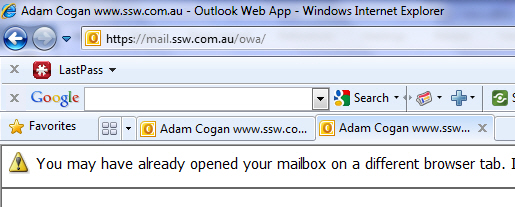
- Figure: Who programs a web app to be single instance?
-
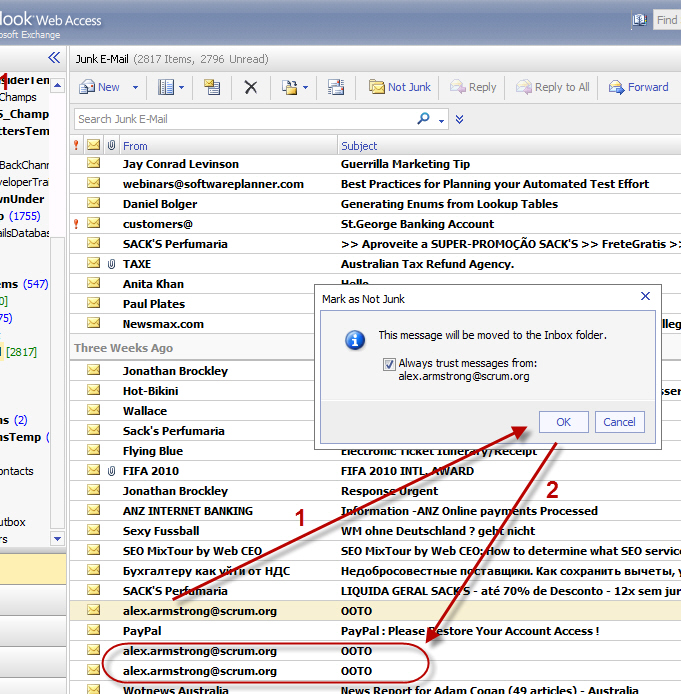
Exchange OWA spam suggestion. Please be a little smarter please
-
-
Figure: Reduce the steps to one, when cleaning the spam folder.
Make cleaning my junk less painful
Exchange OWA spam suggestion. Please be a little smarter please
If I say "Alex" is not spam... I wish it would be smart enough to
move the rest of the emails from him
-
OWA - Need a right click menu like outlook e.g. 'Reply to All'
-
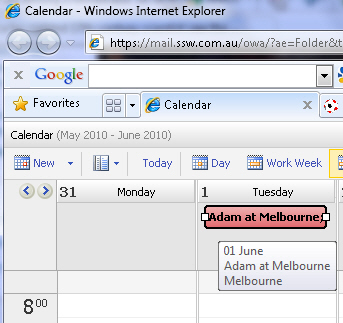
- Figure: No right click menu in OWA
-
Very often people don't follow rules ;-)
So they change the email subject on an email thread, what they
shouldn't do, see
Rule
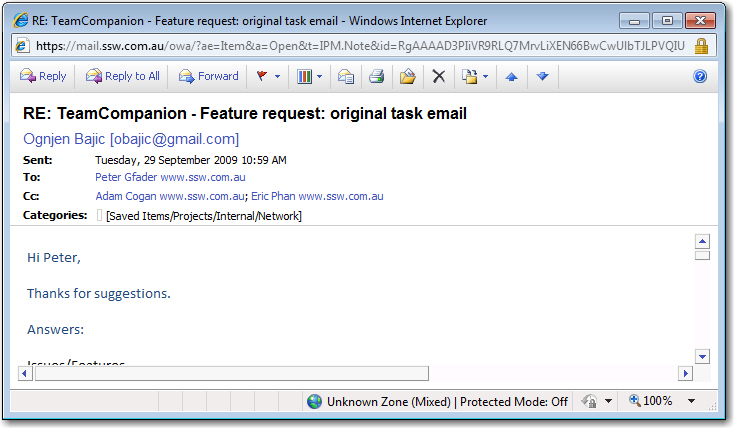
How can I change the subject of an email if I am just using OWA?
-
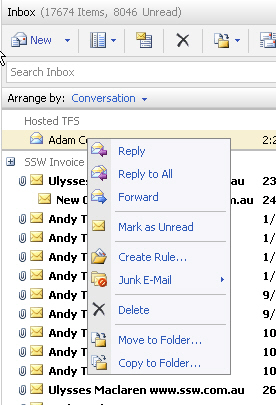
- Figure: OWA ?right click ?No "Edit subject"
-
-
Figure: No "Edit message" with the option to change the subject
-
Creating nice URLs is easy with ASP.NET 4 Routing features.
Please give me nice and easy understandable URLs
BAD:
mail.ssw.com.au/owa/?ae=Item&a=Open&t=IPM.Note&id=RgAAAAD3PIiVR9RLQ7MrvLiXEN66BwCwUlbTJLPVQIU6lf8q2bJXAAAHTUJLAACwUlbTJLPVQIU6lf8q2bJXAHWj3whFAAAJ
GOOD: mail.ssw.com.au/owa/Emails/ShowDetails/Id=53311293
-
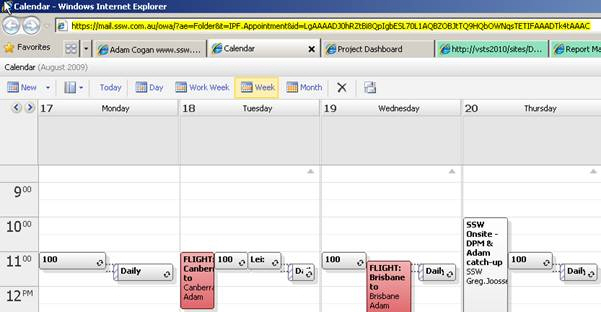
- Figure: BAD - URL for the OWA calendar
Same nice URLs could be done for the calendar
https://mail.ssw.com.au/owa/Calendar/ShowWeek/StartDate=20090917
- link to same suggestion on SharePoint
https://www.ssw.com.au/rules/rules-to-better-sharepoint/
- link to same suggestion on CRM
http://ssw.com.au/ssw/Standards/BetterSoftwareSuggestions/CRM.aspx#FriendlyURL
- link to same suggestion on TFS
http://www.ssw.com.au/ssw/Standards/Rules/RulesToBetterProjectManagementWithTFS.aspx#NiceURL