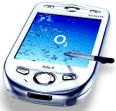
As with every new electronic device I purchase, I have many ideas on
how they can be improved to provide the user with more information,
and an easier way to understand what the device is doing!
Here is a list of some of the improvements I have come up with that
would help me like the XDA II more!
-
Bug with call waiting
The XDA II has a bug when you try to switch between two callers.
When you are one a call to John and another call comes in from
Hannah, the XDA II automatically puts the first caller (John) on
hold. However, the second call from Hannah is not picked up.
You need to press 'Hold' and then 'Swap' to talk to the second
caller (Hannah). This is a bug that needs to be fixed!
-
Active sync issues -
fixed with Active Sync 3.8
There are active sync issues with the XDA II that need to be
fixed.
-
Auto Suggest Numbers
The Smart Phone has the ability to recognize phone numbers whilst
you are typing in the number. It provides a list of phone numbers
that match the current digits you have already entered. This
capability is a nice feature that makes dialling easier in the XDA
II also.
-
Increase Sound
Even the loudest sound is not loud enough on the XDA II !
-
UI on "Settings
Under 'Settings' on the UI there is no option to view the power
remaining on the device.
Add a Power check box that shows the meter on the title bar when
it is less than 40%.
-
UI on the Phone
The button Talk/End should change colour depending on the current
function. For example:
- Green when Talk
- Red when End
- Grey when "Disabled"
-
Call History
In the Call History options, add a right click item to Lookup
Contact.
-
"Current Suburb" option
On the front Today page, add a section called Current Suburb eg.
Chatswood.
I cant believe a modern day phone doesnt have this! The phone
should be able to pick this up easily from the nearest base
station.
-
Record the suburb
On Call History record the suburb I was in when the call was made
or taken.
-
Show the number of running programs in title bar
Too many programs open can mean problems when taking a call. So in
Programs - Running Programs add a check box [x] Show Number of
Running Programs in title bar
-
Use of the "Country" field in Contacts
When you are calling a contact in another country, what is the
first thing you need to know? Their local time. Please display the
current time when you open a contacts in a different time zone
(use the Country field to show this)
-
Turning off the phone
Sometime you need to turn off the phone sometime to conserve
battery sometime because the Qantas staff dont believe the Flight
Mode and want it completely off! The current method for turning
off the phone is not obvious as the UI is unclear. There needs to
be a clearer method to do this (say in a plane). I would add it to
the Phone UI.
Currently a user has to pull out the battery to turn off the
phone. Later they learn they lost their contacts, songs etc.. I
would add a Start / Shutdown option and then have a confirmation
screen that confirms that they will lose all their data.
-
UI needs to give more help
The UI needs to give more help to understand Settings / System /
Permanent Save.
Users need a text description to understand the different way a
PDA works compared to a PC with a Hard Disk. Also why is the
default not set to on for these checkboxes?
-
Add a world map and world time
The XDA II should have a world map! You should be able click
anywhere on the world map and it will tell you the current time.
Yes this utility is great:
http://www.mobimate.com/ppc/worldmate/pro/index.shtml
but it should be built into in like it is with Palm Trios.
-
There should be a cancel button not just an ok button
I dont understand this UI at all. How does a user say I don't want
to save any changes I just made.
-
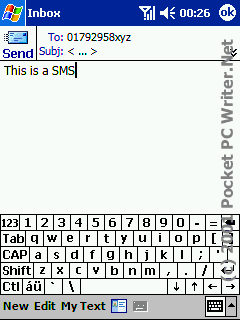
- Figure: There shoud be a 'cancel' button
-
In "Contacts" there is no option to NOT save your changes
When you change a contacts record, then change your mind, how do
you say I want to cancel these changes. I expect Outlook Contact
behaviour, therefore there should be the standard question. Do you
want to save changes? Or at least an option in "Contacts to turn
it on.
-
Make the device work like a wireless modem for your Laptop
It's a better way to make the device work like a wireless modem
for your Laptop.
Here is more info on that:
-
- Figure: PDAnet for Windows Mobile
Software to drive your Windows Mobile Smartphone or PocketPC Phone
as a Wireless Modem for your PC - PdaNet allows your PC to go
online by connecting to your Windows Mobile Smartphone through the
ActiveSync cable/dock. If you own a Treo 700w or PPC/XV 6700 with
any data plan, PdaNet will make it your high speed wireless
Internet Service for your laptop/desktop computer instantly - no
extra hardware or setup necessary, no need to kill ActiveSync or
perform any tricky hacking to your device whatsoever. Check out
what Treo users say about PdaNet.
Due to the none-user-friendly nature of Bluetooth and the vast
variety of Bluetooth devices/drivers, we only offer the Bluetooth
DUN feature as a courtesy and cannot guarantee it will work for
all users, though we are confident that it works for most users
based on user feedbacks. Since most issues actually come from the
Bluetooth devices or drivers, we will keep the feature under beta
stage and will not provide support.
Here is the home page
http://www.junefabrics.com/pdanet/
And here is the Bluetooth info
http://www.junefabrics.com/pdanet/bluetooth.htm