-
Not All SQL Commands Run in a Transaction
As seen in the screenshot below, some SQL commands that would
normally run correctly cause problems when run as part of a
transaction. If there is a technical problem behind this, it should
be cleared up.
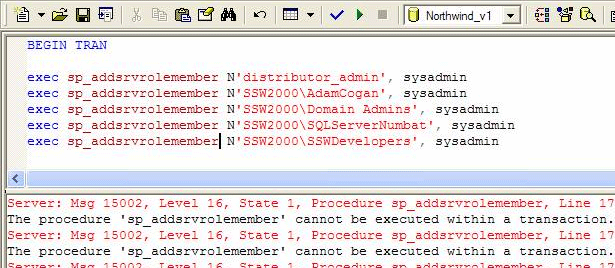
Figure: Can't put this stored procedure in a transaction
-
Allow Collation to be Altered Through T-SQL
Currently, SQL Server does not allow automated alterations to the
collation via T-SQL. SQL Server should include a T-SQL command to
allow Database Collation to be changed. All other properties can
be changed; why not collation?
Also when the collation is changed we need an option to also
change all the objects inside the database as well (to this same
collation).
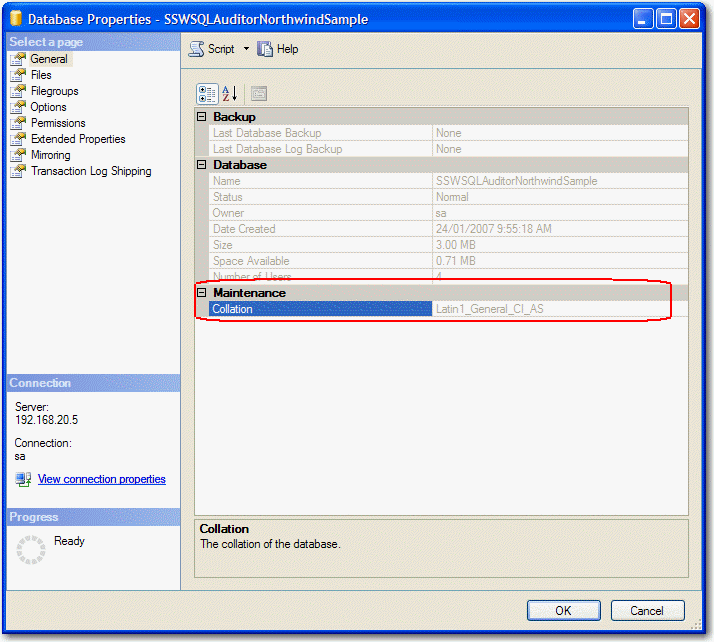
Figure: The Collation should not be read only in the Database
Properties dialog
-
Make Create Stored Procedure Wizard Launch From Command Line
The Create Stored Procedure Wizard in SQL Server provides a quick
and easy way to create basic stored procedures for a database.
However, it can't be used from the command-line, which would be a
welcome feature.
I know there are a million code generators but I want this built
in. I want to be able to customize the templates and run the
command line or the GUI (like DTSRUN and DTSRUNUI)
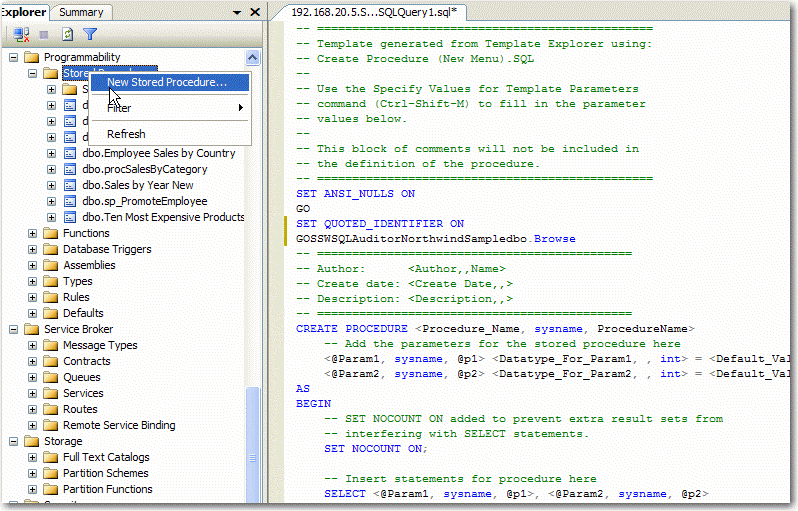
Figure: Can't use this Create Stored Procedure Wizard from a
command line
-
There should only be one SQL Email client
* has been replaced by
Database Mail
*
Did anyone know that there is more than ONE mail client built into
SQL Server? Not 2, but 3 different mail clients.
- SQL Mail MAPI - xp_sendmail, xp_readmail
- SQL Agent Mail MAPI
- DTS Mail - Send Email Task
I should be able to setup and test mail in one location and it
works everywhere. I am very curious how this happened? Don't the
different teams talk to each other? Is this a problem of backward
compatibility...
-
Backups should be able to generate a SQL create script for the
database
How many times have we had to restore a large database just to
have a look at the schema for just one table?
This is why many developers have tried to find a way to script out
their database on a regular basis with their database. I suggest
that a checkbox be added to the maintenance plan wizard which will
generate a .sql file in the same directory as the backup.
Also I think it is important to be able to see the T-SQL that the
Maintenance Plan Wizard has created. Therefore, add a last screen
to show all the script that it has generated.
-
Dragging fields in Query Analyzer
In Query Analyzer a handy thing is you can use the Object Browser
to drag a field to build a SQL statement.
It is handy but to be really useful we need to be able to select
multiple fields (with Control key).
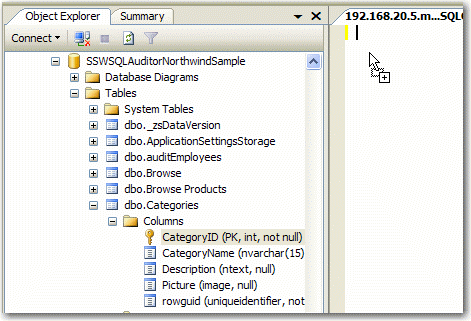
Figure: Dragging fields in Query Analyzer
-
Nice formatted copying of data from SQL Management Studio
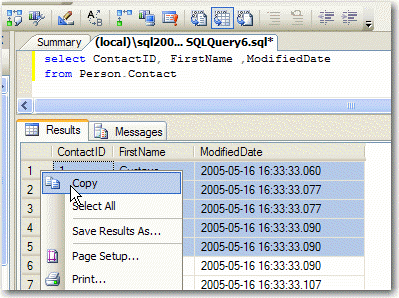
Figure: Copying records in a data viewer in SQL Management
Studio
When copying data from a data grid in SQL Management Studio, data
should be copied to the clipboard in a display-friendly format
(i.e. RTF / HTML), in a fashion that resembles copying data from
the Microsoft Access data viewer.
1 Gustavo 2005-05-16 16:33:33.060
2 Catherine 2005-05-16 16:33:33.077
3 Kim 2005-05-16 16:33:33.077
4 Humberto 2005-05-16 16:33:33.090
5 Pilar 2005-05-16 16:33:33.090
Figure: Bad example: data is plain-text only
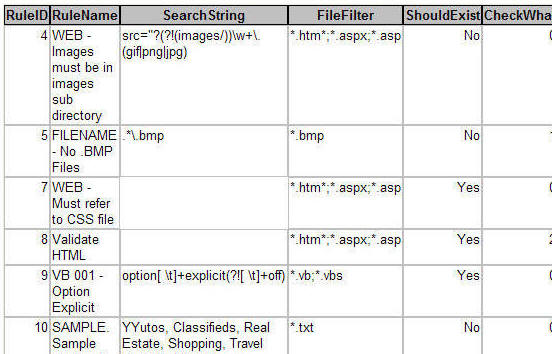
TICK Figure: Good example: Access copies data to the clipboard
pre-formatted - also see the nice column headings
-
Enterprise Manager View
* been replaced by right click Filter not quite as good as this
suggestion but good enough *
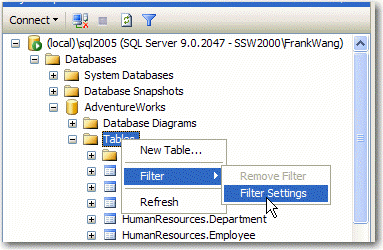
Figure: SQL Server Management Studio
When I am in Enterprise Manager I am usually searching for an
item. This view needs improving.
First, it would be a good idea to include all database objects
(e.g. as Diagrams, Tables, Views, etc.) in the main TreeView.
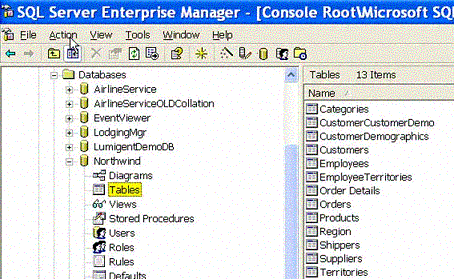
Figure: Current TreeView; does not display all database objects
Second, it would be a good idea to add a filter box to allow the
display to be limited, as is seen in the following image.
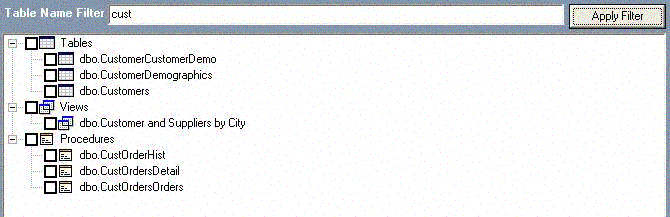
Figure: Limiting display with a filter text box
Alternately, an item that links to the Query Analyzer (see figure
below) could be added to a pop-up menu.
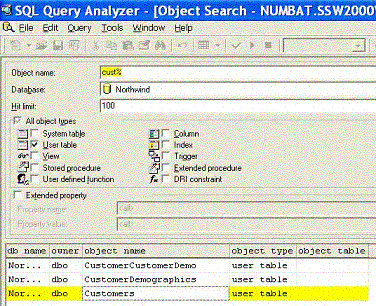
Figure: Query Analyzer
-
Allow Unsigned Integers as Data Types
Visual Basic .NET code allows for the declaration of both signed
and unsigned integers. In the following example, both variable
declarations are valid.
Private StartY As Integer ' Signed integer
Private StartPositive As
            UInt32 ' Unsigned integer
|
|
Figure: Declaration of variable types
|
SQL Server doesn't offer any support for unsigned integers. This
would serve as a useful feature because it could seriously reduce
the size of many databases. Because if you know you have positive
only numbers, you get an extra bit for numeric resolution
(especially useful for all ID fields)
Alternative: Allow use to specify an integer as being positive
only - Either way, an unsigned field type should be there.
-
Allow SELECT * (EXCEPT Column1, Column2, ...)
Sometimes you want all the columns except a particular one. Boy it
would be nice to be able to say:
Example #1: SELECT * (EXCEPT Note, Image)
FROM Customer
Example #2: SELECT * (EXCEPT LargeDataTypes)
FROM Customer (this would automatically remove Text, nText, Image,
VarCharMax, nVarCharMax, XML)
Example #3: SELECT * (EXCEPT XML) FROM
Customer (this is a specific datatype)
-
Generate Insert Statements
I would like to see an extra option Generate SQL Script of Data
Microsoft please get the script here and include the option on the
right click menu:
Note: I should not need to download the SQL Publishing Wizard to do
this it should be in the box
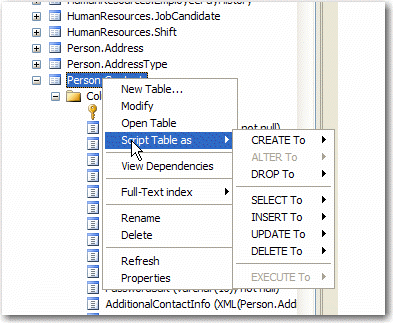
Figure: No option to generate SQL Script of Data
-
Merge Replication Schema changes are too painful
Absolutely the most painful thing when Replication is in place is
making schema changes. In particular:
-
Schema change propagation of ALTER table statements should be
made simpler.
At the moment, I have to add a dummy column with the required
datatype, update it to the new values, then make another column
with the correct name and datatype and update that column with all
the correct values. The removal of replication is a time consuming
process especially when the data has somehow gotten out of synch.
-
Dropping tables should be automatically done without forcing the
removal of subscriptions.
This process is also very time consuming, especially when I have
to remove all subscriptions because I want to remove one article
from publication. It would be great to be able to do this
automatically.
-
Merge Replication - Replication Agent is unhelpful
During the processing of jobs, the Replication Agent does not
provide adequately detailed information for troubleshooting and
resolving the issue. Please have suggested solutions - like the
Windows Event Log: this doesn't just have recommendations, it also
suggests solutions.
-
Merge Replication - Add a Resynchronisation Tool
If I am forced to remove replications, then re-add replications, I
should have the option to recheck the data and resynchronise any
missing records.
This could be as simple as running an "myupdate" on offending
records.
Note: We developed a tool to aid this.
http://www.ssw.com.au/SQLTotalCompare
-
Merge Replication Security
FTP Replication should not require Port 1433 to be open, just the
FTP port. This is an issue with a lot of firewalls and security
guys.
-
Full Text Indexes in SQL Server 2005 SP1 please
As per
http://www.joelonsoftware.com/items/2005/10/17.html
-
Automatic Compression on Backups
This should be in the box I should not need to be buying Quest
LiteSpeed.
-
Configuration Changes Script all config changes
I should be able to script out all settings that are different to
the default. Eg. right click a server and select
-
Save Config Changes, this might be a .sql script or an .xml file
and it would contain and settings you have changed from a
Vanilla install eg.
- Load Config Changes
- Server Collation being different then the default
-
Memory configuration eg. AWE is configured to allow more than 2
GB of RAM
-
Configuration Changes - Comparison of 2 Servers
Like the above I should be able to select 2 different servers and
see the differences basically a server compare
-
A graphical workbench for analyzing trace output
All I want to see is see the top 10 worst performing queries with
a graph.
-
Retain Data in your DMVs
When you restart your server your Data Management Views are
flushed please stop doing this.
-
Have a GUI to generate SQLCMD scripts
For example say I want to restore the master database then I would
like to type SQLCMDUI (like DTSRUN and DTSRUNUI) and it pops a
form with a wizard where I select the command, then the server,
then the database etc.
-
Have a database documenter built in
Then I don't need to purchases Apex SQLDoc or GeckoWare SQL Scribe
Documentation Builder
-
Scripting Database Maintenance Plans
Don't get me wrong, maintenance plans in 2005 are better how they
are just a SSIS package. This means I can migrate it from one
server to another.
I want more. I want to right click it called Generate Script just
like a Job.
Basically everything in SQL Server should be able to have a right
click Generate SQL
-
With Data Dude add Load Tests for a stored proc
Allow me to specify a property Simulate [100] Concurrent Users and
say this stored proc must execute in under [50] seconds.
-
Give me a dashboard with green ticks and red crosses
Like the
SQL Reporting Services configuration manager
please check everything you can eg:
- no backups red cross
- indexes not being used red cross
- database mail not being configured - red cross
-
Change the SQL in a deployed report
In SQL Management studio add the reports datasets into the tree
here, so you can change the SQL in a deployed report
-
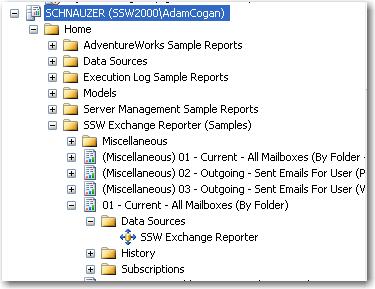
- Figure: SQL Management Studio - Tree
-
Change the Collation
Help users change the collation
You should be able to change the collation of a database
(including tables and fields)
If not we at least need a help button next to the collation field.
So add a button “How to Change?and it will say:
How to change the collation
-
Check you have SQL Server Integration Services installed and
running on local computer.
-
To change the collation, create a
new database
specifying the collation (if the server location is different to
what you want)
- Right Click -> Tasks -> Import Data
-
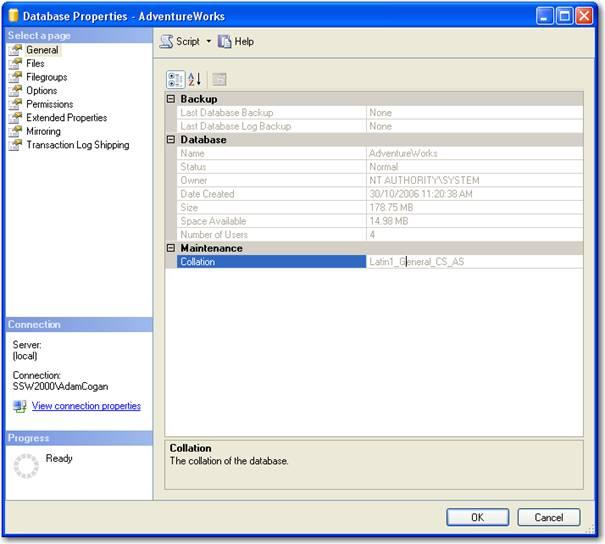
- Figure: Change Collation
-
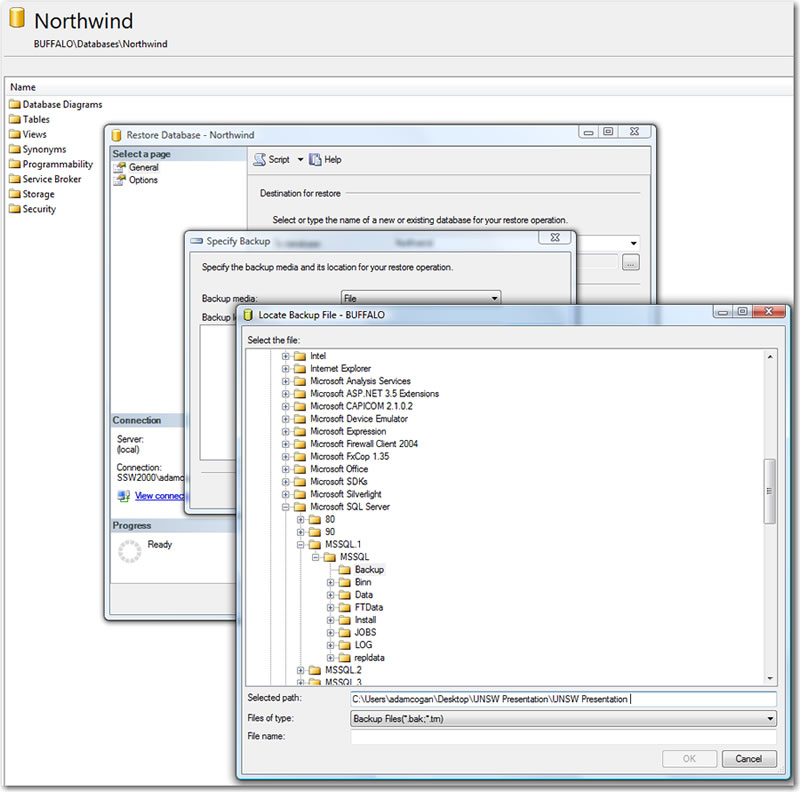
Should be able to remember the folder I had gone
Should be able to past a directory folder and it go to it (so I
can select the .bak file there).
-
-
Figure: Remember this folder and direct there when I want to
select the backup file next time.
-
Do not create a Foreign Key constraint that may cause multiple
cascade paths
An occurs when you create a FOREIGN KEY constraint that may cause
multiple cascade paths.
In SQL Server, a table cannot appear more than one time in a list
of all the cascading referential actions that are started by
either a DELETE or an UPDATE statement, which is a terrible
limitation.
-
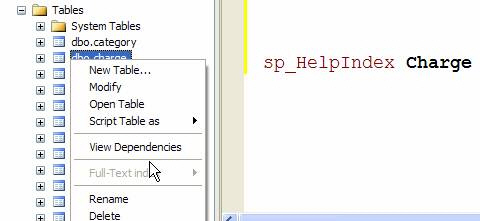
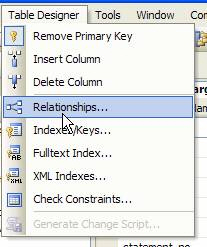
View Indexes/Keys
View Relationships
View Fulltext Indexes
View XML Indexes
View Check Contraints
-
-
Figure: Right-click menu on a table in SQL Server Management
Studio
-
-
Figure: Table Designer menu in SQL Server Management Studio
-
I want to be able to create the .sdf file using SQL Management
Studio and then xcopy the file to the device.
Currently the only way to move data is to use SQL Replication or
the object model(RDA).