Home
>
Archive
>
SSW Standards
>
Better Software Suggestions
>
SSW Suggestions for TFS Debugger Canvas
There was an error displaying the testimonials. Please
report this error
to SSW and include the following text:
- A network-related or instance-specific error occurred while
establishing a connection to SQL Server. The server was not found or
was not accessible. Verify that the instance name is correct and
that SQL Server is configured to allow remote connections.
(provider: Named Pipes Provider, error: 40 - Could not open a
connection to SQL Server)
Do you agree with them all? Are we missing some?
Let us know
what you think.
Cameron Skinner and Kael Rowan on the MSR (Microsoft Research) team
have built this cool tool:
Debugger Canvas
-
Give it a better name
I think "Debugging Helicopter" might be a better name as it
indicates that you are higher up... hovering above the code
If not "Code Bubbles" would be better, but "Canvas" sounds for
designers...
-

-
Figure: This tool kind of is like hovering over the code
-
Help me know which methods/properties/fields are used
-
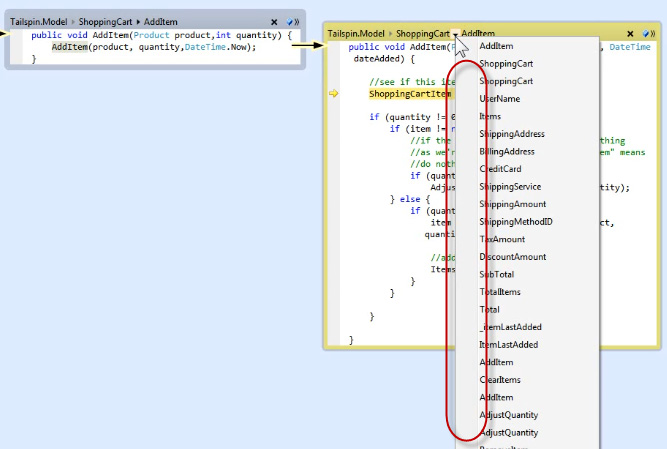
- Figure: Add icons
Seeing all the other methods/properties of a class when
debugging is not super useful.
Despite that, you may as well improve it by:
- Using the standard method/property /field icon
-
Using some extra icon + bold if that method/property is used
in the code bubble you are looking at
-
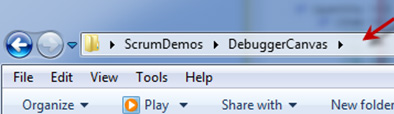
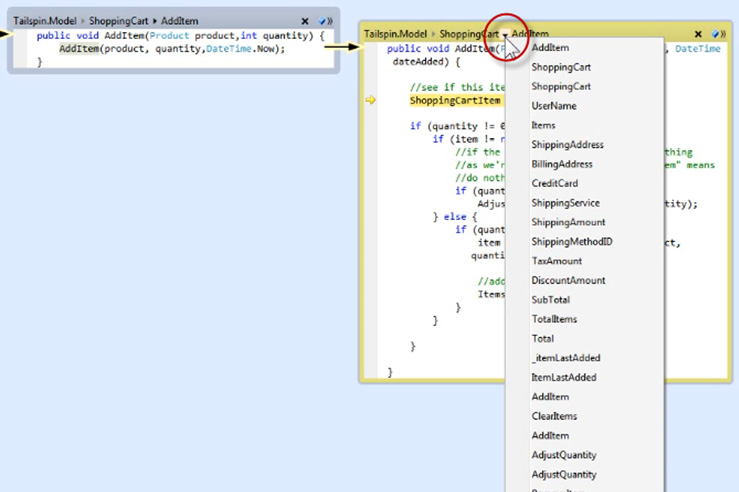
Help me know I can click in the title bar
-
-
Figure: Good example - I know I can click in here because it
is white
-
-
Figure: Bad Example - Missing a visual indication that you can
even click in the title bar
-
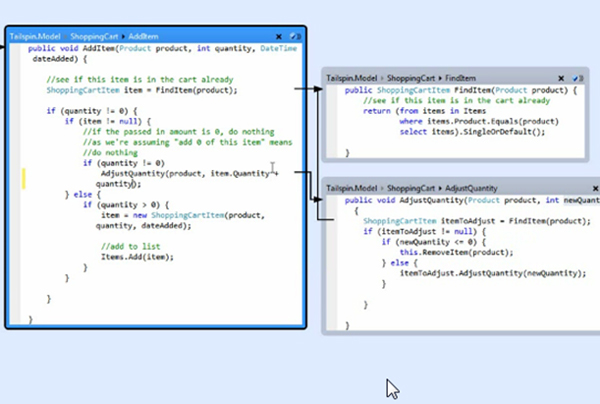
Allow me to color code each project
E.g.
- UI – red
- Business – orange
- DataAccess – Green
Then when we are dropping into each new bubble, we know what
layer we are in.
Even better automatically align them:
E.g.
- UI – top
- Business – middle
- DataAccess – bottom
This would be in the style of the architecture tools.
-
-
Figure: I would
*love*
to be able to color code the layers
Acknowledgments
Adam Cogan