-
Restart Computer prompts after Automatic Updates
When an automatic update has been installed, I am prompted to
restart my computer for the updates to take effect. In the
circumstance of choosing 'Restart Later', the automatic update
initally accepts this but within a short period of time it asks
me again. It will continue to ask me until I have chosen
'Restart Now' or when the update automatically restarts my
computer after the timer has run out. This has led to loss of
valuable information and work in the past. Automatic Updates
should run so that once I have chosen not to restart my
computer, the update should accept my first response and not
repeatedly ask me. Also, if I choose to ignore this prompt, the
update should not automatically restart my computer after the
timer has run out.
-
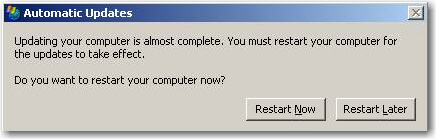
-
Figure: I should not have to choose 'Restart Later' again and
again...
-
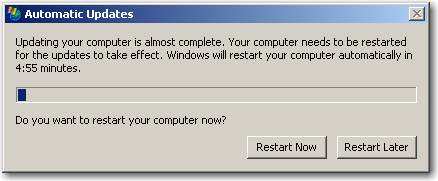
-
Figure: ...and the Automatic Update, by default, should not
restart my computer unless I choose 'Restart Now'.
-
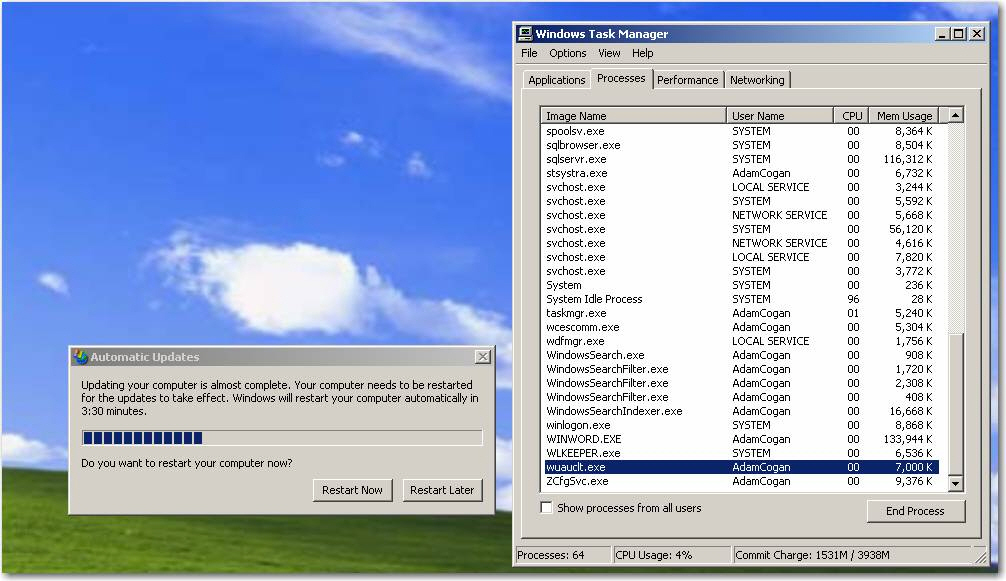
-
Figure: In the Task Manager, end the wuauclt.exe process -
this should prevent the Automatic Update from asking you any
further.
-
Add/Remove Programs Sort By Date
I frequently find it necessary to install new software. On
occasion, something will go wrong and I need to uninstall some
programs in an attempt to fix the problem.
It would be extremely useful to be able to sort the list of
installed programs by the date of installation. This way, I
would save time by having all the most recently installed
programs at the top of the list.
It would make sense to have column headings for the various
properties, then you could sort by any of them in the same way
you can sort listed items in Windows explorer.
-
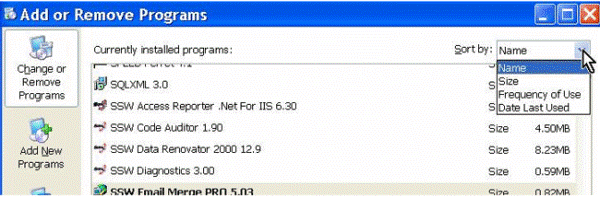
-
Figure: I should be able to sort the Add/Remove programs list
box by date of installation
-
Window Popping Up And Taking The Focus
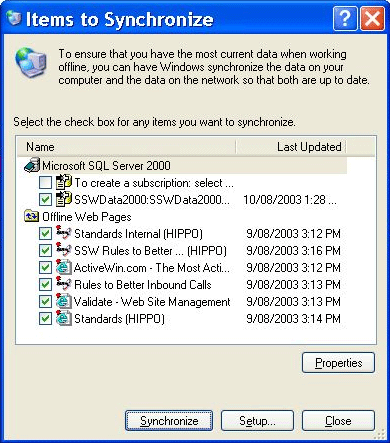
I think that a window should NEVER be allowed to take the focus
if you are typing (have typed something in the prior 2 seconds).
Eg. While I am typing an email this window pops up and takes the
focus. This is INCREDIBLY frustrating.
-
-
Figure: The Window should not pop up if I have typed anything
in the last 2 seconds
-
Allow Use of CTRL+N Keystroke in Explorer
Users of Internet Explorer may be familiar with the keystroke,
CTRL+N, which opens a new browser window. While Windows Explorer
shares many of the conveniences of Internet Explorer,
unfortunately, it still lacks this handy feature.
-
Folder Options List
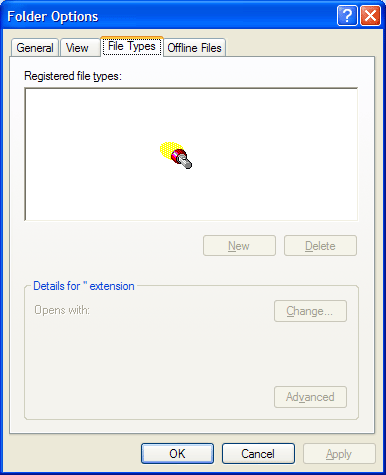
The list box on the File Types tab of the Folder Options dialog
(Start > Control Panel; Folder Options) lists all of the
current file associations on the system. (See screenshot below.)
As a result we will almost inevitably be faced with many
thousands of items in a single list box.
This is a bad idea for two reasons:
-
It is difficult for users to find what they're looking for.
-
The list takes a long time to load; the user may be forced to
wait for as long as 30 seconds before being able to interact
with the dialog box.
A better idea may be to add a filter text box. Then the list can
be filtered according to the characters entered into the text
box, and updated each time the filter text changes.
-
-
Figure: Folder Options dialog takes long time to load the file
type list
-
Date and Time Properties
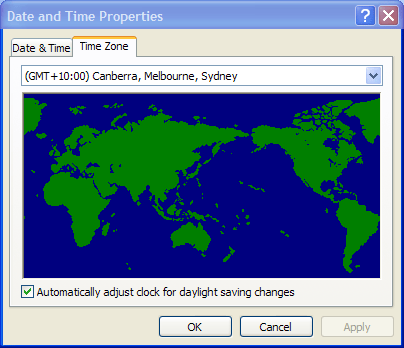
Sometimes it may be necessary to change the selected Time Zone
under Date and Time Properties, such as when moving to a
different location. (See screenshot below.)
Changing this setting is easy enough, but it would be more
helpful if Windows could also offer to automatically adjust the
system time to match the new time zone.
-
-
Figure: Date and Time Properties dialog should add an option,
" automatically adjust the system time to match the new time
zone"
-
Windows Scheduled Task Failure Notification
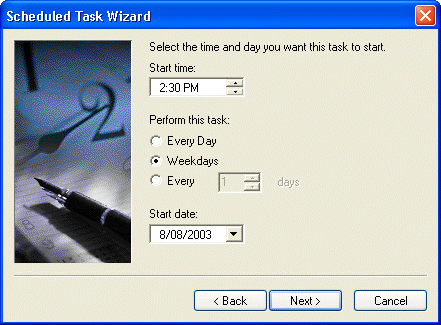
Scheduled Windows Tasks require passwords. However, like all
good users, I change my password reasonably regularly.
Consequently, my scheduled tasks fails after each time I change
my Windows password.
I don't mind updating the passwords (although automatic updating
would make a lot of sense) - however as a minimum Windows should
email me if the Scheduled Task fails (meaning I need a place to
add an email address).
-

-
Figure: My Windows Task failed because I changed my password -
and I wasn't told about it!
-
-
Figure: I should be able to enter an email address "When the
Windows Scheduled Task fails, email this address" - and then I
can solve the problem
-
Notification on VPN disconnect
-
* Fixed by Vista *
When a VPN connection drops out it does it so silently. This is
not a good way to do things. It would be better to have a
setting 'Redial on disconnect' that is set to on by default.
Also, have a balloon notification 'The VPN link 'SSW' has
failed. Click here to reconnect'. This balloon should appear
whether the default reconnect setting is on or not.
-
The Interface for the Startup on Windows XP is very poor
Does the Windows XP team realise that a good interface includes
appropriate sounds (link to Rule)? Well when you restart your PC
you stare at the screen for a minute or so waiting the boredom
cause me to start doing something else nearly
every time and the logon box comes up No noise and it waits
there until I remember what I was doing. Then this noise plays
after logging on, but way too early even prior to the desktop
icons showing. It should play at the very end, a audio
indication that you are ready to start work. Please play a
little
 .wav file
at the end of every long process...
.wav file
at the end of every long process...
The suggestionstill suits for Windows Vista.
-
Wireless Network List Needs Filter/Sort Capabilities
This is a nice looking UI, but who designs a screen these days
where you cant filter or sort? Instead, it should be a ListView
control with:
- sortable headings (like Outlook)
-
customisable fields to display (like Outlooks Field Chooser)
- filterable (eg. Only show non secured wireless networks
- Change the Strength field from a graph to a percentage
More about ListView, please see
Suggestions to better ListView
-
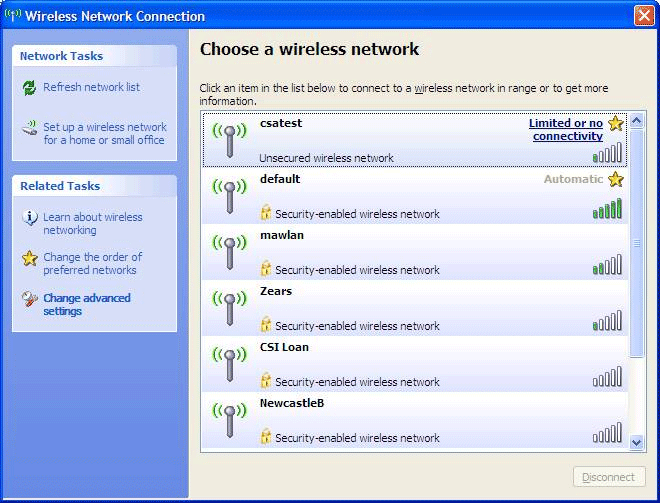
- Figure: It would be nice to sort the results
-
Hey Microsoft - Go ahead and patch pirated software - here's how
to make it work
I don't think it is a good idea to disallow updates for pirated
copies of Windows. I don't think it is a good holistic solution.
I thought this solution was interesting
Greg Hughes solution
-
In MSConfig.exe add an extra column called "URL for more
information" to the Startup tab
The System Configuration Utility (MsConfig.exe) needs improving,
we have so many startup items, but we can't confirm that all of
them are safe and how we got it. Ideally we need a button "More
Information" that would take us to a website that gives us
information to decide if we really need it.
eg. The highlighted one (jusched) would take us to a website
that tells us the basic info like manufacturer and description
of the file.
Even better if we can see how often we use it.
-
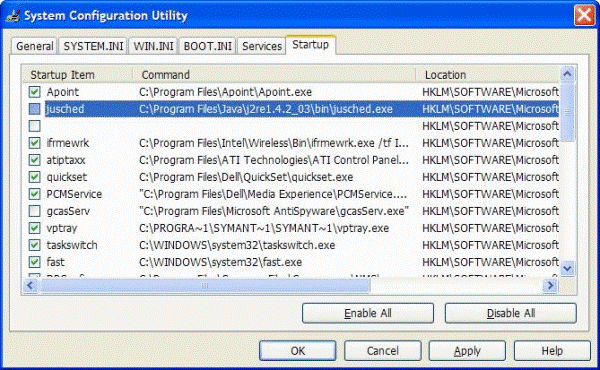
-
Figure: System Configuration Utility needs one extra column to
help you learn what it is
-
Why does the average worker not know how to do a screen capture
of the current window?
Edit - Copy Screen
On every application.
-
The Security Event log should be able to filter by Description
The Event log does have filtering which is great - but you
cannot filter by Description.
-
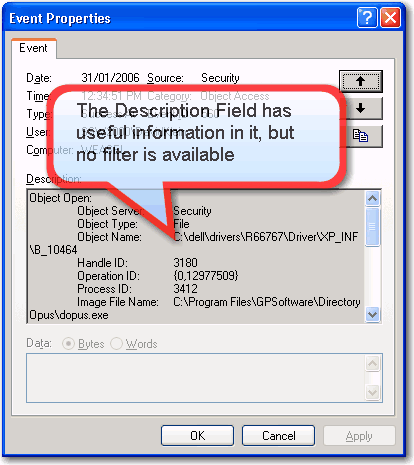
-
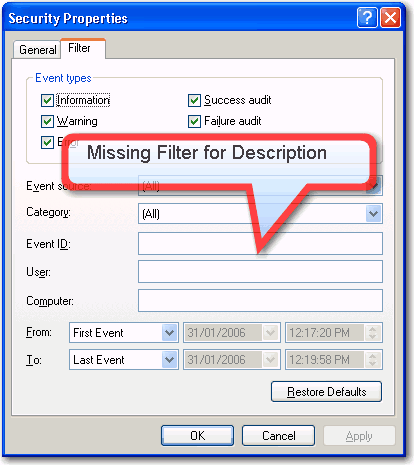
-
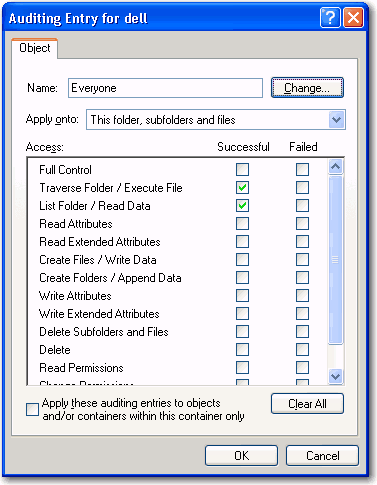
Auditing and Event Log - There needs to be a new event type in
audit settings
-
-
Figure: Need to separate "List Folder /Read Data", so if I
open a folder and then execute a file, I will only see 2
user-related events in the log - 1 open and one execute.
The Security Event log is very verbose and is hard to navigate.
The "List Folder/Read data" audit event needs to be separated
into 2 different events, and we need to see what process name
(not just the process ID at the time) that actually performed
the operation.
In particular - a traverse of a directory (e.g. a user clicked
on a folder to open it) should be easily distinguisable from a
read by another program. At present, you cannot differentiate
between you opening a folder (through explorer.exe) and another
application opening a folder or file. If you open a folder,
there could be 20 or so events recorded in the event log -
mostly "ReadData" events - and these could be by several
applications. Ideally, if I open a folder and then execute a
file, I should only see 2 user-related events in the log - 1
open and one execute.
-
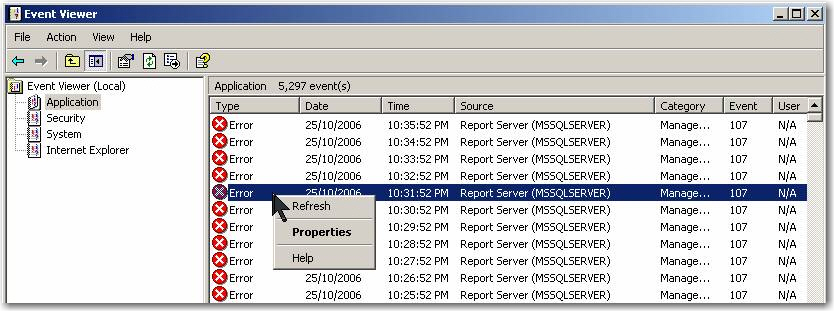
Event Viewer - Add a right-click menu "Delete all items of this
type"
With this menu it will be easy to clean up items of same type.
-
-
Figure: Windows Event Viewer needs a right-click menu item
like "Delete all items of this type"
-
Assist the process of choosing the correct columns
It would be nice to add one sample record so you can see sample
data
-
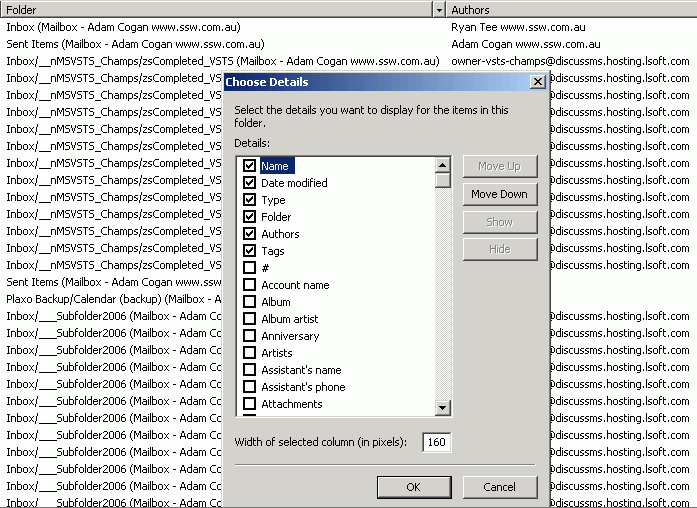
- Figure: choosing the display columns for a folder
-
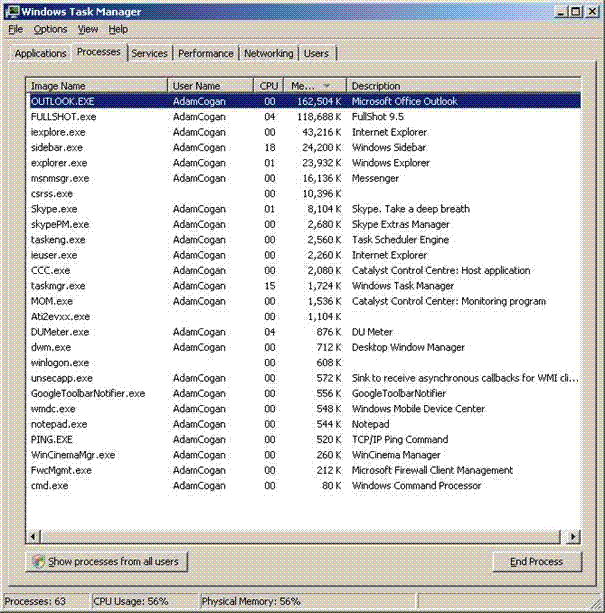
Task Manager - Show the process of threads to go away
Some applications take long time for the process to go away , so
we suggest to display some type of progress bar or hyperlink to
types of reasons.
-
-
Figure: without progress bar, it is hard to know why Outlook
takes 15 minutes to go away
-
Task Manager - Add some prompts for threads
Sometimes you are watching the task manager window for
minutes......
When one dies have it:
- Play a little sound
- Change to red
-
Move to the top for just one second with the text "(gone)"
- Then disappear
-
Power Meter - Add a balloon when it reaches 100%
Often I am recharging multiple batteries after being on the
road. Please add a checkbox '[x] Show when battery hits 100%' in
the Power Meter form.
-
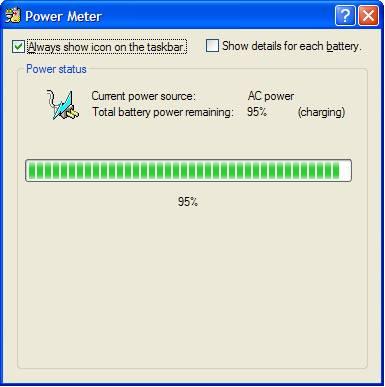
- Figure: Charging in Power Meter (from Windows XP)
-
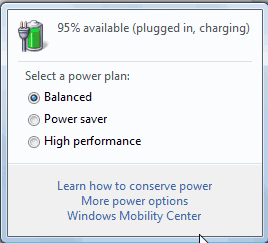
- Figure: Charging in Power Meter (from Windows Vista)
-
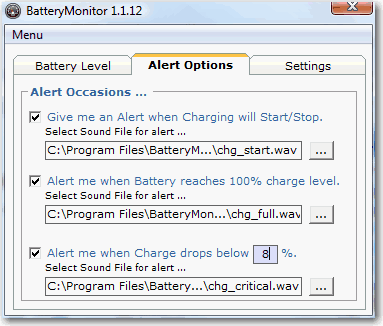
-
Figure: Currently I use a great 3rd Party tool called Battery
Monitor from exs-studios.com
-
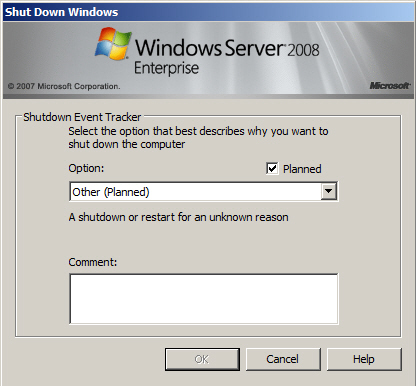
Shutdown Event Tracker - Add a link to discover the event log
When trying to shut down the windows 2003 server, it will ask
for the reason of shutdown.
-
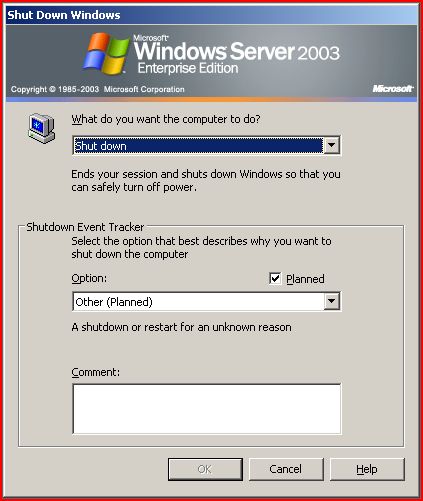
-
Figure: The shutdown event tracker in Windows Server 2003
-
-
Figure: the shutdown event tracker in Windows Server 2008
Asking server administrators for this information before shutting
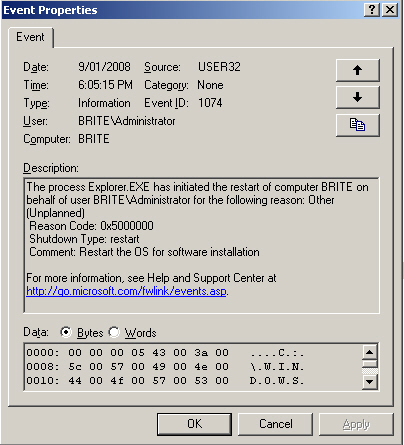
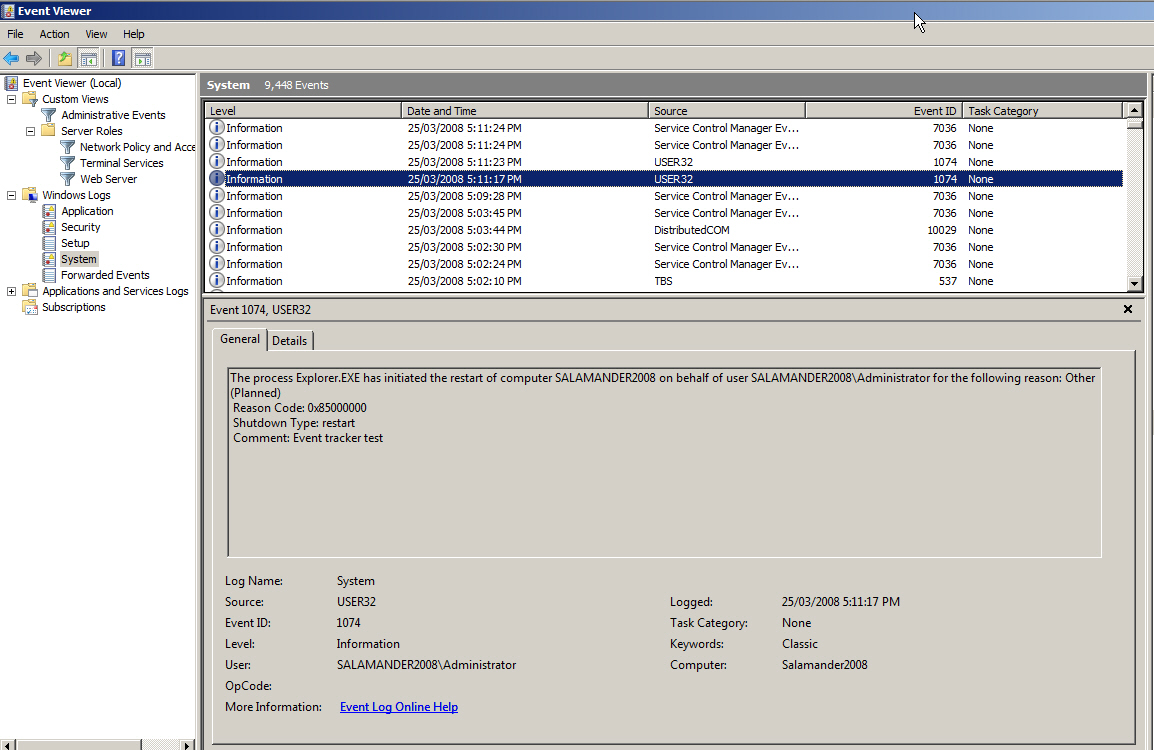
down is a pain. They need to know what they get. So add a link to
aid discoverability e.g. "See restart data".
-
-
Figure: The event log in windows server 2003
-
-
Figure: The event log in windows server 2008
-
Windows Vista? What?
-
* Fixed with Windows 7 *
Names should be chronological, just like software should be
named v1, v2, v3 etc.
I remember hearing that the Windows codename "Chicago" would
actually be called Windows 95 and thinking that was great. And
it worked well as we moved to Windows 98 ... And then it
stopped.
Note: We have the server versions sounding normal like Windows
Server 2003, ISA 2004, Exchange 2003 etc.
-
Shortcuts - Encourage more applications to use the Comment Field
Make the comment 2 or 3 lines high.
Mention that it shows to the end user via a tooltip when you
hover over it.
PS: Media Center is one of the few programs to make good use of
the Comment field.
-
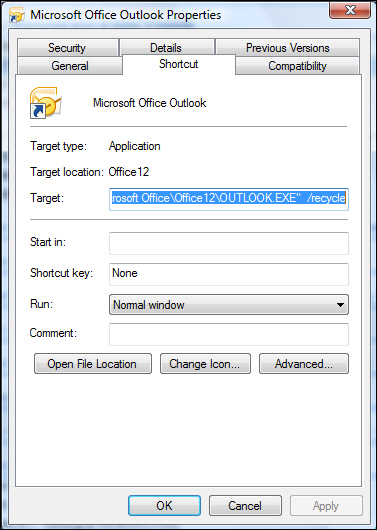
- Figure: Make the Comment field be 2 or 3 lines high
-
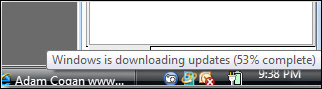
Windows Update - Give option to pause downloading when on a slow
connection
-
-
Figure: Need right click menu to "Pause for 1 hour", "Pause
for 4 hours", etc
-
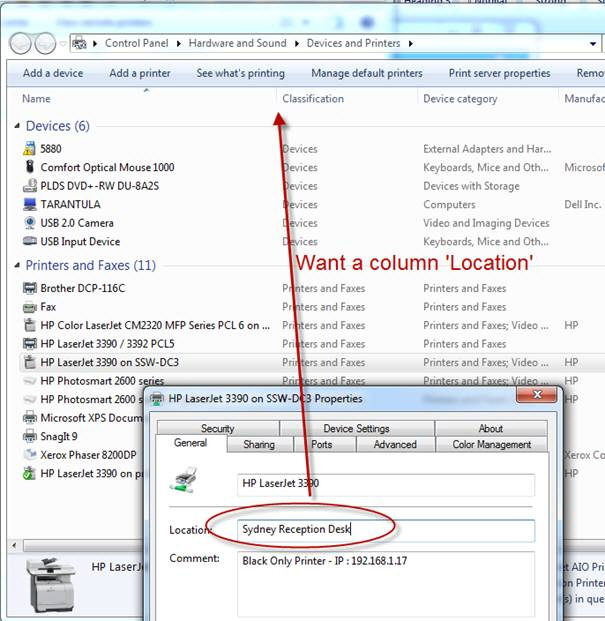
Printers need the location field to show
-
-
Figure: Windows 7 - Printers need the location field to show