-
Introduction
It is more practical and efficient to code in multi-tier. This is
because it facilitates code re-use and thus saves developer time
re-inventing the wheel. This results in more efficient and cleaner
code. However, this can add another layer of complexity in your
solution, especially in large projects.
It is not uncommon today to have a solution that comprises of more
than 5 layers, namely
-
Windows UI layer (AKA presentation layer, or Web UI Layer for
web projects)
- Business Service layer
- Data Layer
- Data Access later
- Common
- Database Layer (stored procs. etc.)
-
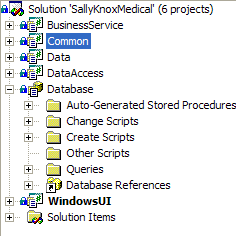
- Figure 1: Generated Projects from the Code Generator
To that, we sometimes need to add other projects, such as
utilities, configurations and our base form from our framework
(for more information on the need for a base form, please read our
Rules to Better Windows Forms Application
)
-
The Problem
Microsoft does not give us any guidance on how to name our
projects and thus leaves it to the developer. The naming style
shown in
F
igure 1
above works ok on small projects, but as soon as other layers are
added, the complexity grows and so does the developer confusion if
the projects are not consistently named.
-
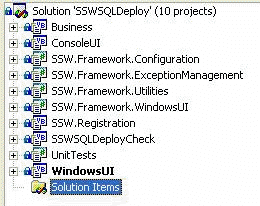
- Figure 2: Bad and inconsistent naming convention
Code reuse tells us that when we need to use the methods in the
"business" project in figure 2, we do not re-write it. Instead we
make a reference to that project and summon forth the methods
therein. The problem arises when the solution in
Figure 1
references the project "business" in
Figure 2
.
-
-
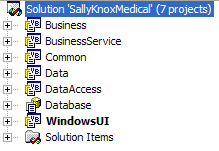
Figure 3: Solution from Figure 1 with Business project added
from solution in Figure 2
By doing so, we have no way of telling that the business project
does not really belong to this solution but rather is has been
"borrowed" from another solution: SSW SQLDeploy. Doing it this way
also increases the chance of having a name clash in the project
name . For example I could need the business service from two
other projects (E.g. from SSW SQL Deploy and SSW Extraction
Manager). On top of that, SallyKnoxMedical (the current project)
might possibly need a business project on its own.
There is a way around this dilema The correct way of doing this
relieves us of this kind of dramas.
-
The way we do it at SSW
While Microsoft has remained silent on this issue, we haven't
failed to notice the way the dlls are named. E.g. we see
System.Windows.Forms.dll
We extend that one step further to include company name: e.g
SSW.SolutionName.ProjectName for the projects and SSW.SolutionName
for the (guess guess) solution name. This helps to easily identify
projects, maintain consistency across our range of application and
enhances portability.
-
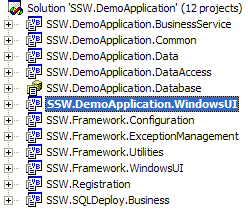
- Figure 4: Good way to name solution and projects
With this style we can readily identify the various projects that
comprises this solution and where they came from. It also frees us
of the worry that comes when a solution needs to reference two
projects from two different solutions with the same name.
It is recommended to have your company as the root element of your
namespace. This helps clarifying who the namespace belong to,
where it came from and that it is unique (or at least reasonably
unique). When creating these namespaces, reasonable thought must
be given in order to create a meaningful namespace. Keep in mind
that namespaces are case sensitive (ssw.framework and
SSW.Framework are not the same thing).
Final thought: make sure your dll has the same filename as the
project (like SSW.Framework.WindowsUI.dll). Externally, it will
help to identify your library.