Home
>
Archive
>
SSW Standards
>
Developer .Net
>
SSW Interop In .NET and How To Avoid DLL Hell
There was an error displaying the testimonials. Please
report this error
to SSW and include the following text:
- A network-related or instance-specific error occurred while
establishing a connection to SQL Server. The server was not found or
was not accessible. Verify that the instance name is correct and
that SQL Server is configured to allow remote connections.
(provider: Named Pipes Provider, error: 40 - Could not open a
connection to SQL Server)
Goal
The goal is to a Visual Basic 6.0 COM component in a .NET Project.
E.g. SSWRegistration.dll. Not only do we want to add the component to
the project successfully, but we also to avoid distribution problems
when it becomes time to release the project.
Potential Problem
Lets say you have .NET Projects that are using the COM component;
Project1.NET, Project2.NET and Project3.NET. All of the projects are
installed and are using the COM component.
During the development of Project3.NET, you decide that you need to
update the COM component (we are not making any changes to the
interface that would break compatibility. E.g. changing the number of
parameters in functions).
So we change the COM component and all of our projects are currently
using 'Project Compatibility' so Project3.NET still works but
Project1.NET and Project2.NET are no longer working. This is because a
new GUID is generated for a COM component using Project Compatibility.
Note: that if all of these projects were developed in Visual Basic 6
then all of the projects would still work.
When you add a reference to a COM component in .NET, it generates a
file called
Interop.[DLLNAME]
. So when we added a reference to the SSWRegistration.dll COM
component, .NET generated a file called Interop.SSWRegistration.dll
which, among other things, contains the GUID information for the
SSWRegistration.dll.
When the program needs the COM component, it will search the registry
for the GUID stored in the Interop.SSWRegistration.dll file, If the
GUID has changed, the search will fail and subsequently will generate
an error stating that the COM component could not be found. If the
search succeeded then the code will be executed.
The Solution
So we need to be able to control the Interface ID. We don't want this
to change because if it does - we will need to generate a new interop
each time we create a new version of any of the projects.
To solve this problem we will need to use the strictist form of
compatibility;
Binary Compatibility
. The definition of Binary Compatibility is:
"the Binary Compatibility option allows you to automatically retain
class and interface identifiers from a previous version of a
component when you compile a new version. The new version contains
both the old identifiers and the new identifiers, and client
applications can continue using the old interface to your component
without having to be updated."
So by using Binary Compatibility, Project1.NET and Project2.NET will
continue to work after Project3.NET is installed.
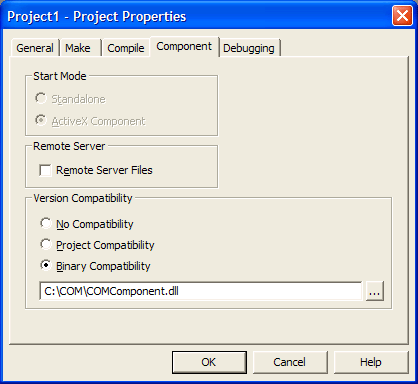
To set the COM component to use Binary Compatibility we have to:
- Open the COM component project.
- Go to Project | Properties.
- Go to the Component tab.
-
Change the Version compatibility to Binary compatibility and specify
the location of the DLL.
The Other Potential Problem
With different versions of a file coming to bear, the other problem we
are likely to face is the order of the installations. If Project3.NET
is using a later version of the COM component and it is installed
first, then you install Project2.NET which overwrites Project3.NET's
COM component then Project3.NET will cease to function properly. The
reason for this is Project3.NET's interop is pointing to a GUID that
doesn't exist in Project2.NET's COM component.
The Final Solution
The solution to this problem is to only update the COM component if
the version is later than the current version. If we need to make
changes to the interface then we should rename the DLL so that it does
not conflict with the old DLL.
E.g.
SSWRegistration_Ver1.dll
SSWRegistration_Ver2.dll
Installing and Uninstalling
The final issue we have to address is distribution. When we install
our 3 projects, what happens if we uninstall one of them? If the COM
component is only in one place and is suddenly removed by the
uninstaller, then the other projects will no longer work properly.
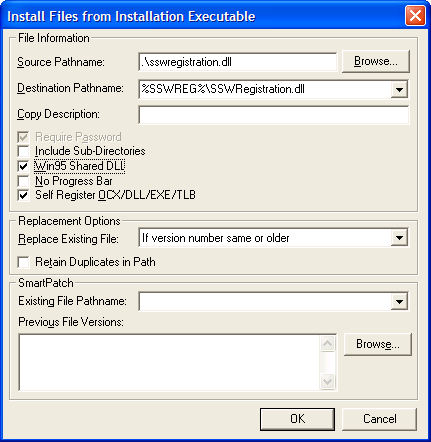
To fix this problem we will need to make the COM component a
Shared DLL
. A shared DLL is a dll marked by the operating system as being used
by a number of applications and only when all of the applications are
removed will the DLL be unregistered and deleted. Product such as Wise
offer this functionality by marking it as a "Win95 Shared DLL".
The alternative to this is to check via script that the SharedDLL
registry entry is present. This can be found at
H_KEY_LOCAL_MACHINE\SOFTWARE\Microsoft\Windows\CurrentVersion\SharedDLLs.
If it isn't there then add it and give it a value of 1, otherwise
increment the count by 1 if it is there to indicate that another
application is using the DLL. When the product is uninstalled it will
check the count and if it is greater than 1 then it will decrement the
count. If the count is 1 then it will uninstall the COM component.
Conclusion
So contrary to what most believe, DLL Hell still exists in .NET and is
in some ways harder to handle then in VB6 days. Hopefully we have made
you aware of a definite problem with Interop in .NET and how best to
handle it.
Acknowledgements
Adam Cogan
John Prince