Home
>
Archive
>
SSW Standards
>
Developer .Net
>
SSW Application Design Architecture Supporting Web Services
This document outlines the design architecture of SSW's software
development projects. We use a multi-tiered approach which can support
the use of web services if need be - allowing our applications to have
complete support for access from locations outside of our network.
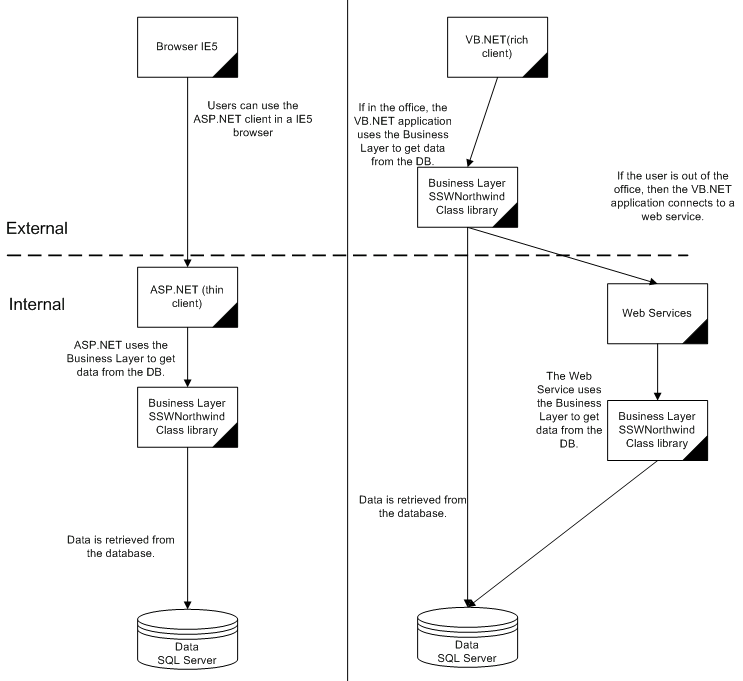
Figure: Diagram of SSW Application Design - Adam's Version
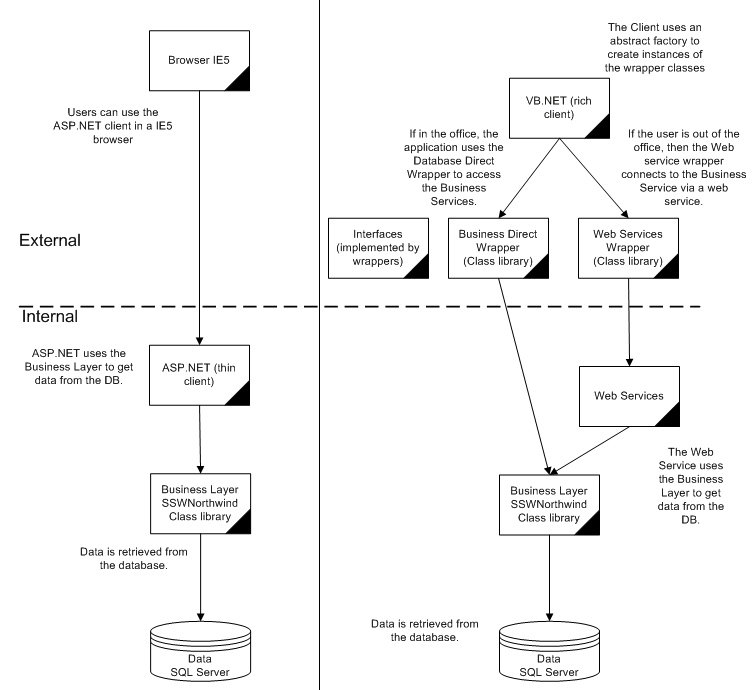
Figure: Diagram of SSW Application Design - Ross' Version
Frontend Windows
The front-end contains only the GUI and basic interface related code.
A couple of examples of what the front-end filename could be are:
- SSWTimePRO.exe (recommended)
- Northwind.exe
Our front-ends are always written in Microsoft Visual Basic.NET. Our
reasoning for this is that:
-
It is a friendlier language for less experienced developers (i.e.
interface designers, etc) to be working with.
- It has declarative events (via the Handles statement)
-
We prefer our developers to have active experience with both C# and
VB.NET - thus, we implement both in our projects (our business layer
is written in C#, as described below)
The following concepts and rules are used in our development of this
tier:
How This Layer Communicates
-
This layer talks to the Middle Tier (or Business Objects) as in
logic and partitioning, obviously not physically as all assemblies
live on the same PC - the functionality is exposed via a reference
to Business.dll.
Example of a standard data entry form
|
Form Name
|
Purpose
|
frmCustomer
(Inherits from frmBase - has standard style definitions and
functionality such as action buttons, etc)
|
Data Entry form
|
|
frmCustomerSearch
|
Form that lists records that match a user's search criteria
|
|
frmCustomerList
|
Lists all records of a particular type
|
One to Many display strategy
-
Always show the many as subforms i.e. as pages on the tab control in
VB.NET (ie. frmCustomerOrderSub, frmCustomerContactSub)
-
Populated with data only as needed, but since a rich client can have
state, do not lose the data until move to a new customer record
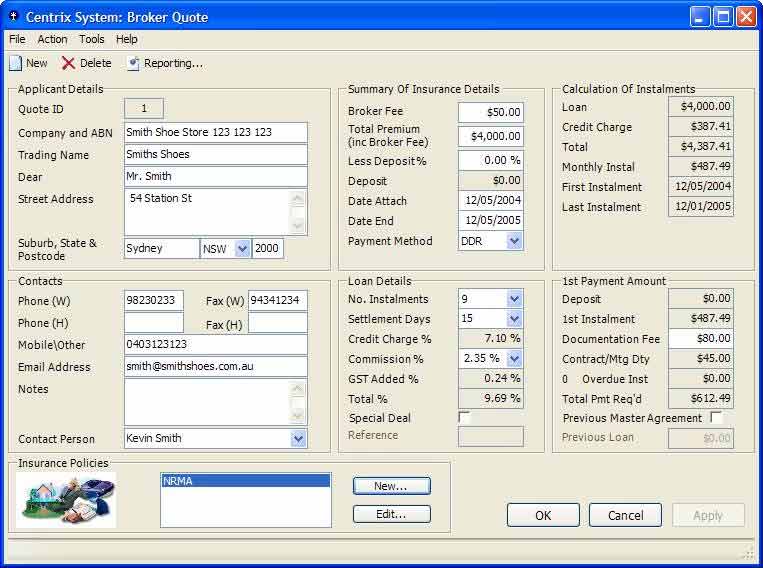
Figure: Related data displayed in a sub-form
Frontend - Web
This area is also written in Microsoft Visual Basic.NET (our reasons
for doing this are described in the
above section
)
Frontend - ASP.NET
|
Form Name
|
Purpose
|
|
Customer.aspx
|
Data Entry form
|
|
CustomerList.aspx
|
Lists all records of a particular type
|
One to Many display strategy
-
Always show the many as subforms ie. as pages on the tab control in
ASP.NET (ie. frmCustomerOrderSub, frmCustomerContactSub)
-
Populated with data only as needed, but since a web client shouldn't
have state, do not attempt to keep the data ie. show one subform at
a time
Business Objects
Examples of Names:
- Business (recommended)
- NorthwindClassLibrary
- MiddleTier
Coding
The Middle Tier (or Business Objects) is essentially ADO.NET code
written in C# talking to stored procedures - no direct actions
(INSERT, UPDATE, DELETE) in inline SQL
- Customer.Select(strWhere, strCnn)
-
Use a DataSet as it is a static snapshot of data, suitable for
transport across a web service (DataReaders aren't)
- Customer.Insert(..., strCnn) - Use sqlCommand DC
-
Customer.Update(..., strCustomerID, intConcurrency, strCnn) - Use
sqlCommand DC
-
Customer.Delete(strCustomerID, intConcurrency, strCnn) - Use
sqlCommand DC
Backend
The backend is our data store - it's typically running on SQL Server
or MSDE.
Examples of Names:
- SSWTimePRO2000 (recommended)
- Northwind
Coding
Stored procs are better but they are more expensive for the
customer. Therefore this is the suggested compromise. Stored procs
for action for data integrity. SQL OK for SELECT
Web Connectivity/Web Services
The web services layer provides access to our business service via
SOAP (an XML-based object access protocol that runs over HTTP).
Examples of Names:
- WebServices (recommended)
- NorthwindWebService
This is then implemented by creating a virtual directory in IIS that
points to a collection of ASP.NET web service files, which in turn
serves as a pointer to the Business Objects class.
Coding
In order to provide this access, we need to make our Middle Tier web
enabled. This is done by adding [WebMethod] attributes to all
functions.
Security is a consideration that should be taken seriously - after
all, having this layer present will provide a publicly accessible
gateway to all data in your backend!