Home
>
Archive
>
SSW Standards
>
Developer General
>
SSW The Best 3rd Party Exchange Server Tools
Do you agree with them all? Are we missing some?
Let us know
what you think.
would you like your software to be considered for this list?
Give us your details
.
-
Exchange 2003 Intelligent Message Filter
Microsoft Exchange Intelligent Message Filter provides server-side
message filtering, heuristics-based message analysis, and support
for per-message spam confidence level ratings.
Intelligent Message Filter is based on Microsoft SmartScreen
Technology from Microsoft Research, which means the add-on is able
to distinguish between legitimate email messages and unsolicited
commercial email. By using email characteristics tracked by
SmartScreen technology, Intelligent Message Filter can help
determine whether each incoming email message is likely to be spam.
Based on this likelihood, you can choose to block email messages at
the gateway or at the mailbox store.
Microsoft Exchange Intelligent Message Filter requires Exchange
Server 2003.
Exchange 2003 Intelligent Message Filter Web Site

-
SSW Exchange Reporter
If you are using Microsoft Exchange Server in your organization,
SSW Exchange Reports
provides the tools you need to efficiently analyze your
organization's email usage. The SSW Exchange Extraction Service
captures all of your Exchange data into SQL Server. The service will
run as a windows service on your Exchange Server to seamlessly
extract your email messages and mail folder statistics, from here
the custom set of Reporting Services reports on any number of
different usages of Exchange within your organization.
Reports can be viewed by any user with a web browser. Reports can
also be configured to automatically 'push' themselves to users'
mailboxes according to a schedule, ensuring that all the necessary
people in your organization are kept up to date with the latest
statistics.
-
GFI MailEssentials
The GFI MailEssentials uses Bayesian filtering technology to detect
spam based on message content. Rather than just checking for
keywords, GFI's Bayesian filter takes the whole message into
consideration as well as the content of valid emails that you send
(known as "ham"). This gives it a huge advantage over other
anti-spam solution that only take spam into account.
GFI is a multifunctional software. Rather than filtering incoming
email only, GFI ME can be far more anti-spam intensive and includes:
mail reporting, disclaimers, inbound/outbound email archiving to
database, auto replies, etc.
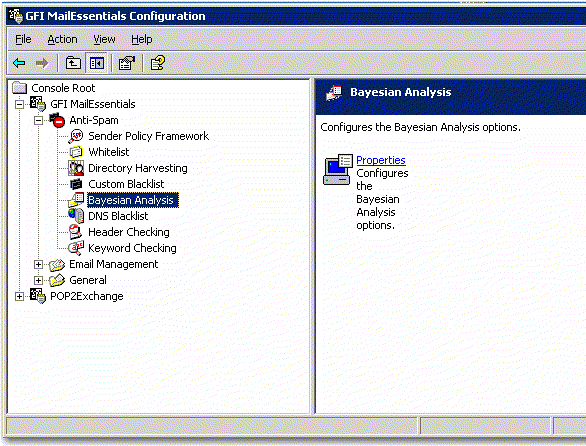
Figure:GFI MailEssentials
GFI MailEssentials clients no longer need to use spambayes (a popular
client side application that uses Bayesian Analysis). GFI integrates
seamlessly with Microsoft Exchange 2000/2003: It installs on the
Exchange SMTP service and does not require gateway configuration. Via
the SMTP protocol, it also works with Exchange 5.5, Lotus Notes and
other popular SMTP/POP3 servers.
Some key features of GFI's AntiSpam Folders:
-
Add to blacklist: GFI MailEssentials checks if the mail sender is
on a third party DNS blacklist (ORDB, SpamHaus, etc). You can also
configure your own blacklist of domains and email addresses.
-
Add to whitelist: Whitelist drastically reduces false positives (a
problem inherent in anti-spam software). GFI automatically creates
a whitelist for you on the basis of emails your company has sent.
-
I want this Discussion list: Often discussion lists are sent out
without including the recipient email address in the MIME TO and
are therefore marked as spam. If you want to receive these
discussion lists, you need to white list the email addresses of
these valid list mailers.
-
This is a legitimate email: GFI intelligently analyzes the email
header and identifies spam based on message field information. It
detects forged headers, encoded IP's spam mutation, spam sent from
invalid domains determining originality of emails.
-
This is a spam email: GFI gives you the flexibility to choose what
to do with spam. You can delete it, move it to a folder, forward
the spam mail to a public email address or folder, or send it to
individual customizable folders (for example, a junk mail folder)
in the end-users inboxes.
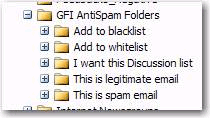
Figure:GFI's AntiSpam Folders
GFI MailEssentials
-
QSS Exchange Connector
Exchange Connector allows you to integrate your existing POP3
mailboxes with Microsoft Exchange Server by periodically accessing
user-determined POP3 mailboxes and delivering the messages to the
appropriate Exchange Server accounts.
With Exchange Connector you can
-
Access legacy email accounts without leaving the Exchange
environment
-
Divert your mail through third-party servers (eg. GMail) for
filtering
- Access multiple POP accounts
-
Choose whether mail is delivered to a predetermined account or
accounts auto-detected from "To:" fields
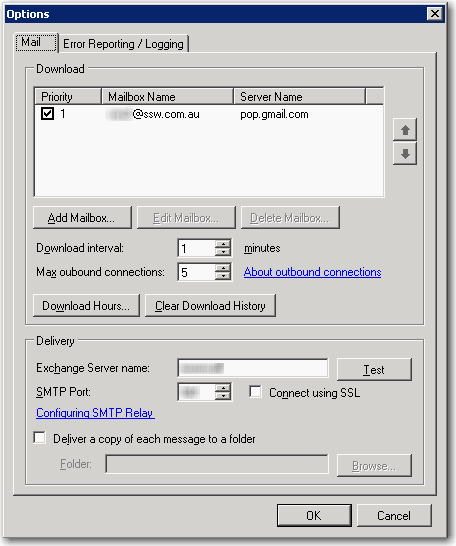
Figure:QSS Exchange Connector configuration options.
Exchange Connector Website
Acknowledgements
Adam Cogan