Home
>
Archive
>
SSW Standards
>
Rules
>
Rules to Better Microsoft CRM 3 to 4 Migration
There was an error displaying the testimonials. Please
report this error
to SSW and include the following text:
- A network-related or instance-specific error occurred while
establishing a connection to SQL Server. The server was not found or
was not accessible. Verify that the instance name is correct and
that SQL Server is configured to allow remote connections.
(provider: Named Pipes Provider, error: 40 - Could not open a
connection to SQL Server)
Do you agree with them all? Are we missing some?
Let us know
what you think.
-
It is recommended that you should run at least 2 or more
sucessful test migrations before running a live migration. The
following steps describe the process of setting up a test
environment for migration:
-
Back up your CRM 3 existing evironment including
customizations, custom codes, sitemap...
-
Configure a new environment with SQL Server and all necessary
components (Do not install CRM yet!)
-
Restore database that you have backup from existing evironment
to the new environment
- Redeploy CRM to the new environment
- Test to see if the new environment works as expected
- Upgrade the new environment to CRM 4
- Test the new environment after upgrading
-
Before running the migration process, you should backup
everything on your existing CRM 3 server including operation
system, databases, callouts...If the upgrading process is
failed, you have to re-install CRM 3 from scratch. So it's very
important that you backup everything and give an early warning
to youself.
-
When run Microsoft CRM 4 installation file, you can check for
setup updates.
-
If CRM server has Internet connection, you can click
Update installation files
during upgrading. Updates then will be automatically
downloaded and applied to your installation files.
-
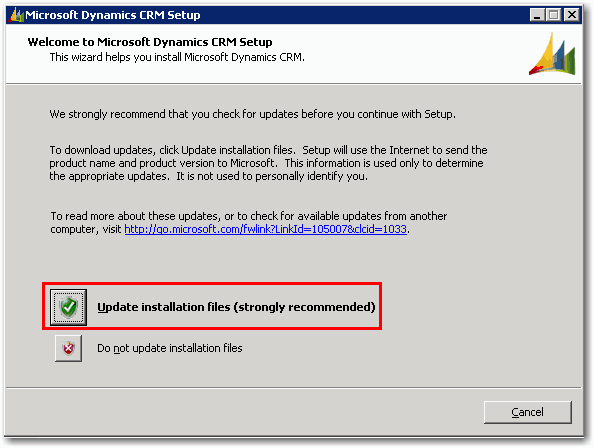
- Figure: Update CRM installation files
-
If CRM Server does not have Internet connection, you can
download setup updates from Microsoft website and manually
deploy them. The instruction on how to manually deploy setup
updates can be found in
CRM Implementation Guide
.
-
As per rule
Installation - Do you log each screen which is different to
the default?
, it's important that you log each screen so that you can have a
historical log of the upgrading.
-
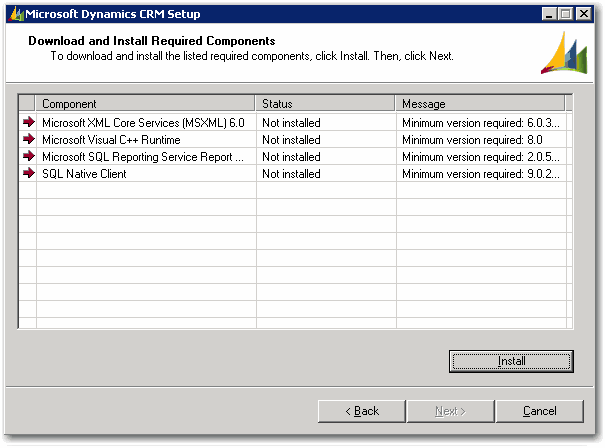
- Figure: Log Screen For Required Components
-
It's important that you review Microsoft KB Article
949256
for CRM 4.0 hotfix information, download the hotfixes and apply
them to your server.
Links
Microsoft Dynamic CRM Team Blog on Upgrading to CRM 4
Acknowledgements
Zune Vien
Adam Cogan