Home
>
Archive
>
SSW Standards
>
Rules
>
SSW Rules to Better ISA Server
MS ISA Server (Internet Security and Acceleration Server) provides
safe and fast Internet access for our office. It integrates a
multi-stage firewall and scalable web cache which limits our bandwidth
usage.
However, to run MS ISA Server in a most efficient way, we have
developed a few rules for a better ISA usage.
Do you agree with them all? Are we missing some?
Let us know
what you think.
-
Do you use triggers for automatically announcements of server
events?
We have triggers on two different database tables, FirewallLog and
WebProxyLog, which log all files downloaded from the web and
uploaded to the web. These triggers created by MS SQL Server
Enterprise Manager announce automatically all file transfers bigger
than 50 MBs. Thus the network administrator can rest assured that
the monthly bandwidth is not going to differ hudgley during the
month as no monster downloads are performed without an
acknowledgement. Note that this will not get all large
downloads. If a client uses a file splitter program like many
download managers and peer to peer programs then there will be a
couple smaller size downloads and this trigger will not be called.
-
Can I block those annoying Internet banners and save bandwidth?
There are two ways of blocking annoying banners with your ISA 2000
Server. Have a look into our
Knowledge Base
.
There currently is no script file for ISA 2004. Once we make one or
receive one then we will put it up for public download.
-
Do you log to SQL server?
By default ISA 2000 server logs to text files. ISA 2004 is better
and stores the data in a MSDE database. The only problem with this
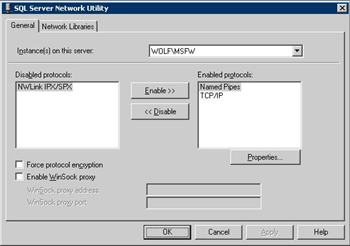
is that you cannot connect to this MSDE database by default. You
have to enable TCP/IP and Named Pipes though the SQL Server Network
Utility.
Also it only stored the last months data. After this time summary
files are made to summarize the month.
Generally you want to keep data for a couple months and show the
trend over time.
The solution is to log to your own SQL server and manage the data
however you choose.
Warning:
This log can get extremely big very fast. Our database is about
17gig and we only keep 6 months of data.
A good idea is to have a job that runs weekly that will delete any
OLD data to spare some space.
Also ISA performance is degraded when using ODBC logging (as opposed
to text logging). This is true whether the SQL server is on the same
machine or over the network. They both use per-entry logging to SQL
and will both stop serving requests if the logging destination
fails. This is not limited to SQL logging; if text or database
logging fails, then ISA will stop serving requests. If the logging
destination is unresponsive during startup, the services will not
start.
This is by design, since firewall logs are often used as evidence.
-
Do you use custom reports?
Now that we have got the data in SQL and at our disposal we can
make some meaningful reports
We can use reporting services to query the data directly and spit
out some reports. Exception reports can be made. Things like which
employees are Checking external mail (Hotmail, Yahoo, GMail)
within work hours.
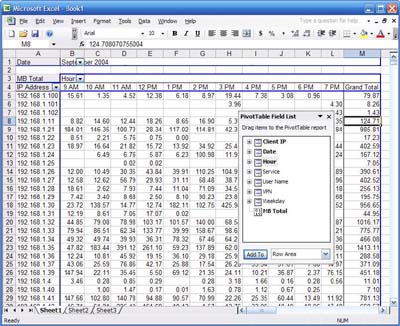
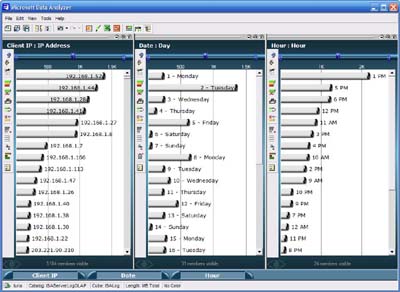
OLAP is also another great way to report on this mammoth amount of
data. Once a cube has been made and processed, management can
quickly and easily query this data though Data Analyzer or Excel.
Reports such as bandwidth by employee by time by date can easily
be achieved. Because the SQL database has been interrogated
earlier that day these reports with would take a long time to
produce can come up instantly.
-
Do you require everyone to authenticate with your Internet
connection?
We have these nice OLAP cubes from SQL for our Internet usage.
However they are not very meaningful as we only know the clients
IP and not who. You could always ping the IP address to find the
computer then find out who owns that computer but that is a lot of
work.
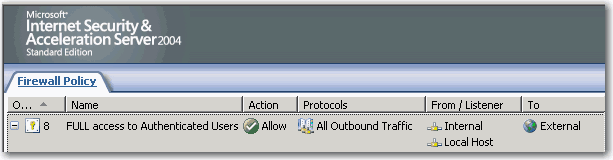
The solution is to enforce authentication to the proxy. This will
slow users a little as every time they want to access some
external content there computer has to authenticate every packet.
When a customer/supplier turns up and wants a wireless Internet
connection at your office, what do you say?
The answer should be
"No we don't allow wireless access to people not on our domain for
security reasons. Instead there is a hub in the boardroom. Under
it there is a sticker with manually IP addresses you can use."
This will be a special IP address which will bypass the
authentication rule
Acknowledgements
Daniel Hyles
Adam Cogan