Home
>
Archive
>
SSW Standards
>
Rules
>
Rules to Better Microsoft CRM data synchronization
Once you have migrated your data from your "old" CRM
application/database/system, you are ready to use Microsoft CRM.
But what about updating external databases with your updates in CRM?
There are powerful possibilities to update external data sinks from
within CRM.
As you may suspect, you can use the whole power of the .net framework.
This is done by CRM Plugins.
-
Do you use you Microsoft CRM as primary database?
Since your other data sink (database or external system) is
updated from CRM, it's a good practice to use Microsoft CRM as
your primary source for all your data, and synchronize your data
from CRM to third party data sinks.
Don't allow editing of your external databases, so you don't
have to update your CRM data from outside.
Try to use Microsoft CRM as primary database, and use 1-way
synchronization.
-
Do you use CRM Plug-ins for data synchronization?
A plug-in is most useful for the following:
- Record auditing
- Business process automation
- Data integration with third party software
CRM 3.0 exposed Callouts for interacting with CRM and developing
custom code to attach to events at the CRM platform layer,
however with CRM 4.0 this architecture has been completely
redesigned.
Now we can create Plug-ins that make use of Synchronous and
Asynchronous operations and improvements in development time,
deployment, administration and reliability.
You should also use CRM Plug-ins for data synchronization
instead of a Workflow because:
-
Workflows are asynchronous, while plug-ins can be either
synchronous or asynchronous and we want to synchronize the
data immediately so we need to use plug-ins
-
Workflows also cannot be cancelled. This is probably necessary
due to the following:
-
You might have business logic that depends from your
external data sink, and you want to cancel an operation
-
Your destination datasink might want to accept user
entries
-
Your external datasink might have other required fields
than the CRM database
-
Do you test your Plugin before deploying it to a Live-Server?
According to the Rule
Do you have separate development, testing and production
environment?
it's important to have different environments for development,
testing and production.
Always test your plugin on your test server before you deploy it
to your production server. Since you should have a development
environment, you should also have a test environment, where your
testers (Administration Office) can test your plugin.
-
Do you use zsValidate to validate your data?
Do you validate the data between CRM and your external datasink?
Try to add validation logic, for example in a stored procedure.
We use zsValidate page for this.
See
Rule - Do you have a zsValidate page to make sure your website
is healthy?
for information, on how we do that at SSW.
-
Do you document your mapping of data between CRM and your other
databases?
In order to easy maintain your data synchronization process, you
should document the mapping between the different datasources.
Make sure your mapping table contains at least following fields:
- CRM Entity Name
- CRM Attribute Name
- External Datasource Table
- External Datasource Fieldname
-
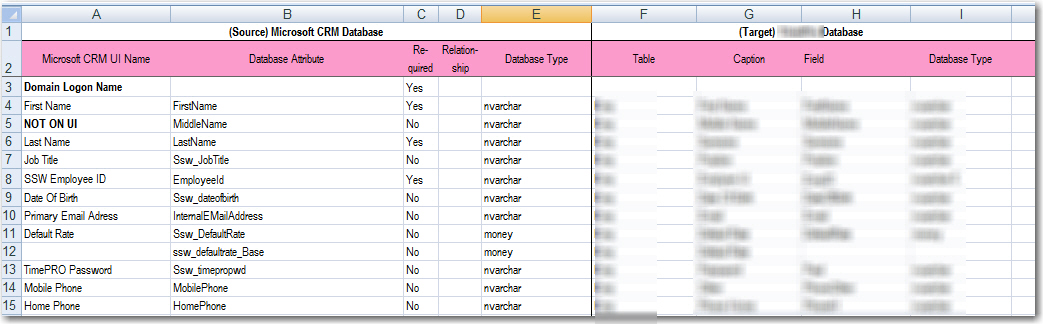
- Figure: Example Mapping documentation file in Excel
-
Do you use Web services (WCF) to synchronize data from CRM?
Webservices (WCF Services) provide a well-used and well-defined
standardized methodology to communicate over different networks.
Acknowledgements
Zune Vien
Peter Gfader
Adam Cogan
Useful resources
The Microsoft Dynamics CRM Wiki
http://channel9.msdn.com/Wiki/DynamicsCRM/HomePage/