Resource Groups- Do you apply Tags to your Azure Resource Groups?
Loading last updated info...
To help maintain order and control in your Azure environment, applying tags to resources and resources groups is the way to go.
Azure has the Tag feature, which allows you to apply different Tag Names and values to Resources and Resource Groups:
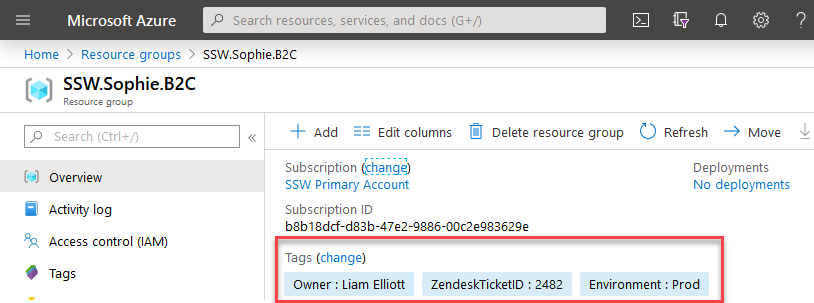
Figure: Little example of Tags in Resource Groups
You can leverage this feature to organize your resources in a logical way, not relying in the names only. E.g.
- Owner tag: You can specify who owns that resource
- Environment tag: You can specify which environment that resource is in
Tip: Do not forget to have a strong naming convention document stating how those tags and resources should be named. You can use this Microsoft guide as a starter point: Recommended naming and tagging conventions.
Tags only help when every resource group has them
Agree on a short list and use the same names in every project:
| Tag | Example | What it answers |
|---|---|---|
Project | Northwind | What is this for? |
Environment | Production | Can it be shut down out of hours? |
Owner | Bob Northwind | Who do I ask about it? |
FinOpsOwner | Bob Northwind | Who watches the cost? |
cost-category | Core | Core, Value adding or Dev/Test? |
resource rg 'Microsoft.Resources/resourceGroups@2025-04-01' = {name: 'Northwind.Production'location: 'australiaeast'}
❌ Figure: Bad example - A resource group with no tags
resource rg 'Microsoft.Resources/resourceGroups@2025-04-01' = {name: 'Northwind.Production'location: 'australiaeast'tags: {Project: 'Northwind'Environment: 'Production'Owner: 'Bob Northwind'FinOpsOwner: 'Bob Northwind''cost-category': 'Core'}}
✅ Figure: Good example - The same resource group with all five tags
- Resources do not inherit tags - A tag on the resource group is not copied to the resources inside it. Use the built-in policy "Inherit a tag from the resource group if missing", or turn on tag inheritance in Cost Management
- Make the tags compulsory - The built-in Azure Policy "Require a tag on resource groups" blocks a resource group that is missing one