The Azure cloud platform is more than 200 products and cloud services designed to help you bring new solutions to life—to solve today's challenges and create the future. Build, run, and manage applications across multiple clouds, on-premises, and at the edge, with the tools and frameworks of your choice.
Need help with Microsoft Azure? Check SSW's Azure consulting page.
Getting application architecture right is super hard and often choosing the wrong architecture at the start of a project causes immense pain further down the line when the limitations start to become apparent.
Azure has 100s of offerings and it can be hard to know what the right services are to choose for any given application.
However, there are a few questions that Azure MVP Barry Luijbregts has come up with to help narrow down the right services for each business case.
Azure is a beast of a product with hundreds of services. When you start learning Azure, it can be overwhelming to think about all the different parts and how they fit together. So, it is crucial to know the right tools to make the process as pain free as possible.
Whether you're an expert or just getting started, working towards gaining a new certification is a worthwhile investment.
Microsoft and GitHub certifications verify your skills and knowledge in a variety of technologies, instilling trust with clients and employers.
To help you out, here is a list of the top 9 Azure services you should be using:
The goal of a modern complex software project is to build software with the best software architecture and great cloud architecture. Software developers should be focusing on good code and good software architecture. Azure and AWS are big beasts and it should be a specialist responsibility.
In a Specification Review you should include an architecture diagram so the client has a visual idea of the plan. There are lot of tools to help build out an architecture diagram, but the best one is Azure Architecture Center
It is a one stop shop for all things Azure Architecture. It’s got a library of reference implementations to get you started. Lots of information on best practices from the big decisions you need to make down to the little details that can make a huge difference to how your application behaves.
The Well-Architected Framework is a set of best practices which form a repeatable process for designing solution architecture, to help identify potential issues and optimize workloads.
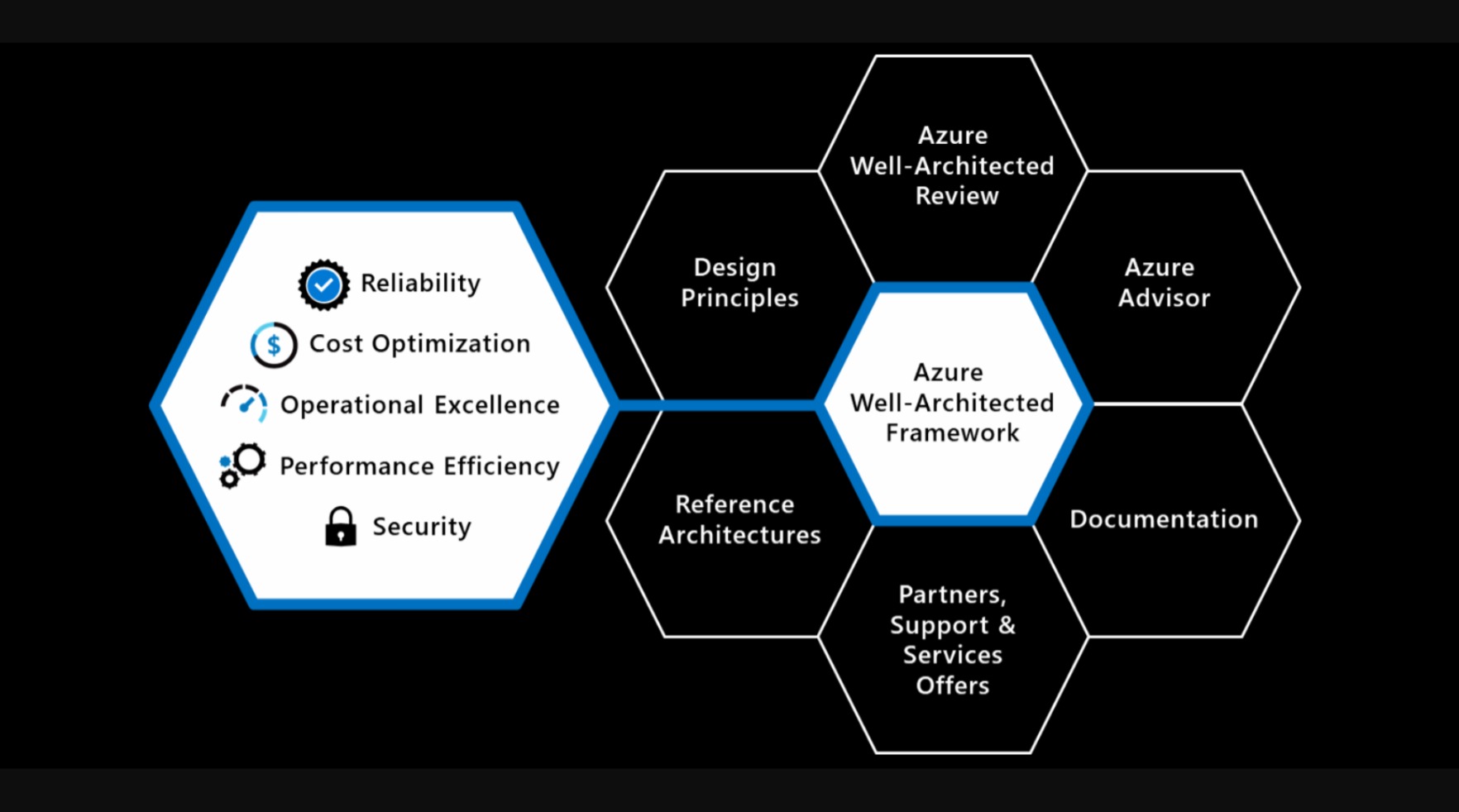
Figure: The Well-Architected Framework includes the five pillars of architectural excellence. Surrounding the Well-Architected Framework are six supporting elements
Looking at a long list of Azure resources is not the best way to be introduced to a new project. It is much better to visualize your resources.
You need an architecture diagram, but this is often high level, just outlining the most critical components from the 50,000ft view, often abstracted into logical functions or groups. So, once you have your architecture diagram, the next step is to create your Azure resources diagram.
Building cloud-native applications can be challenging due to their complexity and the need for scalability, resilience, and manageability.
There are lots of ways to build cloud-native applications and the overwhelming number of choices can make it difficult to know where to start.
If you use the default Azure staging website URL, it can be difficult to remember and a waste of time trying to lookup the name every time you access it. Follow this rule to increase your productivity and make it easier for everyone to access your staging site.
AzureSearch is designed to work with Azure based data and runs on ElasticSearch. It doesn't expose all the advanced search features. You may resist to choose it as your search engine from the missing features and what seems to be an expensive monthly fee ($250 as of today). If this is the case, follow this rule:
Consider AzureSearch if your website:
- Uses SQL Azure (or other Azure based data such as DocumentDB), and
- Does not require advanced search features
Consider ElasticSearch if your website:
- Requires advance search features that aren't supported by AzureSearch
Keep in mind that:
- Hosting of a full-text search service costs you labour to set up and maintain the infrastructure, and
- A single Azure VM can cost you up to $450. So do not drop AzureSearch option unless the missing features are absolutely necessary for your site
We've been down this road before where developers had to be taught not to manually create databases and tables. Now, in the cloud world, we're saying the same thing again: Don't manually create Azure resources.
User-defined data types in Bicep allow you to create custom data structures for better code organization and type safety. They enhance reusability, abstraction, and maintainability within projects.
When teams start with Bicep, it’s tempting to keep everything in a single large
.bicepfile. While this works for small experiments, it quickly becomes unmanageable in real-world solutions. Changes become risky, duplication creeps in, and debugging is painful.That’s why using Bicep modules—small, reusable templates—is the recommended approach. Modules let you break down complex infrastructure into logical components, making your code easier to maintain, test, and share across projects.
Migrating legacy applications to Azure without first performing a readiness assessment can lead to unexpected failures or hidden blockers. Using Azure’s App Service Migration Assistant, an on-premises web application was assessed and packaged for migration efficiently through Microsoft’s PowerShell scripts.
- Video: Hear from Luke Cook about how organizing your cloud assets starts with good names and consistency!


❌ Figure: Bad example - The scariest resource name you can find
Organizing your cloud assets starts with good names. It is best to be consistent and use:
- All lower case
- Include a resource type abbreviation (so it's easy to find the resource in a script)
- Include which environment the resource is intended for i.e. dev, test, prod, etc.
- If applicable, include the intended use of the resource in the name e.g. an app service may have a suffix api

Naming your Resource Groups
Resource Groups should be logical containers for your products. They should be a one-stop shop where a developer or sysadmin can see all resources being used for a given product, within a given environment (dev/test/prod). Keep your Resource Group names consistent across your business, and have them identify exactly what's contained within them.
Name your Resource Groups as Product.Environment. For example:
- Northwind.Dev
- Northwind.Staging
- Northwind.Production
There are no cost benefits in consolidating Resource Groups, so use them! Have a Resource Group per product, per environment. And most importantly, be consistent in your naming convention.
Remember it's difficult to change a resource group name once everything is deployed without downtime.
To help maintain order and control in your Azure environment, applying tags to resources and resources groups is the way to go.
Azure has the Tag feature, which allows you to apply different Tag Names and values to Resources and Resource Groups:
Azure is Microsoft's Cloud service. However, you have to pay for every little bit of service that you use.
Always inform stakeholders in advance if you anticipate a significant increase in Azure resource costs. This proactive communication is crucial for budget planning and avoiding unexpected expenses.
per page
1 - 20 of 47 itemsper page
1 - 20 of 47 items