Do you know the best practices for Azure landing zone design?
Loading last updated info...
Before any app goes into Azure, someone has to set up the basics: the subscriptions, the network, who gets access and which policies apply. Microsoft calls this setup a landing zone. Many teams skip it and set up Azure by hand for each project, so every project ends up different and harder to secure.
That's why you should design the landing zone first, following Microsoft's best practices.
Note: Microsoft splits a landing zone in two. The platform landing zone is the shared part, owned by a platform team. Each project then gets its own workload landing zone inside it.
RequestDisallowedByPolicy: Resource 'northwind-ai' was disallowed by policy. Policy assignment: 'Allowed locations'
❌ Figure: Bad example - The deployment fails because of a policy the team did not know about
Start from Microsoft's design instead of a blank page
- Start with an accelerator - Microsoft's ready-made templates, called accelerators, deploy the recommended design as code. For most organizations they are "the fastest path"
- Decide every design area first - Microsoft lists eight (e.g. identity, network, governance and automation)
- Separate environments with subscriptions - Development, test and production each get their own, organized under management groups
- Set the rules with Azure Policy - Assign policies (e.g. allowed regions and required tags) to a management group. Every subscription below inherits them
- Give roles to groups, not to people - Assign them on the subscription or resource group, a level below the policies
- Share only what many projects need - Set those services up once, centrally (e.g. the network hub, DNS and one Log Analytics workspace)
Tip: These are recommendations, and they do not fit every project (e.g. some projects keep all their environments in one subscription, and that can still work). When you do it differently, know what the recommendation is and write down why you chose another way.
Know the rules before you build on one
When the landing zone already exists, ask the team that owns it what was decided, before you design your app. You can see the policies yourself in the Azure portal, under Policy, then Assignments:
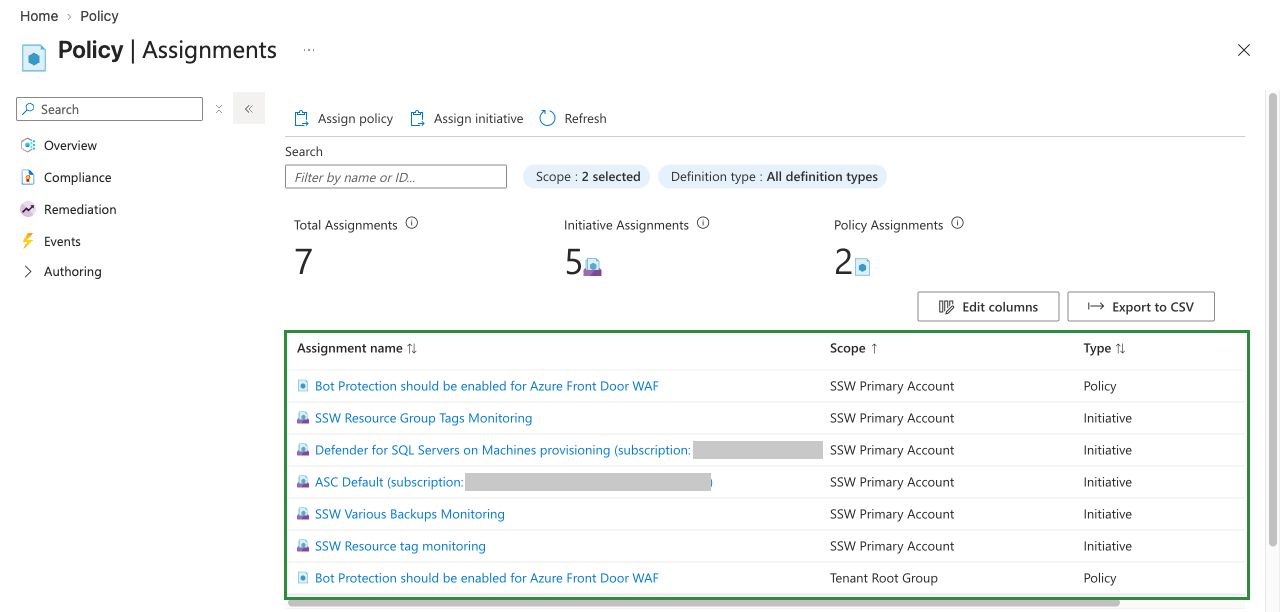
Figure: Policy, Assignments lists every policy that applies to the subscription. The last one is set above it, on the Tenant Root Group
Write the answers down in the repo, so the next developer does not have to ask again.
docs/landing-zone.mdChecked 12 Oct 2026 with Bob Northwind (platform team)Subscription Northwind-Production. Contributor on the resource group onlyPolicies Australia East only. Owner and Environment tags requiredNetwork Private endpoints required. Private DNS zones are in the hubIdentity Access through Entra groups. Pipelines use a managed identityMonitoring Logs go to the central Log Analytics workspace
✅ Figure: Good example - The answers are in the repo before the design starts