Do you make business travel easier?
Loading last updated info...
In our fast-paced work environment, it’s important for staff to get to client sites and meetings efficiently. However, managing the associated travel expenses can often be time-consuming and frustrating.
When staff need to travel, they must follow company standards and keep physical or digital records, including approvals and tax invoices. Completing this paperwork can easily take 10 minutes or more—and even longer if invoices are misplaced. Is there an easier way?
Collecting physical tax invoices (traditional method)
Some companies may ask employees to get a physical tax invoice and get it reimbursed through the finance team.
✅ Pros:
- No additional system is required
❌ Cons:
- Hard to manage – Approval may get lost, and tax invoices can be missing, or duplicated
- Out of pocket – It may take days to have the reimbursement processed and paid
- Heavy admin – Managing paperwork is time-consuming and relies on human resources
Expense management system
Software can be used to get expenses approved, paid and reimbursed.
E.g. Xero Me, the Best Mobile App for Expenses.
✅ Pros:
- Less admin – Expense claims can be processed easily in the cloud
- Efficient reimbursement – Can be reimbursed anytime, anywhere
❌ Cons:
- Risk of not being paid - If the tax invoices are missed or forgotten
- No analysis tool – Hard to have insights into the expenses

❌ Figure: Bad example - Trying to find taxi receipts and how to get them reimbursed
Taxi corporate account
Business users can set up a corporate account that manages travel expenses with a few clicks, or offer employees a digital pass with a prepaid budget. E.g, 13 Cabs for business.
✅ Pros:
- Safe and secure – Taxis usually provide a level of safety and professionalism
- Cloud-based dashboard – Easy to manage multiple bookings at once and pay with a corporate account or passengers themselves
- Customized Pass – Digital or physical pass that has customisable travel rules
❌ Cons:
- Cannot be used overseas – The operating area of taxi companies are often limited
- Not flexible enough – May require admin to book the taxi for the passengers or the passengers are pre-approved to travel within the area
Uber for Business (Recommended)
Uber for Business allows employees to use Uber services—such as rides or food delivery—when their trips meet the rules set by the business. Employees simply add a business profile to their existing or new Uber account, giving them the option to pay using that business profile.
This provides a simpler business travel experience, as all charges and tax invoices are billed directly to the company.
✅ Pros:
- Centralized dashboards - Real-time visibility, and control over all business rides. No more guesswork or manual tracking
- Global service – Travelling to New York or Tokyo? All are covered in one program
- Customization - Businesses can set pending limits, specify eligible ride types, define other parameters, and manage the access of employees at any time
- No misuse - Uber for Business forces the user to switch back to their personal profile if they go to a location that has not been pre-approved (see permitted locations in the figure below)
- Ride and meal vouchers - Businesses are able to create customised vouchers that can be shared and applied at checkout
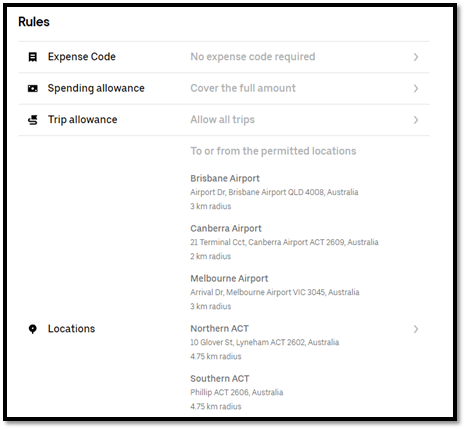
Figure: Predefined rules that allow staff travelling to and from airports and within ACT
❌ Cons:
- Forced to go with Uber – People may have personal objections to Uber
- Safety and user experience – Generally, shared ride service provides less professionalism and safety compared to taxi services
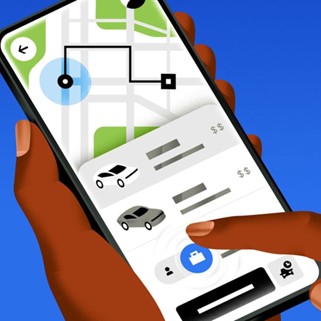
✅ Figure: Good example - Using Uber for Business by a simple toggle of a button