Do you use CSS frameworks?
Loading last updated info...
Efficient programmers do not re-invent the wheel. That's why we use the best Web UI libraries.
Bootstrap is a NuGet Package that provides a jump-start for HTML-based projects. It includes the HTML, CSS and JavaScript framework used to build the Twitter site.
Building your site on top of Bootstrap makes it much easier to have your website look great on devices of all sizes, across many different browsers.
Read our Rules to Better UI (Bootstrap).
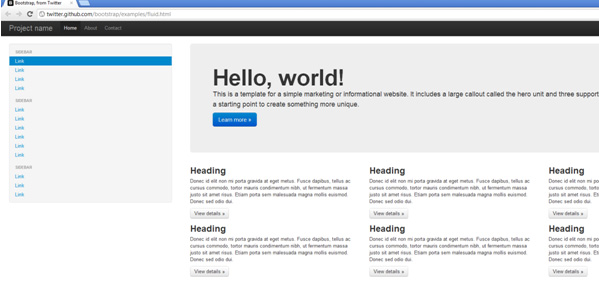
Figure: This website template, along with many others is available as a starting point for building Bootstrap-based sites
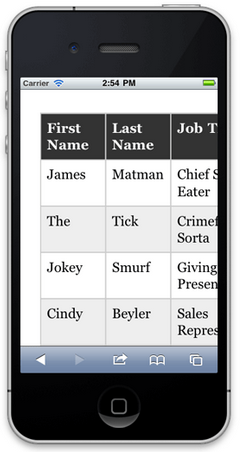
❌ Figure: Bad example - Many websites built by using tables for positioning would render poorly on smaller devices, and be hard to use
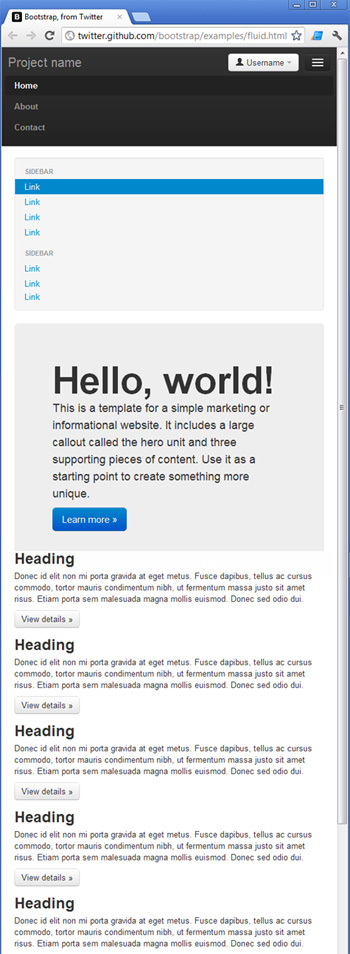
✅ Figure: Good example - Bootstrap uses many techniques to help make your site look great on different browsers, on all devices
Documentation
Framework integrations
One of the benefits of using Bootstrap over a library such as Shadcn is that it's widely supported across a large number of frontend frameworks. Take a look at the following Bootstrap integrations for example:
While you can use Bootstrap without any framework-specific integrations, using one of the libraries can save you a lot of time managing your CSS classes and writing boilerplate code while building your interface. The frontend frameworks listed above are ultimately just wrappers for using Bootstrap, which is little more than a CSS library. This means that you can use Bootstrap with any frontend framework of your choosing. You can even use it for static HTML pages provided that you include links to the required JavaScript and CSS files in your pages. This can be achieved by adding a link to Bootstrap's CDN in your pages.
Tailwind
TailwindCSS is also recommended. Out of the box, Tailwind is lightweight and will get the job done simply; you can build a website without ever having to look at CSS.
Note: The difference between Tailwind and Bootstrap often comes down to how comfortable you are with writing CSS. Tailwind gives you full control with utility classes, while Bootstrap provides ready-made components that require less custom styling. Read more about these differences.
Upgrading Tailwind (v3 → v4)
If you are considering an upgrade to Tailwind 4, plan ahead. The jump from version 3 to 4 is substantial, and requires careful manual QA due to breaking changes in utilities, defaults, and stricter browser support.
✅ Pros of v4
- Faster builds – Up to 5× faster full builds and 100× faster incremental builds
- Simpler setup – Fewer dependencies, one CSS import, zero config for most apps
- Auto content detection – No need for a content array; use
@sourcewhen needed - CSS-first config – Tokens defined via
@theme, exposed as CSS variables for runtime theming - New core APIs – Container queries, 3D transforms, expanded gradients,
not-*,@starting-style - Better DX – Dynamic utility values (
grid-cols-15,w-17), first-party Vite plugin
❌ Migration cons and risks
- Breaking changes – Shadows, radius, blur scales, spacing, ring defaults, and removal of
@tailwinddirectives - Stricter browser support – Safari ≥16.4, Chrome ≥111, Firefox ≥128. Stay on v3.4 for older browsers
- Preprocessors unsupported – Sass, Less, Stylus are no longer supported
- Config changes – No default
tailwind.config.js, use@config; some options dropped - Real-world friction – Some teams reported dark-mode surprises and missing parity during migration
Upgrade notes
Use the official upgrade tool:
npx @tailwindcss/upgrade