Do you avoid using MDI forms?
Loading last updated info...
MDI (Multiple Document Interface) forms should be avoided in most modern data-centric applications because they:
- Are a hangover from the days of Windows 3.1 and Access 2.0
- Constrained within a smaller window
- Only show as one window on the taskbar
- Have no multiple monitor support (the killer reason)
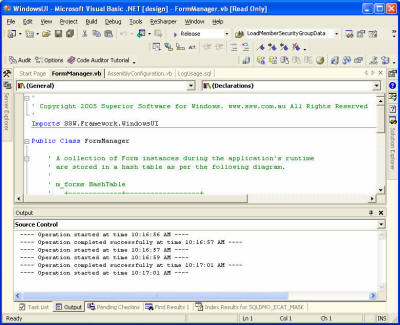
❌ Figure: Bad example - VS.NET with tabs is cool for developers, but not for the average knowledge worker

❌ Figure: Bad example - Word 2003 in MDI mode
::: good

✅ Figure: Good example - Word 2003 with Default Settings
Me.IsMdiContainer = true;ClientForm frm = new ClientForm();frm.MdiParent = this;frm.Show();
::: bad Figure: Bad code example - using MDI forms :::
ClientForm frm = new ClientForm(); frm.Show();
✅ Figure: Good example - not using MDI
MDI forms have the advantage that the MDI parent form will have a collection MdiChildren which contains all of its child forms. This makes it very easy to find out which forms are already open, and to give these forms focus. Accomplishing this with an SDI application requires you to:
- A global collection of forms
- A line of code on the load and closed events of each form which adds / removes the form from the global collection
But what about tabs? As developers, we love to use tabs similar Visual Studio.NET (figure below) and browsers such as Mozilla and CrazyBrowser. Tabs are great for developers, but standard business applications (e.g Sales Order System) should be developed as SDI (Single Document Interface). This is because users are used to Outlook and other office applications, which don't use MDIs at all. If the users want to group windows, Windows XP lets you "Group Similar Taskbar Icons".