This rule has been archived
Microsoft Test Manager has been superseded by Azure Test Plans, a new rule covers how to add test cases to test plans in Azure Test Plans https://www.ssw.com.au/rules/add-test-case-to-test-plan-azure-test-plans
Do you know how to add a Test Case to a Test Plan in Microsoft Test Manager?
Loading last updated info...
You organize your Test Cases by adding them to a Test Plan (also called a Test Suite).
We have one Test Plan per Sprint.
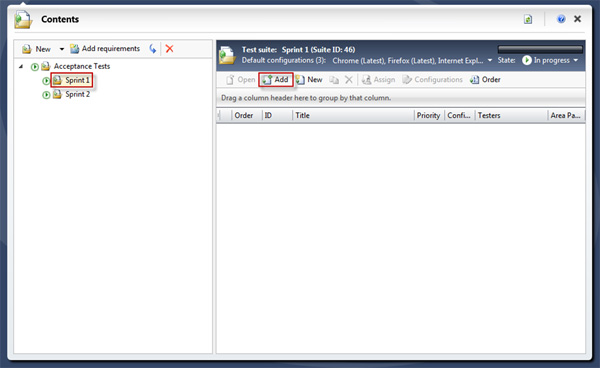
Figure: Select Plan from the main menu, and then choose the Test Plan that you would like to add Test Cases to
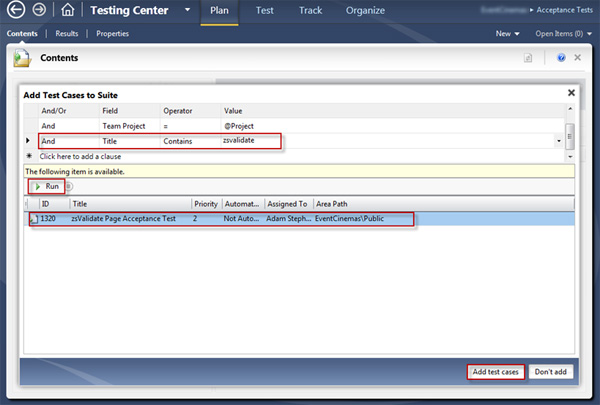
Figure: Add a filter to make it easy to find your Test Cases. Click the Run button, select the relevant items and click the 'Add Test Cases' button
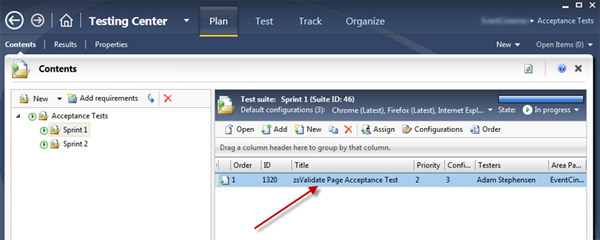
Figure: Your Test Case has now been added to the suite