Do you know the best CMS solutions for websites?
Loading last updated info...
You don't want to build solutions from scratch, so take what business value you can from a CMS: don't reinvent the wheel. A CMS lets business users build and manage websites without writing any code.
In 20+ years, SSW engineers implemented many CMS solutions for clients. SSW's top 2 picks are TinaCMS (recommended) and Contentful.
Video: The Top 2 CMS Picks From 20+ Years of Consulting Experience | Hark Singh | SSW TV (9 min)
SSW's top 2 picks: TinaCMS and Contentful
Both are headless, so you can use any front end: a web app, a static site (e.g. Astro), or a mobile app. Disclosure: SSW owns TinaCMS.
| TinaCMS (recommended) | Contentful | |
|---|---|---|
| Content | Markdown files in your GitHub repo | Contentful's cloud, through an API |
| Visual editing | ✅ Built in, on every plan. Developers connect the pages with useTina first | ⚠️ Developers set up Live Preview first. Contentful Studio is an enterprise add-on |
| AI | ✅ Any AI agent can edit the Markdown | ✅ Official MCP server and CLI |
| Price | Free (open source, or the TinaCloud free plan). Paid plans from $29 a month per project | Free plan with limits. Paid plans from $300 a month |
| Version history | Git: every save is a commit | A snapshot each time you publish |
Source: tina.io/pricing and contentful.com/pricing, checked 12 November 2026. Prices in USD. The video covers each area in detail.
SSW Rules has more than 3,000 rules, all edited with TinaCMS. Every save is a commit. The TinaCloud editorial workflow (Team plan and up) sends each change through a GitHub pull request, so you see who reviewed and approved it. You can revert any change.
✅ Figure: Good example - SSW Rules runs on TinaCMS, with a full history of every change
Let AI work with your CMS
An AI agent can work with your CMS content, not only your code. It talks to the CMS through a CLI or an MCP server. When the content is Markdown in your repo (e.g. TinaCMS), the agent can also edit the files directly.
Example Prompt: "Add a Testimonials block to the CMS schema, build the React component, and add 2 sample testimonials to the home page. Then start the dev server and check that the block shows in the visual editor."
Figure: 1 prompt changes the schema, the component, and the content
Headless CMS vs traditional CMS
A traditional CMS is a monolith: 1 app stores the content and serves the pages (e.g. WordPress, Umbraco, Sitefinity). A headless CMS only manages the content. Your front end gets the content through an API, so you can pair it with a fast static site.
Traditional CMSs like Sitecore and Kentico Xperience have their place, especially if you have no developers and you’re comfortable with serious vendor lock-in. Headless CMSs and static sites for the win. -Adam Cogan
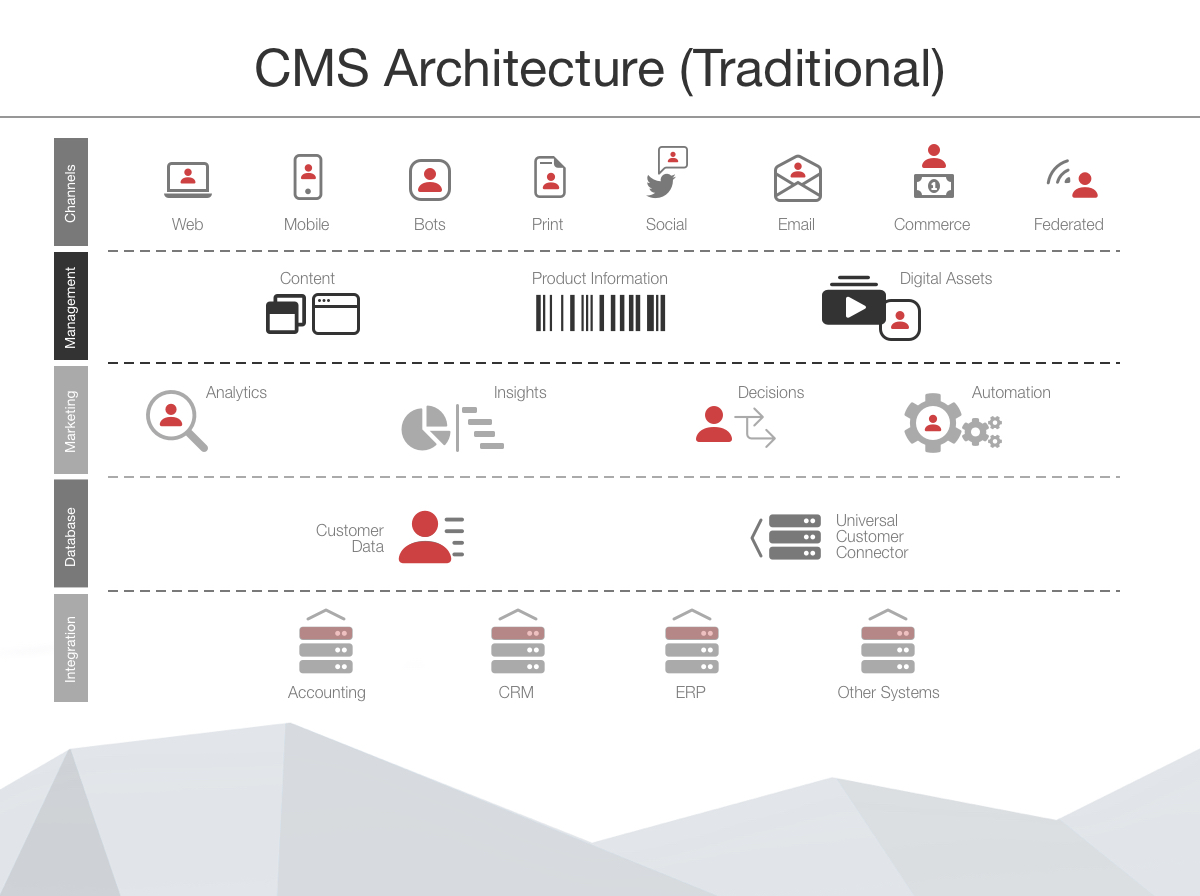
Figure: Traditional CMS Architecture
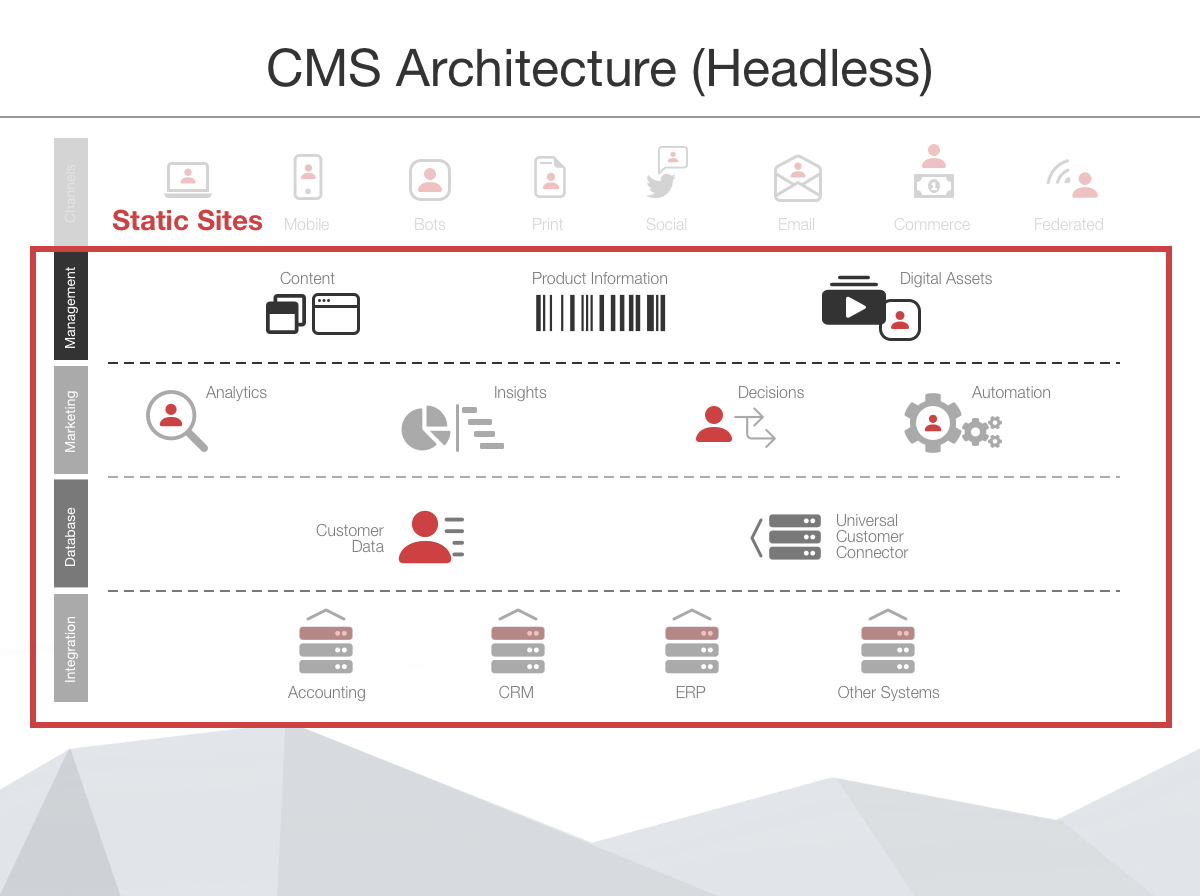
Figure: Headless CMS Architecture
| Traditional CMS | Headless CMS | |
|---|---|---|
| ✅ Pros | Fast to set up. Less reliance on developers. Themes, templates, and built-in integrations (e.g. payments) | Fast, and scales on a CDN. Any front end, including mobile apps. 1 content source for many channels |
| ❌ Cons | Slower, and scales poorly. Limited by themes and the vendor. Needs developers with skills in that CMS | Needs front-end developers for more than content changes. More code and DevOps to maintain |
Source: UDig - Traditional CMS vs Headless CMS
Other CMS options
| Type | Use it when | Options |
|---|---|---|
| Traditional - simple | You need a simple site or shop | WordPress, Shopify, Squarespace, Wix, Joomla, Drupal |
| Traditional - enterprise (.NET) | You have a complex business case | Kentico, Umbraco, Orchard Core, Sitecore, DNN, Sitefinity (see when to use Sitefinity) |
| Headless | You want any front end, with content through an API | TinaCMS, Contentful, WordPress VIP, Sanity, Magnolia, Arc XP, and for .NET: Squidex, SiteServer |
| Hybrid | You want headless plus a full editing UI, and you have a big budget | Optimizely |
Sources: WordPress Market Share Statistics, 5 Top .NET CMS for Businesses in 2026, and 16 Best Headless CMS For Publishers in 2025