Do you lock the SharePoint Content Database before making a backup?
Loading last updated info...
Even though you have advised staff members a migration is taking place – you can guarantee someone will try to check-in or edit documents. The best way to prevent this is to put your content database into read-only mode, locking the content database.
There are two options to lock the content database.
Option 1 ( Recommended ):
- Open SharePoint Central Administration site, navigate to "Application Management " | "Site Collections " | " Configure quotas and locks ".

- Select the "site collection" which you would like to lock.
- Choose "Read-only (blocks additions, updates, and deletions)", then click "OK".
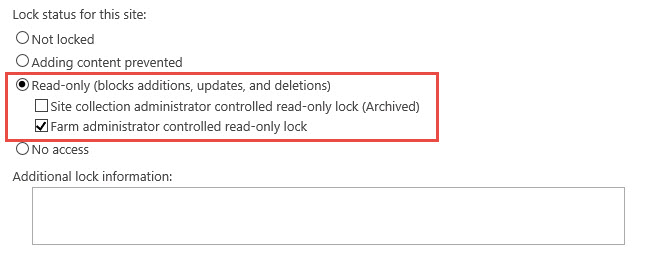 Note: Read more at Manage the lock status for site collections in SharePoint 2013
Option 2 ( not recommended ):
Note: Read more at Manage the lock status for site collections in SharePoint 2013
Option 2 ( not recommended ): - On your database server open SQL Server Management Studio
- Right click on the content database associated with the site collection you're migrating | Properties
- Choose Options | Scroll to the bottom of the options list
- For the Database Read-Only choose True
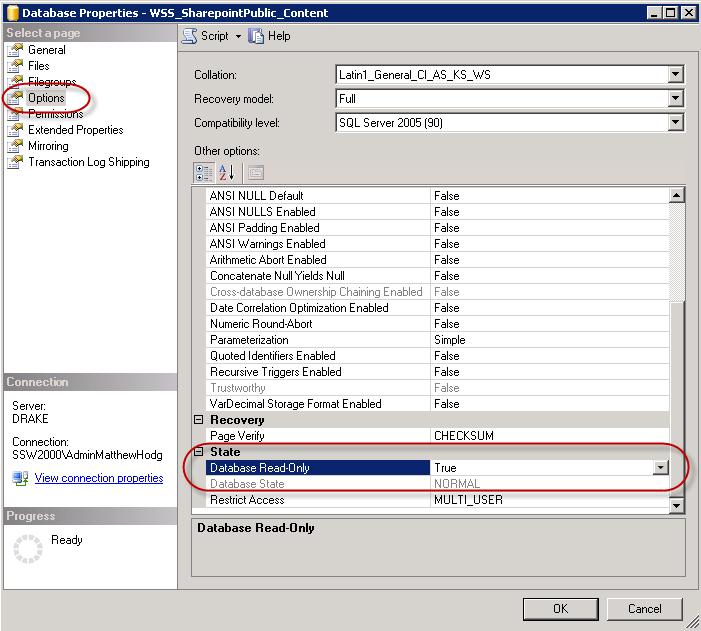
- Now it’s safe to take a backup of your content database
NOTE: When some SharePoint timer services are run it may cause the site to display errors when the database is in read-only mode