Do you use Validator controls?
Loading last updated info...
Validation is extremely important on a data entry form. There are two ways to do validation:
- ErrorProvider control The ErrorProvider control is code intensive. You must manually handle the Validating event of each control you want to validate, in addition to manually running the validation methods when the OK or Apply button is clicked.
Private Sub productNameTextBox_Validating(ByVal sender As Object, _ByVal e As System.ComponentModel.CancelEventArgs) Handles _productNameTextBox.ValidatingValidateProductName(False)End SubPrivate Function ValidateProductName(ByVal force As Boolean) _As BooleanIf Me.productNameTextBox.Text.Length = 0 ThenMe.errorProvider.SetError(Me.productNameTextBox,"You must enter the Product Name.")If force ThenMessageBox.Show("You must enter the Product Name.", _Me.Text, MessageBoxButtons.OK, MessageBoxIcon.Warning)End IfReturn FalseElseMe.errorProvider.SetError(Me.productNameTextBox, _String.Empty)Return TrueEnd IfEnd FunctionPrivate Function ValidateInput() As BooleanDim force As Boolean = TrueDim isValid As Boolean = ValidateProductID(force)If Not isValid Thenforce = FalseEnd IfisValid = ValidateProductName(force)If Not isValid Thenforce = FalseEnd IfisValid = ValidateCategory(force)Return isValidEnd FunctionPrivate Sub okButton_Click(ByVal sender As Object, _ByVal e As System.EventArgs)If Me.ValidateInput() Then'TestEnd IfEnd Sub
❌ Figure: Bad example - lots of code but no balloon tooltips
Private Sub productNameTextBox_Validating(ByVal sender As Object, _ByVal e As System.ComponentModel.CancelEventArgs) _Handles productNameTextBox.ValidatingValidateProductName(False)End SubPrivate Function ValidateProductName(ByVal force As Boolean) _As BooleanIf Me.productNameTextBox.Text.Length = 0 ThenMe.errorProvider.SetError(Me.productNameTextBox, _"You must enter the Product Name.")If force ThenIf Me.balloonToolTip.IsSupported ThenMe.balloonToolTip.SetToolTip(Me.productNameTextBox, _"You must enter the Product Name.")ElseMessageBox.Show("You must enter the Product Name.", _Me.Text, MessageBoxButtons.OK,MessageBoxIcon.Warning)End IfEnd IfReturn FalseElseMe.errorProvider.SetError(Me.productNameTextBox, _String.Empty)Return TrueEnd IfEnd FunctionPrivate Function ValidateInput() As BooleanDim force As Boolean = TrueDim isValid As Boolean = ValidateProductID(force)If Not isValid Thenforce = FalseEnd IfisValid = ValidateProductName(force)If Not isValid Thenforce = FalseEnd IfisValid = ValidateCategory(force)Return isValidEnd FunctionPrivate Sub okButton_Click(ByVal sender As Object, _ByVal e As System.EventArgs)If Me.ValidateInput() Then'TestEnd IfEnd Sub
✅ Figure: Good example - lots of code but balloon tooltips are used
Note: The component for balloon tooltips can be found in the SSW .NET Toolkit.
The error provider has the advantage over the extended provider that it can be used with balloon tooltips. If you are not using balloon tooltips, however, the error provider should not be used.
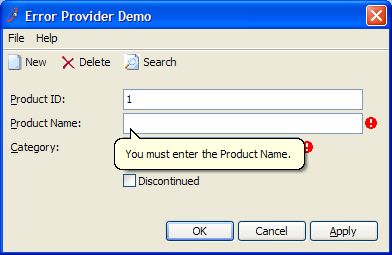
Figure: .NET ErrorProvider Control with a custom balloon tooltip
- SSW Extended ProviderThe SSW Extended Provider integrates with the ErrorProvider control to provide the same functionality, but requires no code to implement (everything can be done in the Designer).
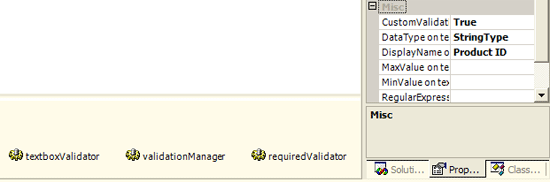
Figure: SSW Extended Provider controls and properties on a TextBox
We have a program called SSW .NET Toolkit that implements this cool Error Provider Control