Do you know the best way to embed a YouTube video?
Loading last updated info...
Pasting YouTube's default embed code drops the full video player onto your page before anyone clicks play – around 1 MB of JavaScript per embed. A page with a few videos can triple its weight for content most visitors never watch. There are 2 lightweight ways to do it better.
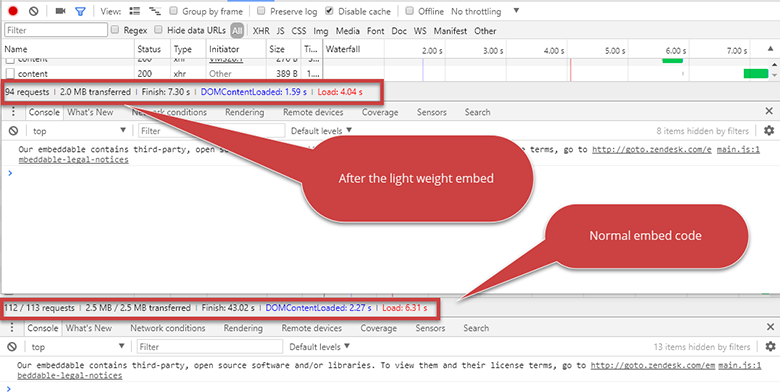
Figure: A side by side comparison – everyone wants less requests and a smaller page size
The problem – the default embed
<iframewidth="560"height="315"src="https://www.youtube.com/embed/VIDEO_ID"frameborder="0"allowfullscreen></iframe>
❌ Figure: Bad example – The copy-pasted embed code loads the entire player on page load, for every video on the page
Option 1 – Lazy load the iframe (simplest)
<iframewidth="560"height="315"src="https://www.youtube-nocookie.com/embed/VIDEO_ID"title="How to embed a YouTube video"loading="lazy"allowfullscreen></iframe>
✅ Figure: Good example – loading="lazy" defers the player until the video is about to scroll into view. No JavaScript needed
All modern browsers support lazy loading iframes natively. Bonus: the youtube-nocookie.com domain sets no tracking cookies until the user actually plays the video.
Option 2 – Use a facade component (best performance)
Lazy loading still fetches the full player once the video scrolls into view. A facade renders only the thumbnail and a play button – a few KB – and loads the real player when the user clicks:
<script type="module" src="https://cdn.jsdelivr.net/npm/lite-youtube-embed"></script><lite-youtube videoid="VIDEO_ID" playlabel="How to embed a YouTube video"></lite-youtube>
✅ Figure: Good example – A facade keeps the page instant, and the player still starts on click
lite-youtube-embed is the maintained implementation of this pattern, and wrappers exist for most frameworks (e.g. react-lite-youtube-embed). Using facades for heavy third-party embeds is also what Lighthouse recommends.
Tip: Whichever option you choose, give the embed a descriptive title (or playlabel) so screen reader users know what the video is before it loads.