Do you know the best way to feed your data to AI?
Loading last updated info...
Your AI solution needs data: your support docs, your business information.
How the model reaches it decides your cost per query, latency, and the quality of your response. Back when LLMs had tiny 4K token context windows, RAG was the clear choice. Nowadays, context windows can fit millions of tokens - this adds some nuance to the decision.
Video: Is RAG Still Needed? Choosing the Best Approach for LLMs (11 min)
Option A: Long context
The brute-force approach. Requires the least infrastructure.
If the entire corpus required to answer a particular question fits inside the context window, then just inject it into the context window!
This can be useful when the answer isn't in any single document. A question like "which security requirements never made it into the release?" may need two or more documents in full to answer, because the answer is the gap between them.
It has caveats worth knowing. Positioning matters, and context in certain areas is predisposed to being missed – such as in the middle and in multi-hop conversations.
Prompt Caching - Making long context economical
Long context becomes even better when accounting for caching. Caching keys on how a prompt starts, not the whole thing. Put the documents at the front and the user's question at the end, and every request opening with those same documents reuses the cached copy at a fraction of the price, independent of the following question. Check the numbers for your own provider and model first - the minimum cacheable size, how long the cache lives and the size of the discount all differ. See prompt caching.
That discount is what makes putting a whole corpus into every request affordable, so the ordering is an important design decision here.
Option B: Retrieval-Augmented Generation (RAG)
RAG means retrieving the relevant material first and passing only that to the model. The retrieval itself can be keyword, structured, graph-based, vector similarity, or a mix; vector search over embeddings is the most common.
Best for large unstructured prose: support docs, PDFs, policies, transcripts. SSW's RulesGPT works this way, and so does Cursor - it chunks your repo and keeps the embeddings in a vector DB.
On the "RAG is dead" comment: RAG as the default pipeline (i.e. chunk, embed, top-k, then stuff the prompt) is no longer an obvious choice, yet as a capability, it is still an important element of AI solution architecture. Claude Projects switches RAG on when a project outgrows the context window, then backs off when it shrinks.
Option C: Agentic search
This involves setting up an agentic loop, giving the agent tools like grep or a query API, and letting it reason through the results, in-between searches.
This is great when the results from the first search require more granularity, or a slightly different query - in fact, it's exactly how a human would look for knowledge.
There's no index to keep in sync, so nothing goes stale - as long as the tools read the live source and not a snapshot or a cache.
This does require handing an agent a real shell. Vercel's just-bash is a simulated bash over a virtual filesystem - grep, find, glob and friends, no child processes, and network access off by default - so you can leverage the model's knowledge of these tools, without giving the agent any real power.
The agent chooses its own search at query time, and can reach for any of the same tools RAG uses. The key difference is the AI manages its own context rather than the system.
So which should I use?
These are composable building blocks, not mutually exclusive architectures.
That said, 3 questions settle most cases:
- whether the corpus fits with room to spare
- whether the answer needs all of it at once
- whether the same documents come back on every request
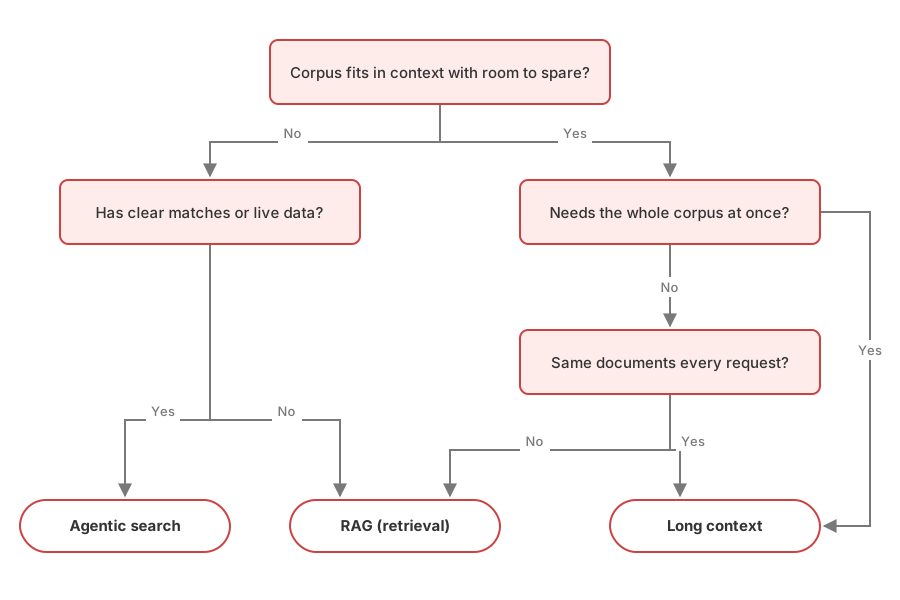
Figure: Decision AI Tree – which retrieval strategy do I want to use?
Using the Decision AI Tree
YakShaver turns a screen recording into a PBI, which means picking the right backlog out of every project a user has.
Go for a stroll amongst the decision trees…
Q1: The list of projects and what each one covers is small, so it fits with room to spare.
Q2: Picking the best match means weighing every project against the others, not retrieving the three that look closest - so it needs the whole corpus at once.
The result: Two questions, and it lands on long context. The project list is also identical on every request, so it caches cleanly.
✅ Figure: Good example - The decision tree recommended using long context for YakShaver
The decision tree is a good starting point. Remember hybrid solutions and more complex context engineering are also options if you need to further optimise the solution.