This rule has been archived
This rule may no longer be relevant or up to date.
Do you know how to use Windows Integrated Authentication in Firefox?
Loading last updated info...
Internet Explorer has a great feature that you hardly notice. The Authentication credentials of the current user will be used by default.
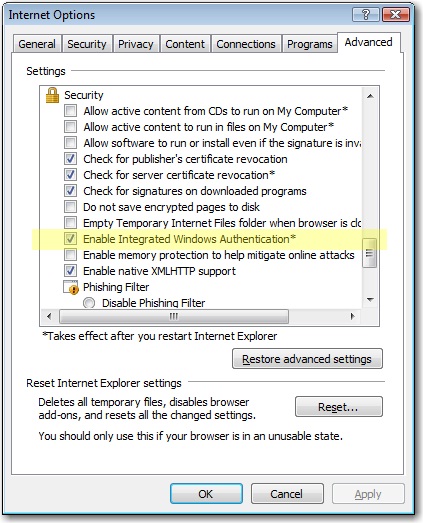
Figure: Internet Explorer has the Integrated Authentication feature built in
In Firefox, if you sign-in to an internal server like SharePoint or CRM, you will get an authentication dialog. Even though you are already authenticated to the local domain.
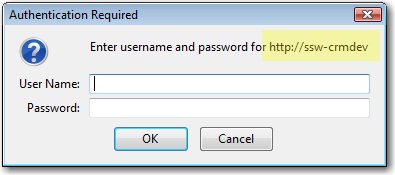
Figure: We want to avoid authenticating using Firefox (so it works like IE)
The Solution
- Open Firefox
- Go to "about:config"
- Click "I'll be careful, I promise!"
- Enter in the Filter box above: "network.automatic"
- You see 2 records
- Double-click the second one - It is the key called network.automatic-ntlm-auth.trusted-uris
- Enter the servers delimited by ",", e.g. "aphrodite, mermaid"
- Close browser and test
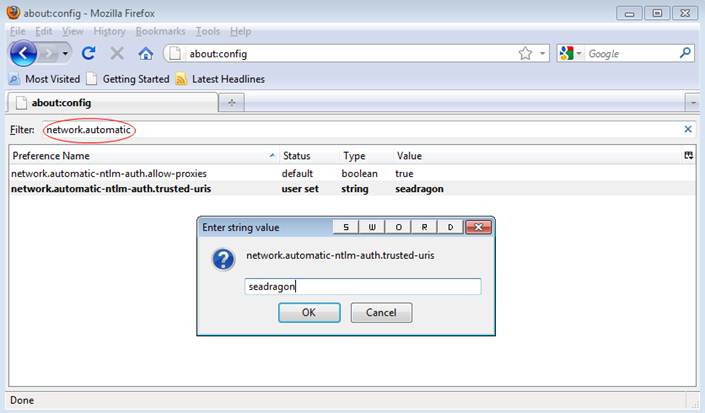
Figure: Showed how to find "network.automatic-ntlm-auth.trusted-uris" by using filter: "network.automatic"
More info on this blog: Firefox and Sharepoint.
Tip: To test this without the Integrated Authentication enabled, you need to clear your session. You do this via: Tools | Clear private data | Authenticated Sessions .
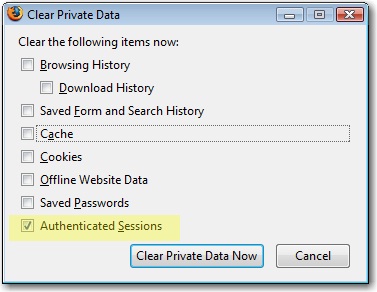
Figure: To test you will need to clear your "Authenticated Sessions" to completely logout from a site (SharePoint, CRM)