Do you know how to run write application to run with UAC turn on?
Loading last updated info...
Some applications may need to have administrator right for running the application, e.g. create a file, access system library, etc. It will be an issue for the application to run if UAC is turned on. Below is the step to solve the issue:
- Add App.Manifest into WindowsUI project. It should contain the below code:
<?xml version="1.0" encoding="utf-8"?><asmv1:assembly manifestVersion="1.0" xmlns="urn:schemas-microsoft-com:asm.v1" xmlns:asmv1="urn:schemas-microsoft-com:asm.v1"xmlns:asmv2="urn:schemas-microsoft-com:asm.v2" xmlns:xsi="http://www.w3.org/2001/XMLSchema-instance"><assemblyIdentity version="1.0.0.0" name="MyApplication.app"/><trustInfo xmlns="urn:schemas-microsoft-com:asm.v2"><security><requestedPrivileges xmlns="urn:schemas-microsoft-com:asm.v3"><requestedExecutionLevel level="requireAdministrator" uiAccess="false" /></requestedPrivileges></security></trustInfo></asmv1:assembly>
App.Manifest
- Change the project settings for WindowsUI to use the newly created App.Manifest.
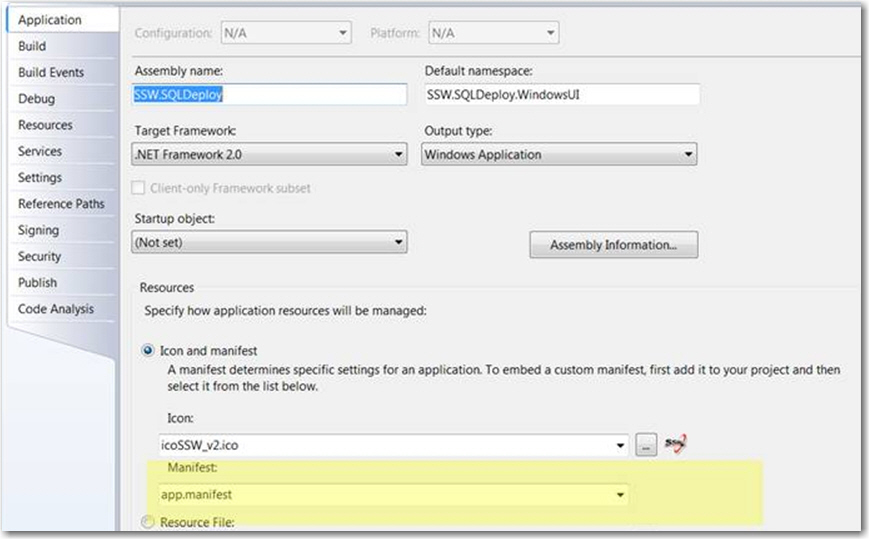
Figure: Use the newly created App.Manifest