Do you use LAPS to manage local administrator passwords?
Loading last updated info...
It is best practice to limit the number of administrator accounts in your environment, including local administrators on users' computers. However, it is necessary to have a local administrator account so the computer can be accessed if it loses connection to the domain. LAPS does exactly that.
Microsoft LAPS provides management of local account passwords of domain or hybrid-joined computers. Passwords are stored in on-premises Active Directory (AD) or Entra ID and protected by ACL or RBAC, so only eligible users can read it or request for it to be reset. The passwords are automatically changed regularly - the default is every 30 days, but this can be changed. LAPS is provided by Microsoft and comes integrated with newer Windows versions.
As of April 2023, Microsoft has launched a new solution called Microsoft LAPS which replaces the older Windows LAPS. This updated version of LAPS brings some much needed features:
- Cloud native - You can back up passwords to Entra ID
- Security - Passwords are encrypted in AD (they weren't in legacy)
- History - Password change history is now recorded
If you still have legacy OSs (e.g. Windows Server 2016, older Windows 10/11 versions) in your fleet, you can have the new and legacy LAPS working in parallel with clever Group Policies applying to those systems, as the new LAPS does not work with them.
Microsoft LAPS (new)
The new LAPS is integrated directly into Windows and does not need any install or downloads to work, you only need to be at least in the April 11 2023 Update in Windows 10/11 and Server 2019/2022; it only needs Group Policy settings to come into effect. High level steps are:
- Install the management components on management computers (i.e. extend the AD schema if you plan to store passwords in AD)
- Configure permissions (i.e. make sure only the right people can view passwords)
- Enable and configure LAPS by GPO (you can choose how to deploy this GPO, via AD or Intune; you can also configure password complexity & duration, and more)
✅ Good Example - Video: Managing local admin account passwords in AD and Azure AD (long - 20 min)
Windows LAPS (legacy)
The legacy LAPS download includes a comprehensive operations guide, with step-by-step installation instructions. The high level steps were:
- Install the management components on management computers (i.e. SysAdmins)
- Install LAPS on computers to be managed - this can be done by GPO
- Create the AD attributes that will securely store the password
- Configure permissions (i.e. make sure only the right people can view passwords)
- Enable and configure LAPS by GPO (you can configure password complexity & duration, and more)
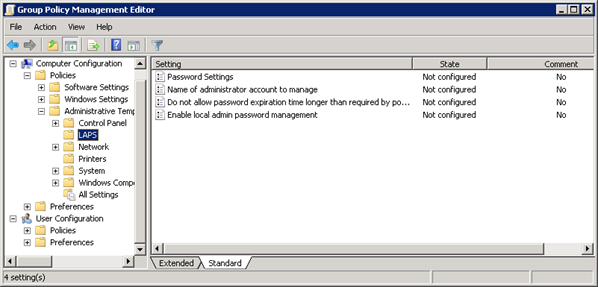
❌ Figure: Bad example - Figure: Legacy LAPS GPO settings
To view the password you can use the LAPS UI tool (included with the standard installer), view it in AD Users and Computers, or with PowerShell. You can reset the password with the UI tool or with PowerShell.
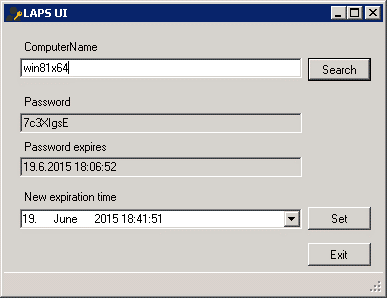
❌ Figure: Bad example - Figure: Legacy LAPS UI