Do you automate recurring tasks with Microsoft Planner?
Loading last updated info...
Managing recurring tasks effectively can be a major challenge, especially when you don’t have visibility into whether tasks are completed on time or not.
Previously, we relied on manual methods like recurring calendar appointments or reminders. However, these approaches made it difficult to track the status of tasks and understand each team member's workload. Microsoft Planner offers a better solution, allowing you to manage, automate, and gain insight into recurring tasks for your team.
Why use Microsoft Planner?
By using Microsoft Planner, you can streamline recurring task management. It organizes and assigns tasks to team members, showing progress and status.
How to set it up in 2 steps
- Select or create a Team in Microsoft Teams
- Ideally it has all the people you want to manage these recurring tasks for
- Create a Plan in Microsoft Planner
- Use Microsoft Planner’s built-in recurrence feature to create tasks that repeat daily, weekly, monthly or at any specified interval
- Example: Assign a task for team members to complete every Monday, such as sending a status update
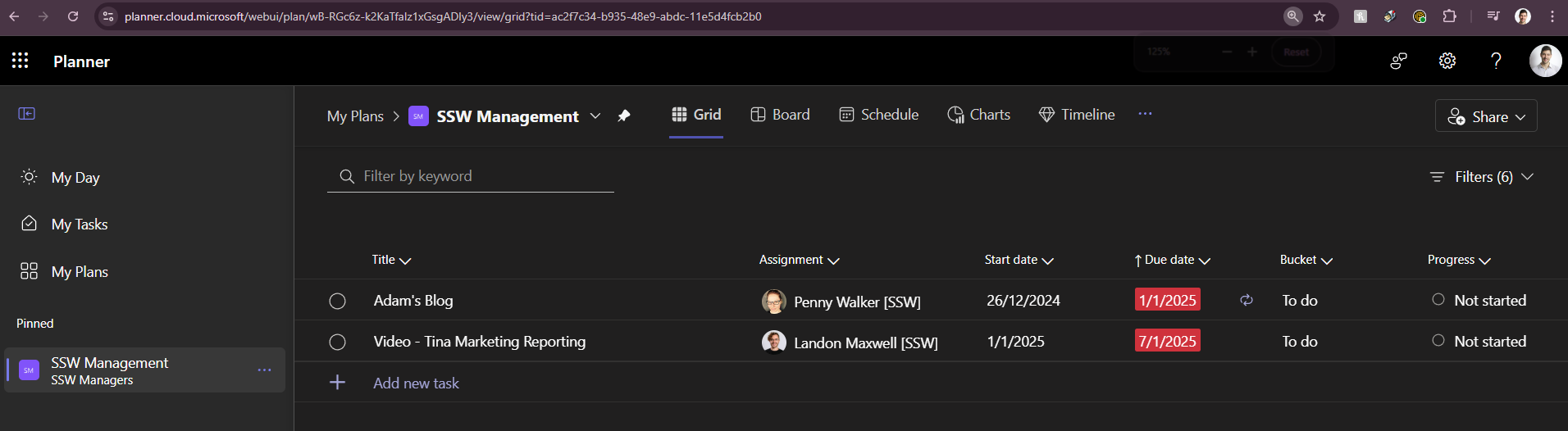
Figure: See your team's upcoming or outstanding recurring tasks
Benefits of using Microsoft Planner
- Centralized Management: Track and monitor the workload of your team from one place.
- Visibility for Managers: Managers can easily see overdue tasks and assess team performance.
- Timely Notifications: Ensure team members get timely reminders where they usually work, like in their Outlook inbox or Teams notifications.
Use Filters to Cut Down the Noise
Planner has filters that can help only show you the tasks that are relevent for you to see right now. You should use the following "Due Date" filters:
- Reduce noise: Tasks are only visibile in your Planner when they're supposed to be worked on, or if they're overdue.
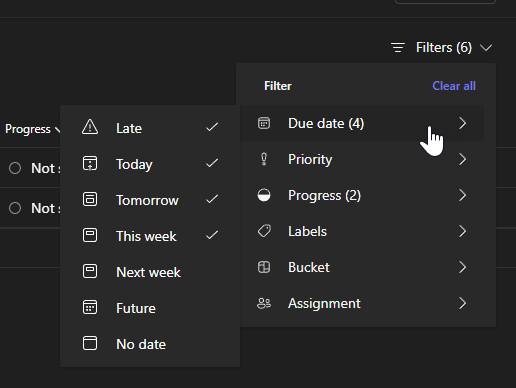
Figure: Limit the due dates so you don't have to look at tasks that are not due for ages
By centralising and automating task management, you improve accountability and can quickly identify if any tasks are slipping through the cracks. Adopt this method to keep your team organized and efficient.