Do you create a migration plan?
Loading last updated info...
Migrating from .NET Framework (4.x) to the latest version of .NET brings huge advantages to your app's performance, hosting fees, and maintainability. But it's important that you understand what the road to migrating to the latest .NET will look like for your app before you start breaking things! So how do you ensure your migration is being done the right way?
Preparation
Migration to a newer version of .NET is the perfect opportunity for you to take stock of your current application architecture, and address any technical debt your app has accumulated. Trying to migrate an application that's poorly architected or carrying a lot of tech debt will make your migration exponentially harder. Therefore, now is the perfect time to perform a full audit of your app and ensure you have PBIs to rectify these problems before you consider it "migration-ready".
Manual dependency analysis
Imagine a typical N-tiered application. Over the course of its life, the lines between each tier will often get blurred, either accidentally or deliberately. This can result in certain dependencies appearing where they shouldn't - such as System.Web references showing up in your application or data layer. This is a very common code smell and a great starting point to cleaning up your app.
If your app has 3rd party dependencies (e.g. with a financial system, reporting system, etc.) - now is the time to investigate those integration points to determine whether those services provide compatible libraries and how those libraries differ (if at all). Create PBIs for these as well.
Infrastructure
If you host your app on premise, it's also worth checking your infrastructure to ensure it has the necessary runtimes.
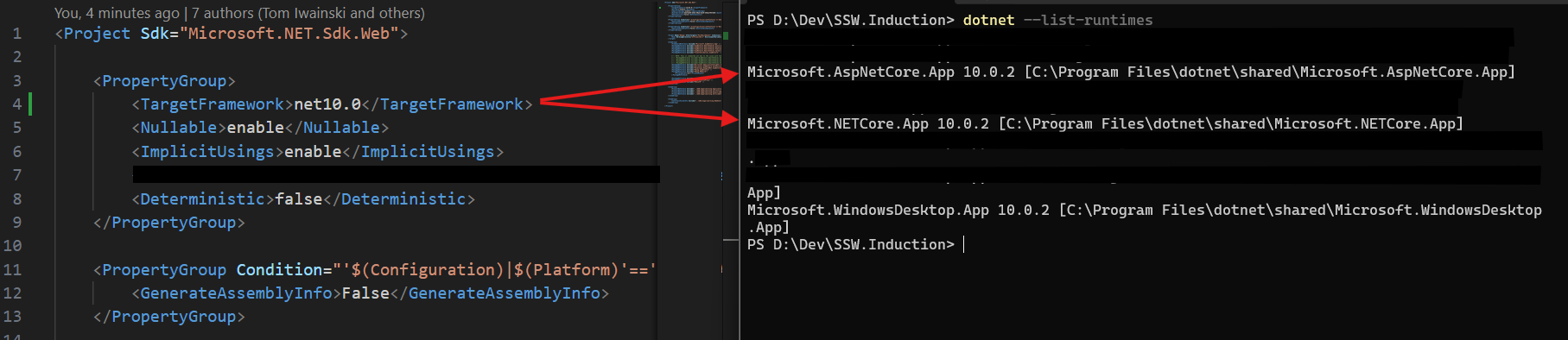
Figure: Install necessary .NET 10 runtimes
Breaking changes
Once you've addressed any technical debt or architectural concerns, you can start gauging the amount of work involved in the migration itself.
Identify Unavailable Technologies and Obsolete APIs
Several technologies available in .NET Framework are no longer supported in modern .NET architecture. These include APIs like AppDomains, .NET Remoting, and Code Access Security (CAS). Identifying these early will help you avoid unexpected blockers later in your migration. See Microsoft's documentation: .NET Framework technologies unavailable on .NET
For a complete list of obsolete APIs, broken down by .NET version, check out: Obsolete features in .NET 5+
Finding usages of these legacy or obsolete APIs gives you a strong sense of the blast radius of your migration and highlights areas where modern replacements will be needed. This is also the perfect time to begin banning deprecated APIs to avoid regression. Check out our rule on using the BannedApiAnalyzers
For a list of potential breaking changes when migrating to later versions of .NET, See Microsoft's documentation: Breaking changes in .NET
Tip: You want to work from the bottom up in N-tiered applications (or inside-out with Onion architecture). This will allow you to work through the migration incrementally, and address any breaking changes upstream. If you migrate top-down (or outside-in), you will find yourself having to rewrite downstream code multiple times.
Upgrade the csproj files
The first thing you want to do is update your projects' csproj files to the new SDK-style format. This greatly simplifies the contents of the file, and will allow you to easily target multiple versions of .NET framework monikers simultaneously (more on this below).
For a detailed walkthrough of the conversion, its gotchas, and the post-conversion cleanup, see Do you migrate your csproj files to SDK-style?
Tip: You can use the try-convert dotnet tool to convert your projects to the new sdk style csproj format.
Install the tool using:
dotnet tool install -g try-convert
Run the tool on current csproj whilst maintaining the existing target framework using:
try-convert --keep-current-tfms
Note: For Web applications, we'll update at a later stage based on migrating Web Apps to .NET.
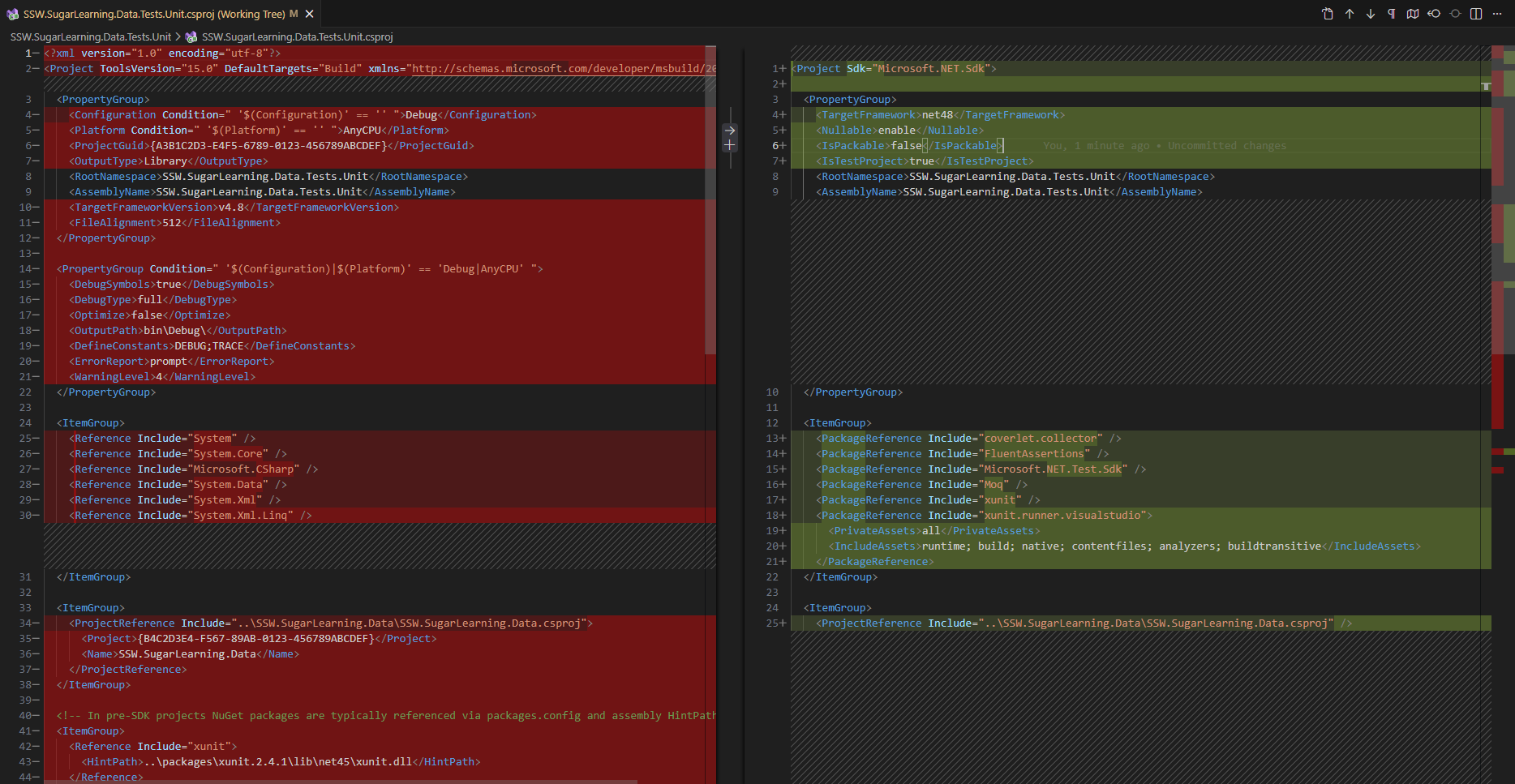
Figure: The differences when migrating from legacy csproj to the new SDK style
Target multiple Target Framework Monikers (TFM)
Now you have shiny new SDK-style csproj files, it's time to see what breaks!
Multi-targeting both your original .NET Framework version and your future .NET version will help give you the following information:
- Expose any build errors you receive when trying to build for .NET
- Expose any build errors you receive when trying to build for .NET Framework
Why is this important?
Imagine you don't do this, and instead, you simply target the newer version of .NET only. You get a list of 100 build errors due to breaking changes - too many to handle for 1 Sprint (or 2 Sprints, or 3).
You start fixing these build errors. You go from 100 errors to 50 - progress! Then you're told there's an urgent bug/feature/whatever that needs fixing ASAP. But you've still got 50 build errors when you're targeting .NET.
"No problem", you say. "I'll just switch back to .NET Framework and do this fix, and push out a new deployment".
You switch the target framework back to .NET Framework, build the project, and...25 build errors?!
Why did this happen…?
While you were fixing those build errors, you wrote code that isn't compatible with .NET Framework.
When you don't multi-target a project with both .NET Framework and .NET, you may miss any incompatibility issues preventing you from building your original project.
Now you have an urgent bug/feature/whatever, as well as 25 new build errors you have to solve ☠️.
Using multiple TFMs from day 1 ensures you are fixing the breaking changes for .NET, without introducing breaking changes in .NET Framework.
This allows you up to work on your migration PBIs incrementally, while still allowing you to deploy your app on the current .NET version - win/win!
In all your project files, change the TargetFramework tag to TargetFrameworks. You want to do this early on to allow for multiple target frameworks and enable a smoother flow later to avoid needing to reload projects or have to close and reopen Visual Studio.
<TargetFrameworks>net48;net8.0</TargetFrameworks>
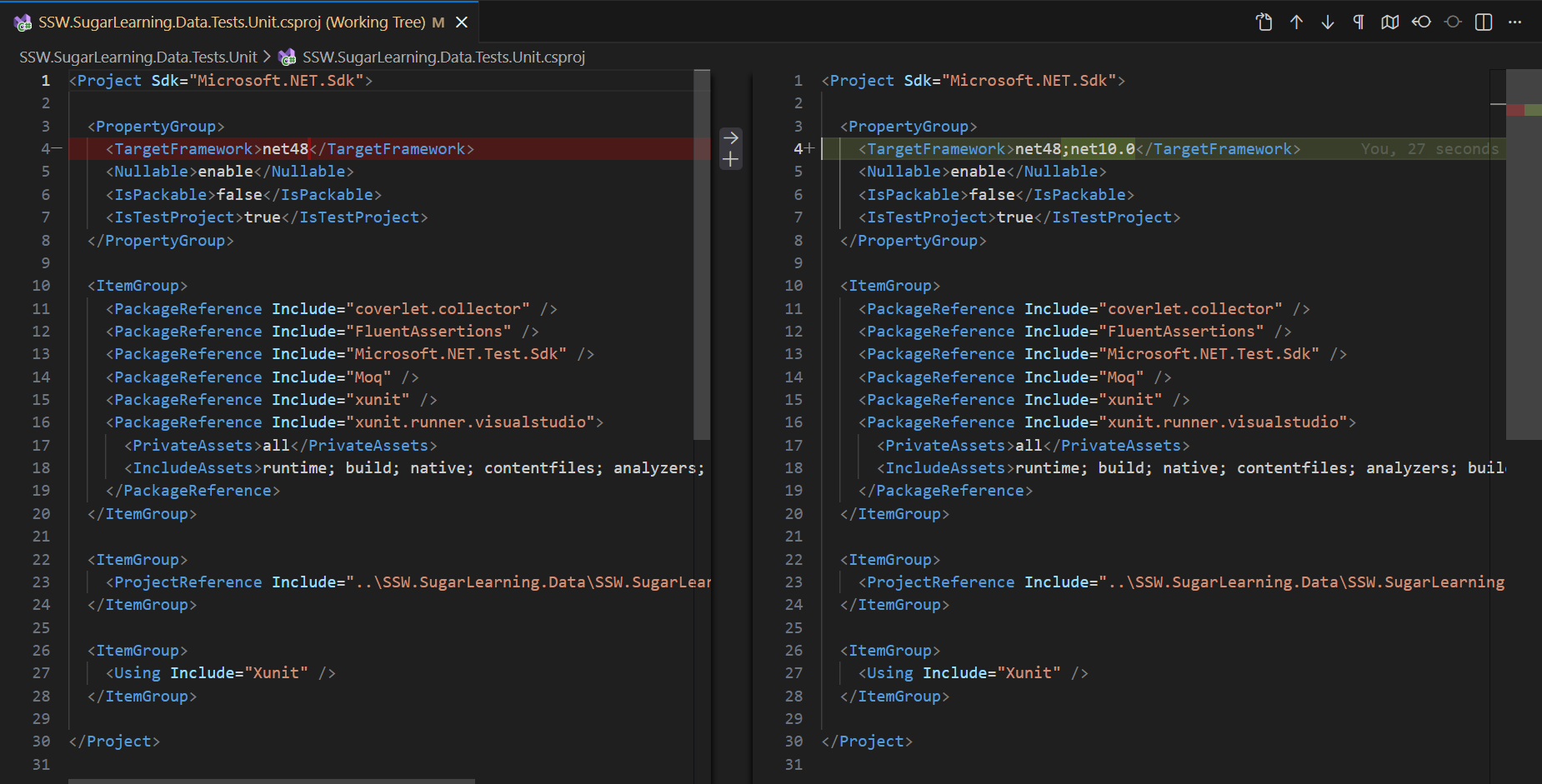
Figure: Multi-targeting .NET Framework and .NET 10
Watch for SYSLIB diagnostic warnings
As soon as you add the new .NET to your targetFrameworks, you'll likely encounter build warnings like:
SYSLIB0011: BinaryFormatter serialization is obsolete and should not be used.
These warnings are part of Microsoft's structured obsolescence plan. Each SYSLIBxxxx code identifies an API that has been marked obsolete due to security, performance or support issues.
Many of these APIs are removed completely in .NET 8+, so treating these as blockers early will save you from future runtime issues.
See the full list of SYSLIB warnings
Recommended:
- Fix them immediately or raise PBIs if the fix is non-trivial or complex
- Add
<WarningsAsErrors>SYSLIB*</WarningsAsErrors>to your.csprojfiles to stop deprecated APIs creeping back in - For stricter enforcement, consider using BannedApiAnalyzers
This makes sure progress isn't undone later by new usages of deprecated APIs.
Creating the migration backlog
At this point, ensure your project can target both the .NET Framework and the new target .NET. Some of the projects might not support both platforms right away and you can follow these steps to fix the issues and have a better understanding of how much work might lie ahead.
- Add the target framework to your project
- Compile to see what breaks
- Fix what is easy to fix
- Remember to commit changes after each fix to help your reviewers 😉
- Anything that is not easy to fix, create a PBI with details of the issue
- This allows another developer on your team to work on that PBI independently
- If you have a project that is able to compile at this point you can leave the new .NET TFM in your project and continue on to the next project
- If it does not compile, remove the new .NET TFM from the
TargetFrameworks, ensure it builds with the original .NET Framework TFM, and continue to the next project - Repeat these steps once the PBIs have been created for each project
By the end of this process, you'll have a much clearer view (and backlog!) of your path to the latest .NET version:
- PBIs for technical debt
- PBIs for architectural concerns
- PBIs for breaking changes
What's next?
While this guide aims to give you a high-level view of migrating your app, there are other some special considerations when dealing with complex applications and web apps. Check out these other rules: