Do you monitor AI cost and usage?
Loading last updated info...
AI tools dramatically increase productivity, but they also introduce variable usage costs. Without visibility into token consumption, API calls, and agent activity, teams may unknowingly generate significant expenses
What should be monitored?
Teams should track key indicators such as:
- Monthly AI bills (OpenAI, Anthropic, etc.)
- Token usage
- Number of agent runs
- API request volume
- High-cost workflows
This information helps teams optimise usage and ensure that AI remains a productivity multiplier rather than a financial burden.
Providing visibility through status updates
Instead of constantly wondering “Wait, which model am I using?” or “How much money did I just blow in the last 20 minutes?”, you can have those figures right there at the bottom of the screen - this is called the status line.
When using CLI AI tools, one of the easiest ways to keep track of your AI usage and costing is through the status line.
Customising the status line in Claude Code
Claude Code currently is the leading tool for customisation of the status line, with most other CLI tools preferring a dashboard UI. Some easy ways to customise your status line with Claude Code:
- goccc - A fast, zero dependency CLI cost calculator and status line provider for Claude Code

✅ Figure: Good example - A simple, yet effective status line using goccc
Tools for monitoring AI cost and usage
There are many tools out there for monitoring AI cost and usage, highly dependent on which tools you are utilising. However, knowing where and how to track your AI bills can save you from some unexpected costs!
Some of the different ways:
- Native CLI tools commands - Most CLI tools provide their own native way of checking cost and usage stats (i.e /stat for Claude Code and Gemini CLI or /status for OpenAI Codex CLI)
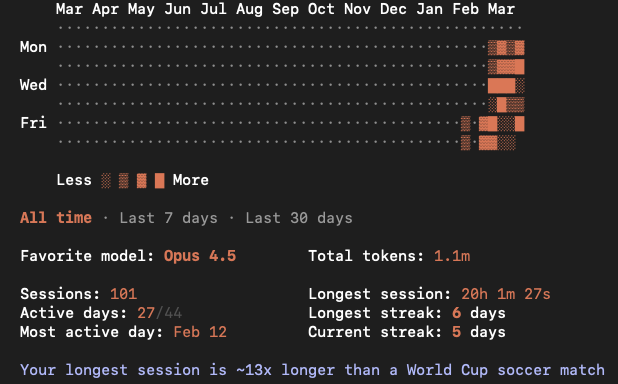
Figure: Running /stats in Claude Code
- Provider Dashboard - Most AI providers also offer dashboards that give a more comprehensive view of usage and billing. These dashboards are often the easiest way to observe usage for non-CLI tools (i.e Cursor, Windsurf)
- AI Observability Platforms - For production AI systems, teams may use dedicated AI observability platforms to track usage, costs, and model performance across applications (i.e LangSmith, Helicone, Langfuse)
- Custom Developer Tools - Smaller scale command line tools created by developers, for developers. Often gives the user more control and flexibility over the function of the tool.
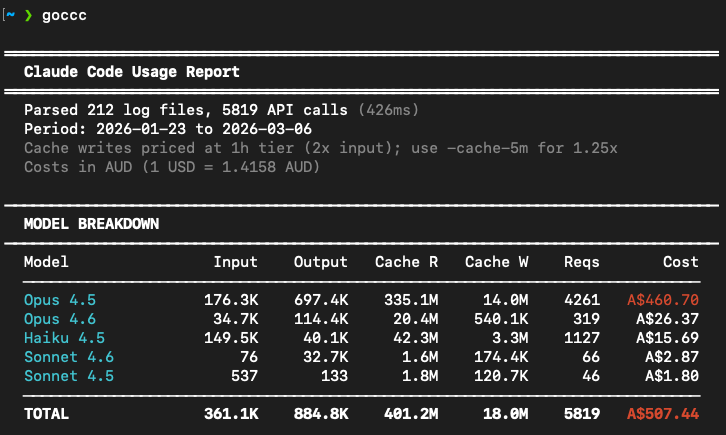
✅ Figure: Good example - Running goccc in the command line