Do you know how to use Playwright with your AI Agents?
Loading last updated info...
Playwright is Microsoft's end-to-end browser automation framework. It used to be about writing frontend tests. These days, it's so much more. By pairing your AI Agent with Playwright, you can give the Agent the ability to write tests, verify its own frontend changes in a live browser, heal flaky tests, and even automate repetitive web tasks.
Check out the 3 best ways of using Playwright with AI below!
Video: 3 Ways to Supercharge Playwright with AI Agents | Hark Singh | SSW Rules (18 min)
Why pair Playwright with an AI Agent?
Without access to a browser, Agents have to guess and assume what the UI looks like.
- It writes tests blindly
- It can't see the result of code changes and how they render on screen
- It can't understand why certain frontend tests fail or pass
In turn, AI can ship tests that break the moment they're run as well as building features that look or behave incorrectly.
By giving the Agent access to Playwright, we can bridge this gap, giving your Agent the power to build, run, and examine its own changes. This allows for:
- Automated UI testing - generating end-to-end tests for the frontend by exploring the layout of the app itself and self-healing the tests when certain selectors drift during development. See also: Do you do automated UI testing?
- Frontend development - allow the Agent to open the page that it just built, click through the page, and verify that the changes made work as intended before claiming that it is done
- Reproduce reported bugs - when a bug report comes in, the Agent can use Playwright to follow the reported steps, inspect the app state, and confirm the bug in a real browser. If the steps are incomplete, it can explore the flow to find a reliable reproduction path before proposing a fix
- Automation and scraping - have Agents drive multi-step web workflows (form fills, data extraction, scheduled checks, etc.) using the existing structured accessibility data for navigation and assertions, rather than driving from screenshots that break with the slightest UI change. Screenshots still have a place as evidence for humans (see below)
- Easy handling of popups and modals - it allows your Agent to see and interact with popups within the context of your own application and frontend tests
Development - Using Playwright for AI-assisted frontend dev
Most Playwright + AI content focuses on testing, but the more interesting day-to-day use case is the inner development loop. Without a browser, the Agent's "is it done?" check is just "it compiles." With Playwright (typically via the MCP), the Agent can open the page it just changed, click through it, and verify the behaviour the same way a human dev would refresh the browser.
This unlocks a few high-value workflows:
- Verify frontend changes inline - After editing a component, the Agent navigates to the page, captures an accessibility snapshot, and confirms the change actually rendered. Stops the "looks good to me, ship it" failure mode where the code compiles but the UI is broken
- Explore before editing - Before changing a flow the Agent doesn't know, it navigates the app to understand the current behaviour (e.g. "click through the checkout so you know what state I'm starting from"). Reduces blind edits to code the Agent has never seen run
- Deep-link inner loops - For changes buried behind login and several clicks, the Agent automates the navigation each iteration, instead of asking the human to manually click through after every save
- Component playground verification - Agent navigates Storybook, Histoire, or your component sandbox after a change and confirms each variant still renders correctly
- Network interception during dev - Agent uses Playwright's route mocking to test edge cases (slow API, 500 errors, empty states) without needing to touch the real backend
- Check acceptance criteria - For PBIs with UI changes, the Agent can use Playwright to verify the user flow against the Acceptance Criteria before merging. See also: Do you write Acceptance Tests to verify Acceptance Criteria?
Capture the evidence, not just the check
The verification loop above produces something worth keeping. When the Agent has confirmed the change in the browser, get it to take a screenshot or record a short video from that same session, then put the capture on the PR description and the Done comment. The reviewer sees the result without checking out the branch, and the Agent has already fixed whatever it found along the way.
Use the two outputs for different jobs:
- Accessibility tree - for the Agent's own assertions. It is deterministic and does not change when a font or animation does
- Screenshot or video - for the human reading the PR. It shows the result at a glance
See Do you get your AI agent to capture its own UI changes? for what to capture and where to put it.
How can you pair Playwright with an AI Agent?
There are a variety of ways that you can give your AI Agent access to Playwright, however, there are a few ways that are built and optimised specifically for AI Agents and those are what perform the best in terms of integration with AI Agents.
For more detailed information on the specific commands to use, checkout the Playwright Documentation
1. Playwright MCP server
The Playwright MCP works by exposing your browser to your AI Agent via the Model Context Protocol. Unlike other forms of Playwright, instead of taking screenshots of views and navigating it from there, it sends the page's accessibility tree (i.e. ARIA roles, labels, and states), which are deterministic, LLM-friendly, and allows users to avoid the cost of vision models.
Best for
- Stateful tasks: The Agent needs to explore an app across multiple turns (e.g. clicking around to figure out how to reproduce a reported bug)
- You're building an agentic workflow where the same browser session carries context between steps (e.g. "log in, add three items to cart, check out, verify the receipt email")
Trade off: higher token usage, because the page snapshot is part of the chat context every turn.
Playwright MCP is NOT a security boundary. By default, it can navigate to any URL that the agent asks for, and submit any form.
You should always scope it to safe origins, and never point it at production with real credentials.
2. Playwright CLI
The Playwright CLI driven by your AI Agent is the fastest and cheapest option for day-to-day test authoring, running, and debugging. In benchmarks, the same prompt run via the CLI uses fewer tokens than running it through the MCP.
Why is it token efficient?
- Results written to disk: the Agent runs a test, output goes to a file, and only the relevant lines come back into the chat context - unlike the MCP, which loads a full page snapshot every turn
- Independent bash commands per action: each action is a one-shot CLI call, no long-lived session to keep alive in context
Best for
- Stateless tasks: tasks such as writing a test, running a test, or debugging a failing test
- Example:
“I've just deployed some SEO improvements. Go to 5 random tina.io pages and check the heading hierarchy, SEO, and accessibility”
3. Playwright Test Agents (Planner, Generator, Healer)
These Playwright Test Agents are custom agents you can invoke from your AI tool of choice (e.g. @AGENT_NAME in Claude).
Playwright ships with 3 out of the box Agents that help wrap the test lifecycle. This is the recommended way of using Playwright with Agents, they are:
- 🎭 Planner - used to explore the app and produce a Markdown test plan that covers one or many scenarios and user flows, the plan itself is human readable but still accurate enough to drive test generation
- 🎭 Generator - used to take the Markdown test plan and produce executable Playwright tests. It also verifies that selectors and assertions live as it performs the relevant scenarios
- 🎭 Healer - automatically heals the tests created by the Generator Agent that fail, replaying the failing steps, inspecting the current UI, suggesting a patch to fix the tests, and rerunning until the test passes or the built-in guardrails stop the loop
Best for
- Complete end-to-end testing loop: As frontend tests are notoriously brittle and sensitive to change, the testing loop of plan —> generate —> heal, reduces the repetition and pain of having to fix frontend tests as they become outdated or broken.
Trade off: As the Test Agents are run with a specialised test-mcp, they are not suitable for general Playwright use cases such as automation or exploration.
CLI, MCP, and Test Agents are not mutually exclusive, the strongest workflow combines them:
- CLI: Stateless tasks
- MCP: Live exploratory work where the agent needs a stateful browser session
- Test Agents: Specialised lifecycle: plan → generate → heal
Mixing them gives the right tool for each job, lower token cost on tasks that don't need a live browser, and a faster feedback loop overall.
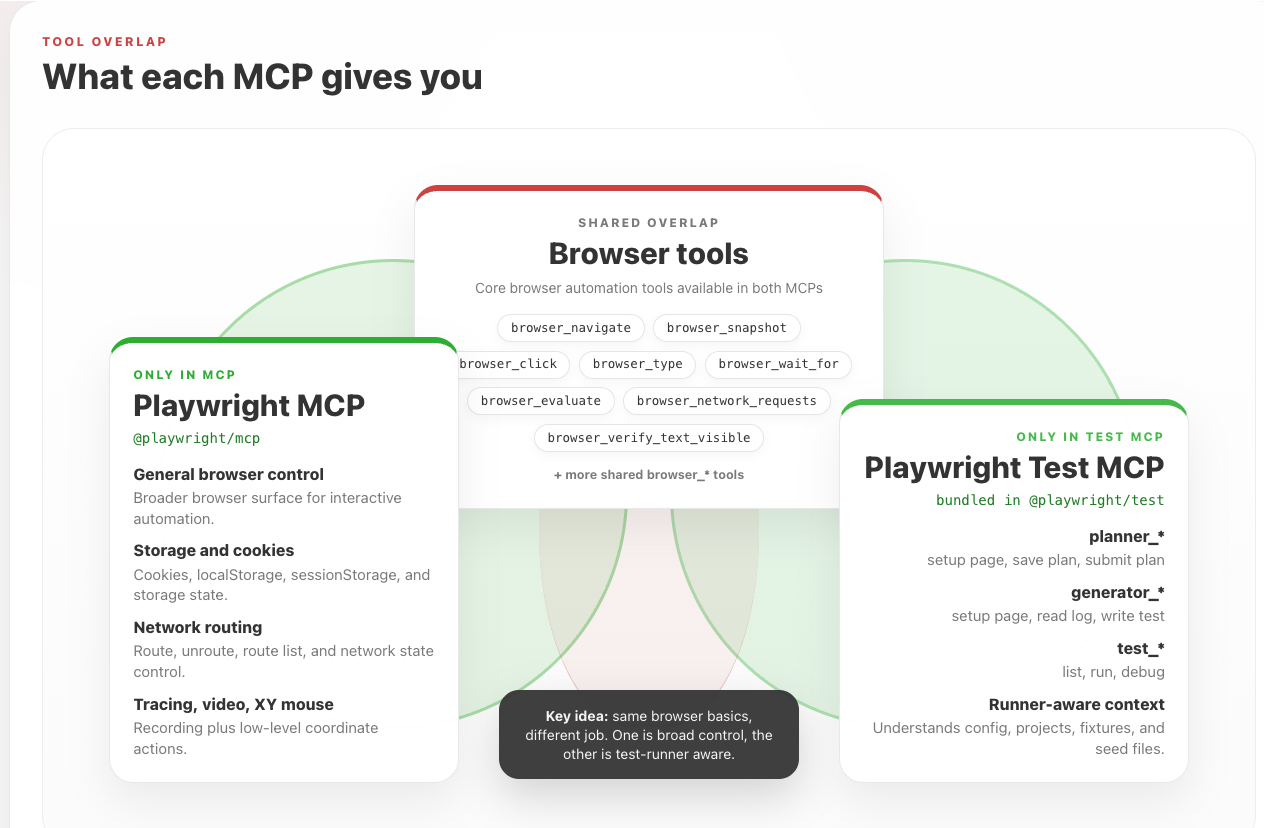
Figure: Playwright MCP and Playwright Test MCP share the core browser_* tools, but each adds its own specialised capabilities - one for broad browser control, the other for test-runner awareness