Do you review your AI coding plans?
Loading last updated info...
Measure twice, cut once. Before any non-trivial change, always create and review a plan with AI. An AI plan is only as good as the human review it receives. The Discuss step in the Plan → Discuss → Implement → Review workflow is where your domain knowledge and judgment provide the most value. See the SSW rule on AI-assisted development.
Reviewing the plan is what separates professional AI-assisted development from vibe coding.
Video: Claude Code Plan Mode Plugin - Plannotator (2 min)
Why plan review matters
Catching problems at the plan stage is dramatically cheaper than catching them after implementation (both in development costs as well as tokens):
- Wrong assumptions - The AI may have misunderstood requirements or made incorrect assumptions about your architecture
- Scope creep - The plan may include unnecessary changes that increase the scope of the change without you intending it to
- Better alternatives - You may have more domain specific knowledge and know of a more effective approach that the AI didn't consider
- Multiple iterations - Reviewing and refining the plan leads to much better outcomes than approving the first draft
Modifying a plan is cheap, re-implementing a feature is expensive.
The traditional approach
The original way to review AI plans is to discuss back and forth with your AI agent directly, such as in the terminal, or inside of your editor if you wanted to have more control by reading the raw PLAN.md file yourself.
Terminal - Discussing and iterating with your AI Agent
The simplest approach to reviewing the plan is directly inside of the chat interface with your AI Agent, describing the modifications to your plan that you want.
In the 'Data Access Layer' section, where you suggest adding a new repository class - instead, use the existing IUserRepository we already have. It already supports the query pattern you need.
Figure: Quoting the exact section and describing precisely what to change gives the AI enough context to act
Editor - Overview of the actual plan file itself
For more direct control over just reading summaries inside of the terminal, you can open the generated plan file (e.g. PLAN.md) inside your editor alongside the chat session with your agent. This gives you a visual overview of the whole plan at once.
- Edit manually - Revise the plan directly in the markdown file, then ask the AI to implement from the updated version
- Cursor - Built-in plan mode shows the plan inline; you can chat about specific sections directly without leaving the editor
Limitations
These methods work, but they have clear drawbacks:
- Hard to give targeted feedback on specific sections without copying and pasting chunks of text
- No structured way to annotate, comment on, or reject parts of the plan
- Difficult to track what changed between plan iterations
- Suitable for small plans only - larger plans become unwieldy
Tools that enhance plan review
A number of tools have popped up that give you a proper visual interface for reviewing and annotating AI plans, similar to how you would review a pull request on GitHub.
Plannotator (Recommended)
Plannotator provides a browser-based pull-request-style review UI - think GitHub PR review, but for AI plans. It makes structured, multi-round plan review practical for any plan size.
Key features:
- Inline comments on specific lines or sections (like GitHub PR review)
- Delete unwanted sections
- Replace or insert content
- Global comments for overall feedback
- Multi-round iteration - Deny with annotations → AI refines → re-review → approve
- Works with any AI agent - Claude Code, Codex, Copilot CLI, etc.
- Once approved, the AI builds based on the agreed, refined plan
Plannotator triggers automatically when the plan tool is used. See plannotator's documentation for more information
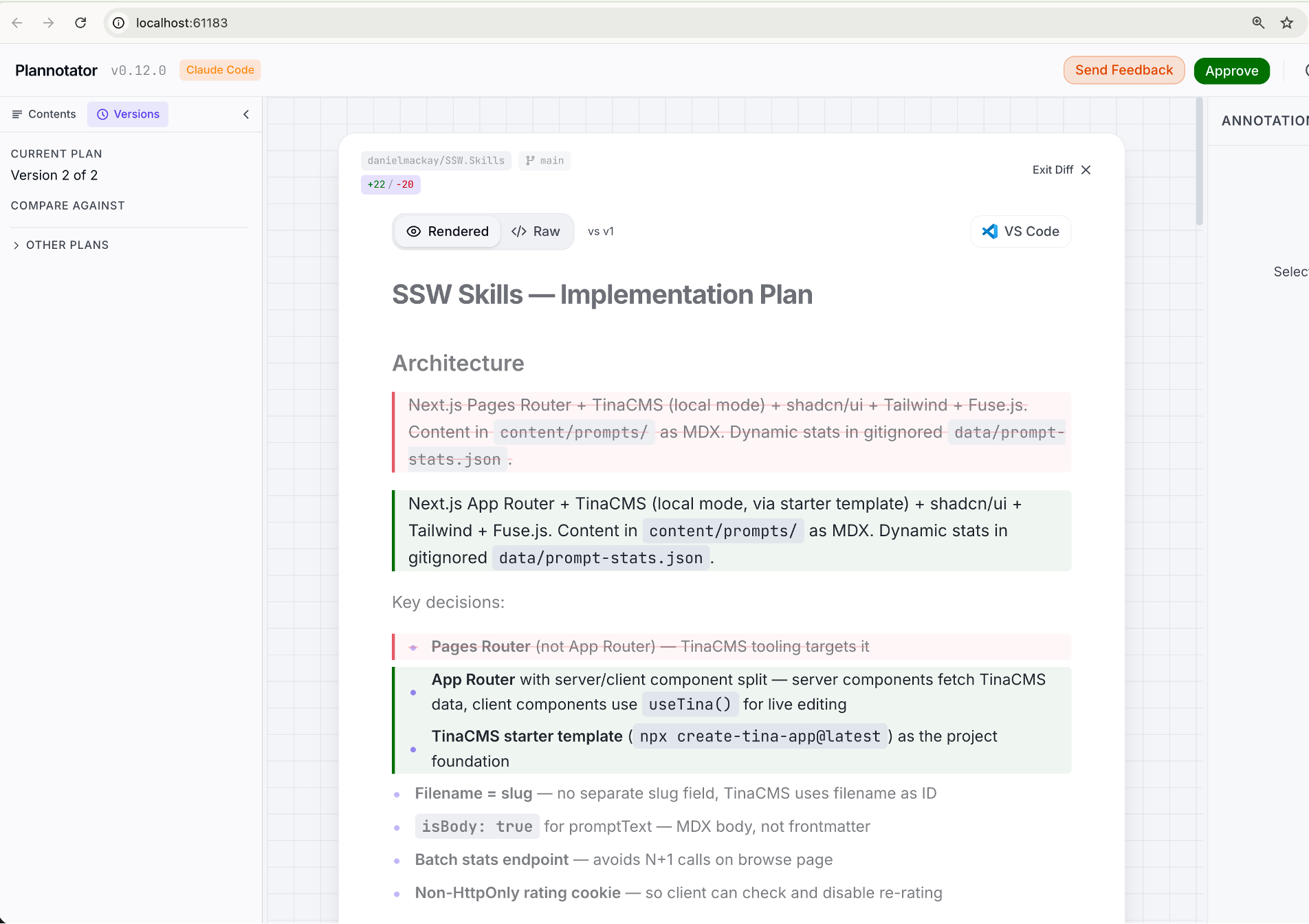
✅ Figure: Good example - Plannotator's diff view shows exactly what changed between plan versions after an AI revision
Review workflow with Plannotator:
- AI generates
PLAN.md - Plannotator opens automatically. The plan renders as an annotatable document
- Add an inline comment on the data access section: "This approach will cause N+1 queries - use batch loading instead"
- Submit as Send Feedback with overall comment: "Address the N+1 issue before proceeding"
- AI updates the plan based on annotations
- Re-review the revised plan
- Approve - AI begins implementation
✅ Figure: Good example - Plannotator enables precise, structured feedback with multi-round iteration until the plan is right
UltraPlan
UltraPlan bridges your local Claude Code CLI with Claude Code on the web. You kick off a planning task from your terminal, and it drafts the plan in the cloud while your terminal stays free. Once ready, you review, comment on, and revise the plan in a rich browser-based UI.
Key features:
- Inline comments - Highlight any passage in the plan and leave a comment
- Emoji reactions - React to sections to signal approval or concern
- Outline sidebar - Navigate between plan sections easily
- Terminal stays free - The plan drafts remotely so you can keep working
- Flexible execution - Approve to run on the web (auto-PR) or send the plan back to your terminal
- Launch via
/ultraplancommand, the keyword "ultraplan" in a prompt, or by promoting a local plan
Note: UltraPlan is currently in research preview (requires Claude Code v2.1.91+ and a Claude Code on the web account with a GitHub repo).
Claude Code VSCode Extension
The Claude Code VSCode extension has built-in plan review features. When Claude generates a plan in VS Code, it automatically opens as a full markdown document in an editor tab - not just a chat message.
Key features:
- Full document view - The plan opens in a dedicated editor tab for easy reading
- Inline comments - Add comments directly on specific sections of the plan to give Claude targeted feedback
- Approval workflow - Once reviewed, choose to execute in auto mode, review each edit manually, or keep planning with feedback
Limitation: Inline comments are freeform text feedback to Claude - there is no tracked resolution workflow like a GitHub PR review.
GitHub Copilot
GitHub Copilot lets you review a plan before any code is written, in VS Code and on GitHub.com:
- VS Code - The Plan agent opens the full plan in the editor, where you can edit it or add inline comments before you approve implementation
- GitHub.com - Ask Copilot cloud agent to propose a plan, iterate on it in the session, then have it implement on a branch and create a pull request
Comparison
| Terminal | Editor | Plannotator (Recommended) | UltraPlan | Claude Code VSCode | |
|---|---|---|---|---|---|
| Targeted line feedback | ❌ | Partial | ✅ | ✅ | ✅ |
| Multi-round iteration | ❌ | ❌ | ✅ | ✅ | ✅ |
| No copy-pasting needed | ❌ | ✅ | ✅ | ✅ | ✅ |
| Structured feedback to AI | ❌ | Partial | ✅ | ✅ | ✅ |
| Works with any AI agent | ✅ | ✅ | ✅ | ❌ | ❌ |
| Terminal stays free | ❌ | ❌ | ❌ | ✅ | N/A |
| Cost | Free | Free | Free | Research preview | Built-in |