If you still need help, visit our Access Database Upsizing consulting page and book a consultation.
What is it that makes a good software development consultancy? What sets one company completely above another? What makes a project completely successful?
Having spaces in table names necessitates the use of square brackets in all your code. e.g. [Order Details].[Order ID] instead of OrderDetail.OrderID. Spaces will also cause problems when you upsize to SQL Server later on... there is just no benefit.
Upsizing PRO will check this rule
They just add characters. Surely Order_Details.Order_ID is no better then OrderDetail.OrderID.
- Access2000: Hidden tables are not shown in the list of tables available for upsizing regardless Tools->Options->View
- All versions of Access: Tables created by ADODB ("CREATE TABLE ...") are not shown at all
If Access linked table does not have an index to uniquely identify rows, the whole table will be read-only
Upsizing PRO will check this rule
When you upsize a table, the Upsizing Wizard tries to "map" Visual Basic for Applications functions in your DefaultValue and ValidationRule properties to an equivalent TSQL function. If this attempt is not successful, the validation rule or default will be skipped by the Upsizing Wizard. Consider the following:
ValidationText is upsized only if its accompanying ValidationRule is successfully migrated. Avoid the use of apostrophes ( ' ) in your validation text because they will be displayed as quotation marks ( " ) when upsized.
SQL Server and MSDE have no equivalent to the Format or InputMask property in Microsoft Access 2000. As a result, neither property will be upsized when it is encountered by the Upsizing Wizard, nor will any errors be reported in the Upsizing Report. All formatting displayed as a result of using the Format property will be lost when the data is migrated to SQL Server or MSDE.
The Caption property is ignored by the Upsizing Tools. The true column name of a field will always be upsized, regardless of what the caption for that field may read.
- The value that you select for the AllowZeroLength property determines whether zero length strings ("") may be inserted into a field. Currently, the Upsizing Wizard does not create a constraint or trigger against an upsized table to enforce this rule. Instead, you must manually create a Check Constraint on the columns once the upsizing process is complete.
- Still an issue in Access 2000 -2003
Upsizing PRO will check this rule
The Required property of a field determines whether the field will allow null values after upsizing. If Required is set to Yes in Microsoft Access, the upsized field will not allow null values. If Required is set to No, null values are acceptable.
In SQL Server a field with a unique index cannot contain Null values.
Upsizing PRO will check this rule
Don't use sys as a prefix for Access tables. Some developers use this for system tables etc. SQL Server uses tables with this prefix and it becomes confusing. We recommend system tables start with zs - E.g. zsUsers
We always use two tables for tracking versioning information:
- _zsDataVersion tracks the schema changes, and which update script we are up to. This helps tremendously in determining which version of the scripts are still required between development, test, and production databases.
- _zsVersionLatest tracks which version the front-end client should be. This allows us to give a warning to (or even deny) users who are connecting to the database while not using the right version of the front-end client.
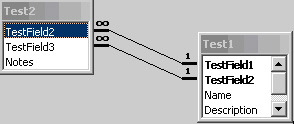
Figure: Multiple Foreign Key Relationships Different Names
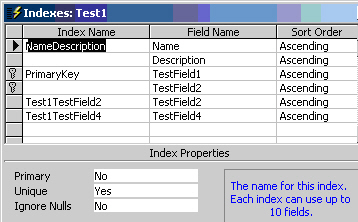
Figure: A table with fields with multiple key indexes where the total size of the fields adds to more than 450 characters
The Upsizing Tools do not try to upsize every type of Microsoft Access query that you may have in your Access (Jet) database. The following varieties of queries will not upsize:
The Upsizing Tools do not try to upsize Microsoft Access query that includes VBA function names that don't have their equivalent Transact-SQL functions. The upsizing result will depend on Microsoft Access version (2000/2002/2003) and SQL Server Version (2000/2005). The following varieties of queries will not upsize:
The MS Upsizing Wizard cannot upsize Microsoft Access queries containing:
- EXISTS <> FALSE/TRUE or
- EXISTS = FALSE/TRUE
For example, the following query will not be upsized:
One of the more common complaints about Microsoft Access databases is that some screens are slow to respond. This is often misinterpreted as poor performance on the part of the database engine but the real culprit is usually the screen design.
Here are a few techniques that developers can use to improve screen responsiveness.
When adding a new record should we use ADO rst.AddNew or a SQL INSERT statement?