Do you know you can update or delete chat messages with mistakes?
Loading last updated info...
Fix mistakes in chat messages you've sent. Edit or delete small slips, and strike through anything someone may have already read.
Typos and messages sent in error - Edit or delete
Edit a typo. If you sent a message to the wrong chat or by accident, delete it.
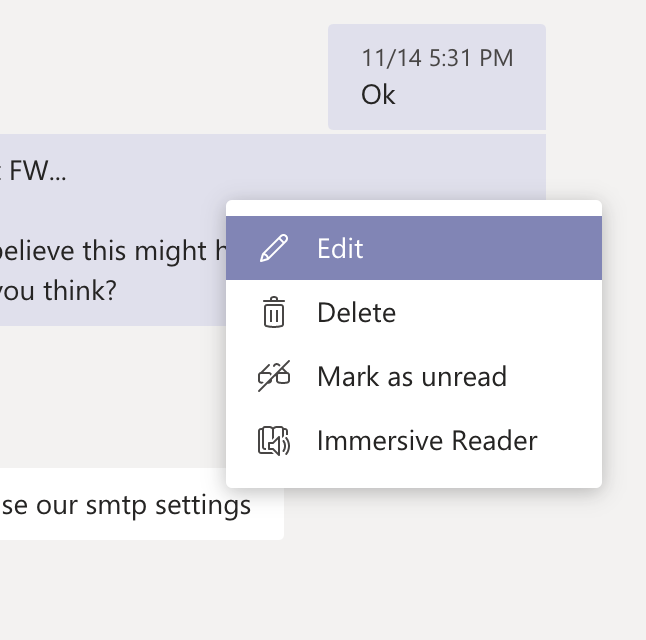
Figure: "Edit" and "Delete" are options after you send a message
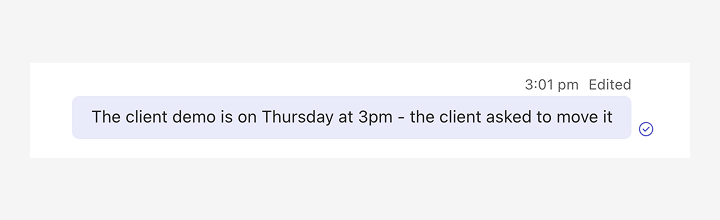
🙂 Figure: OK example - The sender corrected the time from "2pm" to "3pm", but those who read it can miss the change
Wrong or outdated information - Strike it through
If someone may have already read the wrong information, strike it through instead of overwriting or deleting it. Readers see what changed, and earlier replies still make sense. In Teams, use the formatting toolbar or Markdown.
If the whole message no longer applies, like a question you've since answered, strike it through and add a note such as "Found it in the wiki".
Option A - Small changes: Correct it in the same message
Strike through the wrong text and add the correction next to it.
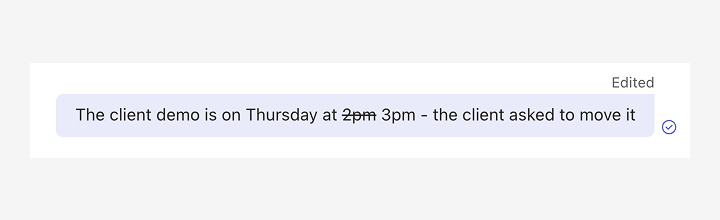
✅ Figure: Good example - The sender struck through the old time and gave the reason for the change
Edits don't notify anyone. If the correction changes the meaning, let people know you updated the message.
Option B - Big changes: Post a v2 message
If most of the message changes, strike through the original and post the correction as a new message starting with "(v2 - reason)". The new message notifies everyone.
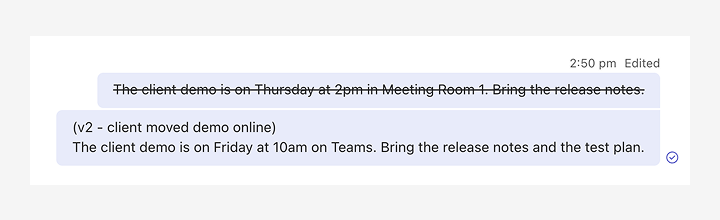
✅ Figure: Good example - The sender struck through the original and posted a v2 with the reason for the change