Do you use AI artifacts to communicate ideas to stakeholders?
Loading last updated info...
Instead of sending a client a deck or a PDF, ask the AI for a live page - a clickable screen, a cost calculator, a dashboard over the client's own numbers - and share the link. The client clicks through and answers their own "what if" during the call 🚀
Video: Anthropic Just Dropped Claude Code Artifacts (endless possibilities) (9 min)
What is an AI artifact?
An artifact is a working page the assistant builds and renders beside the chat. It is not a picture of a screen or a dashboard. It runs and it:
- Responds - Stakeholders click through the flow instead of imagining it from a flat image
- Changes mid-sentence - "Make that wizard 2 steps instead of 4" is a 30-second edit, not a backlog item
- Ships as a link - Publish it and the GM who missed the call opens it on their phone
- Takes their data - Paste a sample export or a photo of the workshop whiteboard and the artifact is built on the thing they recognize
Every vendor has the same idea under a different name - Anthropic calls them Artifacts, OpenAI calls them Sites, Google calls it Canvas.
Take a cloud spend review. The data is the same in both cases. What changes is whether the client can read it.
{"subscription": "Northwind Traders - Azure","period": "2026-03-01/2026-08-31","budgetMonthlyUsd": 114000,"rows": [{ "resource": "nwt-prod-app-plan-p3v3", "workload": "App Services", "env": "Production", "aug": 31400, "jul": 28010 },{ "resource": "nwt-sql-mi-prod-01", "workload": "SQL & storage", "env": "Production", "aug": 24800, "jul": 23006 },{ "resource": "nwt-prod-aks-nodepool", "workload": "App Services", "env": "Production", "aug": 18900, "jul": 18138 },{ "resource": "nwt-uat-app-plan-p2v3", "workload": "App Services", "env": "Non-production", "aug": 14200, "jul": 10245 },{ "resource": "nwt-storage-archive", "workload": "SQL & storage", "env": "Production", "aug": 8600, "jul": 8784 },{ "resource": "nwt-egress-apim", "workload": "Networking", "env": "Production", "aug": 7900, "jul": 7221 },{ "resource": "nwt-dev-aks-nodepool", "workload": "App Services", "env": "Non-production", "aug": 6400, "jul": 5259 },{ "resource": "nwt-log-analytics", "workload": "SQL & storage", "env": "Production", "aug": 5100, "jul": 5010 }],"monthlyTotalsUsd": { "mar": 98400, "apr": 104100, "may": 108900, "jun": 116200, "jul": 125400, "aug": 133600 },"reservedInstanceSavingUsd": 18400}
❌ Figure: Bad example - We used to show clients this. The numbers are all there, and nobody in the room can find the one that matters
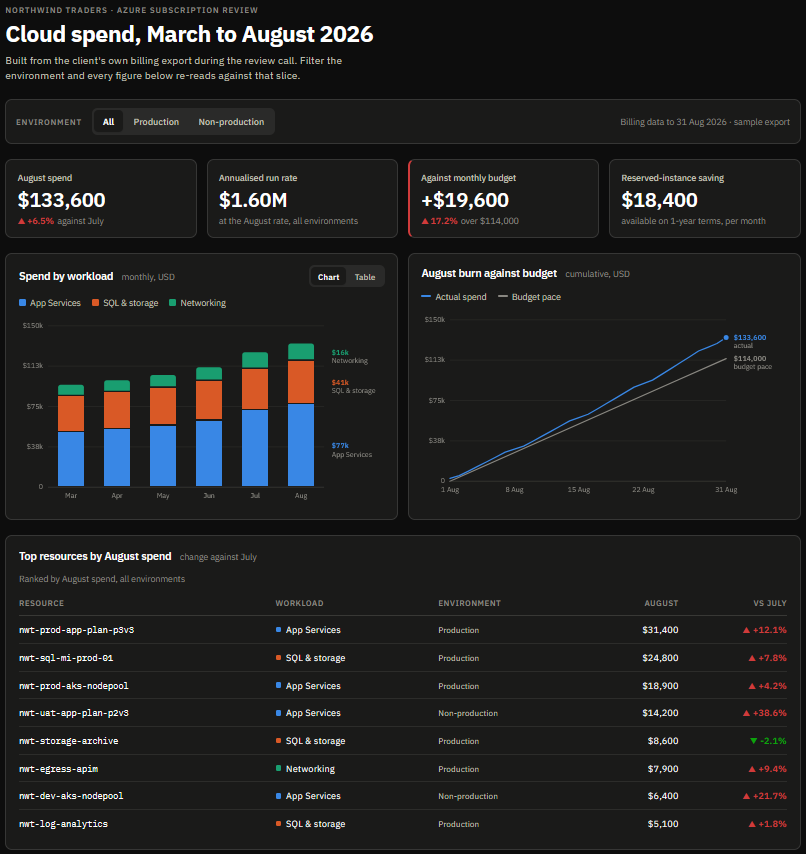
✅ Figure: Good example - Now we show them this. The same export as an artifact, so the client filters by environment and sees the overspend during the call
Why do artifacts beat static deliverables?
Because a document can only show what you already decided. An artifact lets the room decide. Take the most common case - showing a screen that does not exist yet.
Without an artifact - You present a Figma wireframe of the approvals screen. The GM asks what happens when a request is rejected twice. You write it down, mock it up on Thursday, and book another meeting for the following week.
❌ Figure: Bad example - Static deliverables turn every stakeholder 'what if' into another meeting
With an artifact - Same meeting, but the approvals screen is live. The GM asks the same question. You type it into the chat, the screen updates in under a minute, and they click the rejected path themselves before the call ends.
✅ Figure: Good example - A live artifact lets stakeholders answer their own 'what if' during the call
What should you turn into an artifact?
Almost anything you currently send as a PDF, a slide, or a spreadsheet:
| What you send today | What you could send as an AI artifact |
|---|---|
| Wireframes and UI mockups in Figma | A clickable screen the client drives themselves |
| A hosting options comparison table | A cost calculator with a user-count slider, so they watch the Azure bill move |
| An estimate and roadmap in a spreadsheet | A timeline where ticking scope items moves the go-live date |
| Architecture diagrams you redrew after the workshop | A sequence or C4 diagram built from the whiteboard photo and edited live on the call |
| A 40-page handover Word doc | An interactive explainer wired to the config they actually have |
| A monthly report PDF | A dashboard over their own sample export, filtered in front of them |
| A plan for a PBI written in the ticket | A page the coding agent builds from the repo, showing the approach, the files it touches and the open questions, sent to a senior dev before you start |
The roadmap is the one to try first. Scope conversations stall because "if we drop SSO, when do we ship?" is a question nobody can answer in the room. Build the timeline as an artifact with a checkbox per feature and the answer is a click. The client stops negotiating against your estimate and starts making trade-offs against their own deadline.
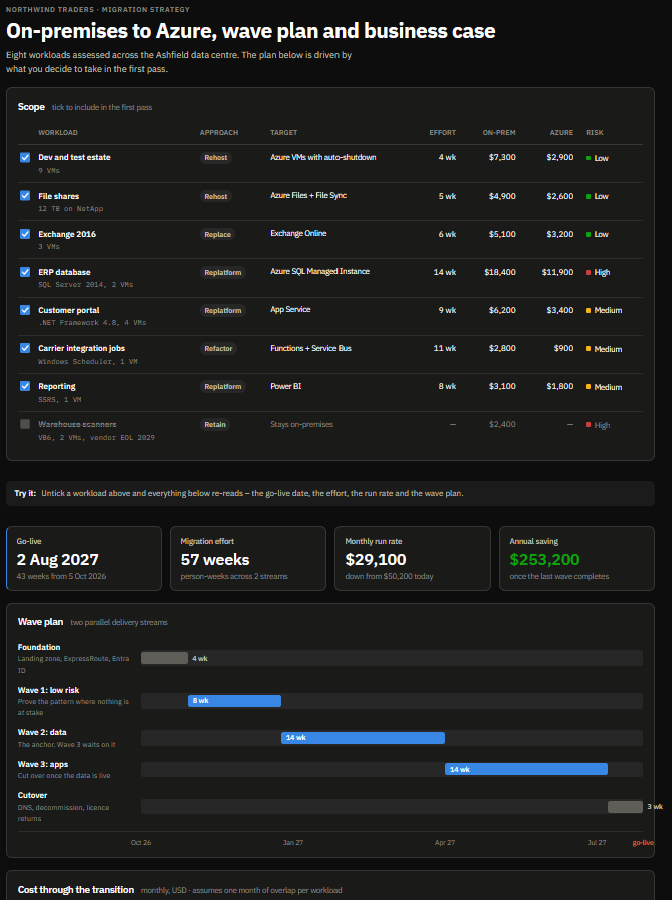
Figure: Unticking a workload moves the go-live date and the annual saving in front of the client, so scope becomes their trade-off rather than an argument about your estimate
Which tool should you use?
Whichever one your client already pays for. The four big assistants all do this now, and the differences that matter are where the thing gets hosted and who can open the link.
| Tool | Vendor | Best for | Sharing |
|---|---|---|---|
| Claude Artifacts ⭐ | Anthropic | Interactive pages and apps built inside the conversation, or from a coding session with Claude Code | Publish to a link, and the viewer needs no account |
| ChatGPT Sites | OpenAI | Hosted web apps with storage, access controls and a database | Every deploy gets a production URL. Still in public beta |
| Gemini Canvas | Docs, dashboards and apps, when you want the code back | Share link, or export the code to GitHub | |
| Copilot Pages | Microsoft | Collaborative documents inside Microsoft 365 | Shared through Teams, Outlook and the Microsoft 365 app |
Copilot Pages is the odd one out. It is a shared document you and Copilot edit together, not a page that runs, so it fits the handover doc and the options paper but not the clickable prototype.
This corner of the market moves fast, so check the vendor's own docs rather than trusting a comparison you read six months ago. OpenAI's equivalent was Canvas until mid-2026, when it was dropped from the current GPT-5.5 models in favor of Sites, with writing and code moving inline into the chat.
Don’t start a client meeting with nothing to react to
Before the meeting, create a rough first version of whatever you’re discussing - a mockup, proposal, process, etc. It does not have to be correct.
The reason is that people usually find it easier to say, “That part of the UX is wrong; move the approver after the manager,” than to answer broad questions like, “How should the approval process work?”
So instead of spending 20 minutes asking client requirements questions, you show a mockup or proposal and let the client correct it. Their corrections quickly reveal what they actually want.
In simple terms: give people something to edit, not a blank page to describe.
Tip: Use the client's real data. Artifacts are private to you until you share them, so building one on their real export is no different from opening that export on your laptop. Never publish an artifact with real data to a public link.