Do you use Group Policy to enable auditing of logon attempts?
Loading last updated info...
It is important as a Network Administrator to know when and where failed login attempts are coming from. Through Group Policy you can enable "Audit logon events".
- Create a group policy called 'Logon Auditing Policy'
- Right click on 'Logon Auditing Policy' and click on Edit to bring up Group Policy Management Editor
- Select 'Audit account logon events' from Computer Configuration | Policies | Windows Settings | Local Policies | Audit Policy and set to Success, Failure
- Select 'Audit logon events' from Computer Configuration | Policies | Windows Settings | Local Policies | Audit Policy and set to Success, Failure
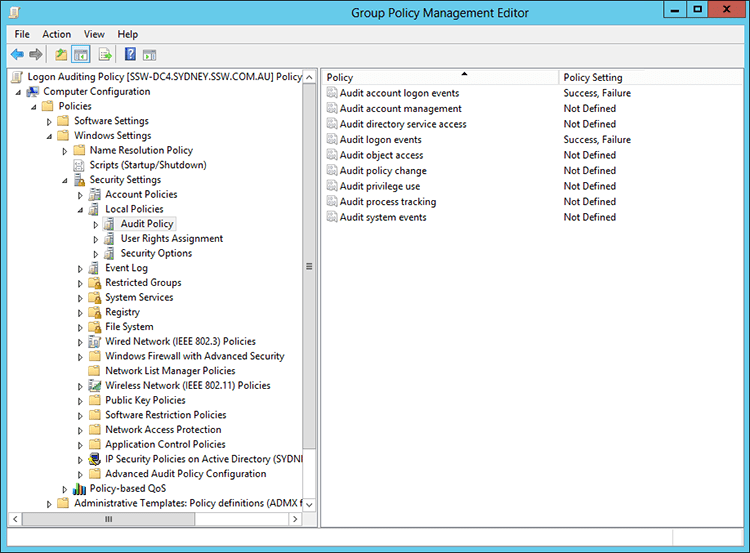
Figure: Select 'Audit logon events'
- Select 'Audit: Force audit policy...' from Computer Configuration | Policies | Windows Settings | Local Policies | Security Options and set to Enabled
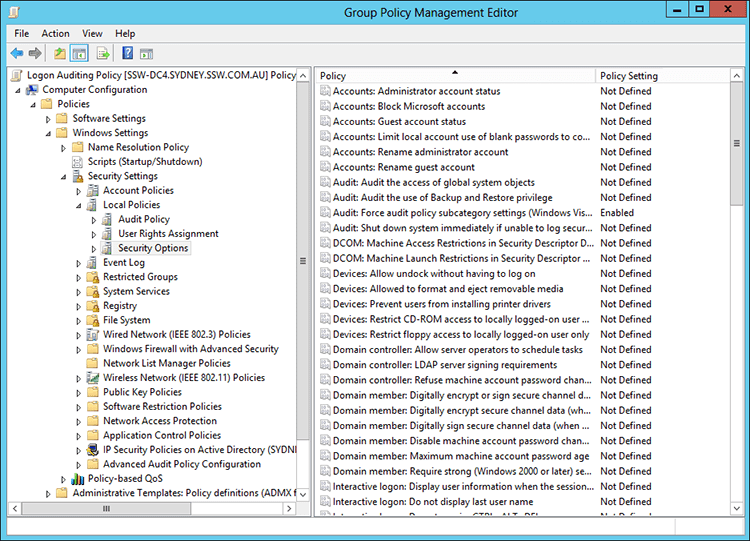
Figure: Select 'Audit: Force audit policy...'
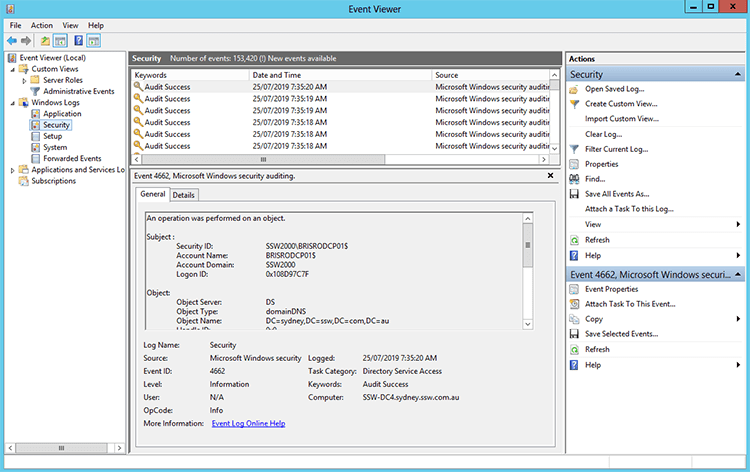
Figure: Successful and Failed login attempts will now appear in Event Viewer | Security
Now when you will have access to seeing success/failed login attempts on user accounts, these can then be captured and audited with your own internal process or a third party application such as Whats Up Gold, see: Do you monitor failed login attempts?