Do you 'zz' old files rather than deleting them?
Loading last updated info...
When you regularly create new releases of an application or new versions of a document, files will inevitably become outdated. Rather than deleting them, put a 'zz' at the front of the filename. These old versions should not be deleted straight away - it is just an unnecessary risk! The zz'd files can remain there until you need more space, then you should delete them.
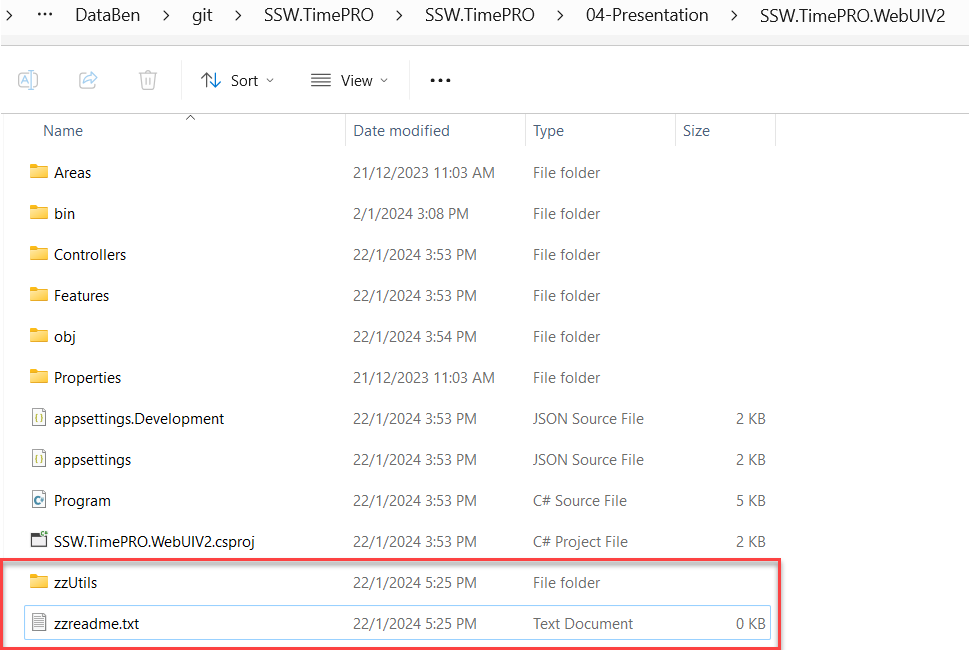
Figure: 'zz' your files rather than deleting them! Alternatively add a folder named zz and move the outdated files into the new folder
Warning: You should not zz if you are using source control.
Tip: Use a follow up to remind yourself to delete it after a reasonable amount of time.
Videos versioning - Using 'zz' on YouTube
When uploading to some video hosting sites, like Vimeo, you can update a video by replacing the original video while keeping the same URL and view count.
In YouTube an uploaded video can't be replaced, so to create a new version of a video it will be uploaded as a new video with a new URL.
So that there are no broken or missing links, the video status is set to "unlisted", and we use the 'zz' process.
Once a new version of the video is ready to be uploaded, do the following:
New approved version:
- Upload the new version and set its visibility to "public"
- Playlists - Add it to every playlist the old version was in
Tip: If a video isn't approved and ready to be public (e.g. Waiting for approval), avoid adding it to playlists.
Old version:
- Title - Add "zz" at the beginning of the title
- Description - Add a link to the latest version at the top of the description
- Visibility - Set its visibility to "unlisted"
- Playlists - Remove it from every public playlist
Warning: Unlisted doesn't mean hidden. A 'zz' video left in a public playlist can be found by anyone browsing the playlist, and viewers see an outdated or duplicate video. See Do you know that unlisted YouTube videos can still be found by the public?
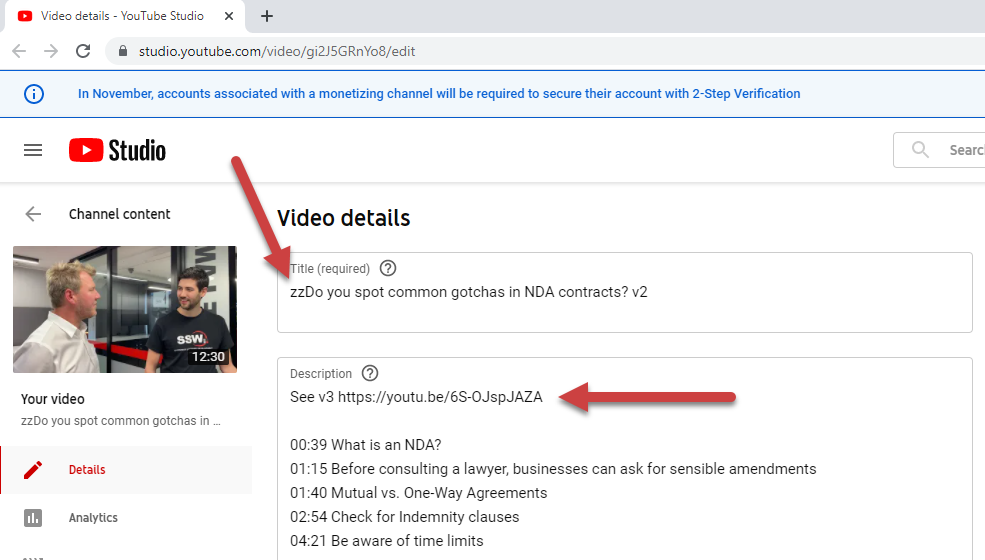
✅ Figure: Good example - Good example of the 'zz' process for YouTube videos
'zz' videos for viewers
When you see ‘zz’ in the title of the video description, it’s important to know how to access the latest version of the video so you're not watching old content.
On YouTube click the ‘New Version’ link in the description.
Figure: Accessing the latest video from a zz'ed video
Not ready to 'zz'? Use 'yy'
Other systems are used that are less aggressive than this 'zz' rule.
- In code, many programming languages let you mark types and members as "obsolete" or "deprecated" - anyone who still uses them gets a compiler warning
- In HTML/Markdown content, the keyword "deprecated" is often used
Both allow for some backward compatibility. In these cases, use 'yy' instead.