Wise for Windows Installer
There are two ways of creating a setup installation.
-
The old way is via a script-based system, which is basically a
batch file system, and defines step by step what is required (a
process-focused approach). Usually this builds a setup.exe file.
-
The newer way is Microsoft's MSI format, which focus on what
needs to be installed (and then how to install them). The new
MSI format allows for operations such as repairing a broken
installation without re-installing the entire application. Also
each installation can be treated as a transactional process
where failures can be rolled back object by object.
Wise and InstallShield both offer commercial products and support
for the old script-based approach and the newer MSI approach. We
choose Wise over the InstallShield offerings because Wise is
traditionally easier to use.
If you visit these company's websites, you would notice that they
both have a confusing amount of installation products. There are
even wizards to help you choose which product is suitable for you!
We spend a bit of time evaluating between different installation
systems and products, and summarize our requirements and findings
here.
1. Wise for Windows Installer (recommended)
-
There are supports for importing from .NET projects and
solutions, or wise script projects. These can be helpful to kick
start your installation file.
-
Wise products all have Standard, Professional and Enterprise
editions. We decided on the Professional version, as we want the
'Wise Update' feature, which is not available in the standard
edition. The enterprise edition has additional
software/setup files/merge module repository suitable for very
large enterprise-wide installations, which we find will probably
not be useful for us.
Wise product comparisons

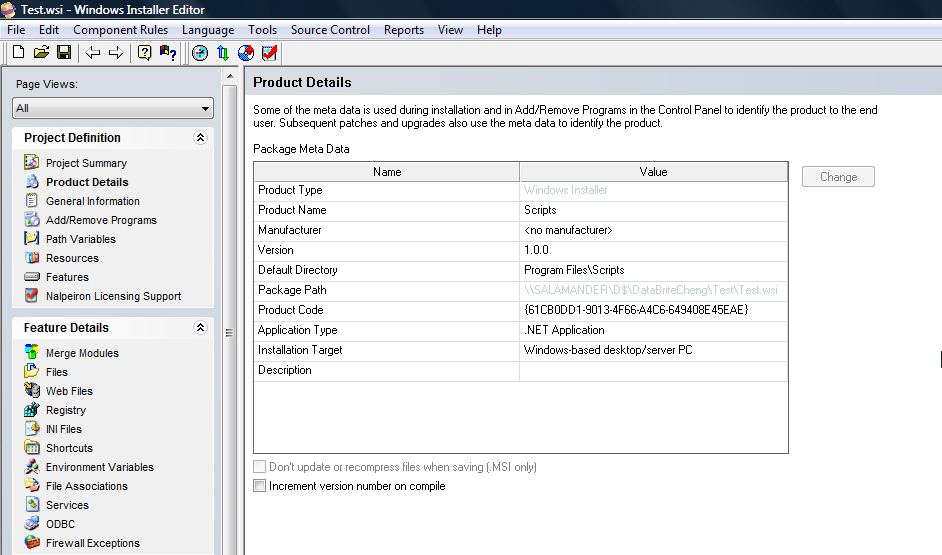
Figure: Filling in the Product Details with the Wise for Windows
Installer
Wise for Windows Installer Web Site
2. Wise for Visual Studio.NET
-
The user interface and functionality are exactly the same as the
Windows Installer. This particular Wise product is integrated
into Visual Studio.NET. It is useful for scanning dependencies,
and update project assemblies. Also, the WSI project file can be
included in the .NET solution.
-
The VS.NET integration was also the reason we didn't choose this
product, we didn't want a setup software that requires VS.NET to
run, nor do we necessarily want people without the plug-in
getting a warning when opening a solution with a WSI
project. Also, when we start using newer versions of
VS.NET (or beta), we don't want the setup program to stop
working.
3. Nullsoft Scriptable Install System (NSIS) Recommended by
Scott Hanselman
NSIS (Nullsoft Scriptable Install System) is a professional open
source system to create Windows installers. It is designed to be
as small and flexible as possible and is therefore very suitable
for Internet distribution.
Nullsoft Scriptable Install System Website
4. Windows Installer XML (WIX) Recommended by
Chris Kinsman
The Windows Installer XML (WiX) is a toolset that builds Windows
installation packages from XML source code. The toolset supports a
command line environment that developers may integrate into their
build processes to build MSI and MSM setup packages.
Windows Installer XML Website
5. Macrovision FLEXnet Installshield
InstallShield comes with time saving InstallScript enhancements,
allowing you to quickly and easily customize any part of your
installation, including the user-dialog sequence, file transfer,
reboot and even uninstallation. Possibly the best feature of
InstallShield is its support for the latest beta of Microsoft
Windows Vista, including Internet Explorer 7, Windows Installer 4
and other exciting new technologies. This means you can start
working with Vista now, by building your installation to be
compatible with the current beta. InstallShield also minimizes
reboots through the Restart Manager and gives you more direct
control of setup prerequisites.
Macrovision FLEXnet Installshield Website
Please be aware that after our own trials of a number of setup
package creation applications, at SSW we choose to use Wise For
Windows Installer for all of our Windows projects' setup files.
Note
: That for
web
projects we avoid elaborate setup packages altogether. See our
Rules To Better Setups
for our reason why.