would you like your software to be considered for this list?
Give us your details
.
-
NetTiers (via CodeSmith) for .NET Code Generation
.netTiers
is an open source set of templates for the
CodeSmith
code generator. It follows Microsoft's patterns and best practices
guidelines to generate a customized, layered, application
architecture for your database (we call it "maintenance pages".
See our rule on
maintenance pages
).
Choosing a code generator that's right for your needs involves a
reasonable amount of consideration. You should think about things
like:
-
ability to alter templates in a familiar environment (such as
.xsl)
-
the code output is of good quality and adhering to your
coding standards
-
it generates a layered architecture to support extendable
projects
-
it is easy to regenerate and compile the code output (see our
regenerate standard
)
Other code generators that we have used in the past include:
-
Jetbrains ReSharper
ReSharper was created with the single purpose in mind: to increase
the productivity of C# developers. It comes equipped with a rich
set of features, such as intelligent coding assistance, on-the-fly
error highlighting and quick error correction, unmatched support
for code refactoring, and a whole lot more. ReSharper's tight
integration with Visual Studio .NET provides quick and easy access
to all of its advanced features right from the IDE.
- Error Highlighting
- Error Quick-fixes
- Refactoring Support
- Live Templates
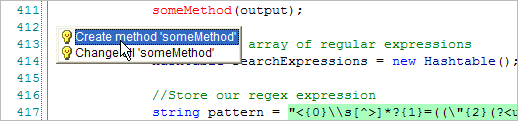
Figure: Inline error highlighting and fixes
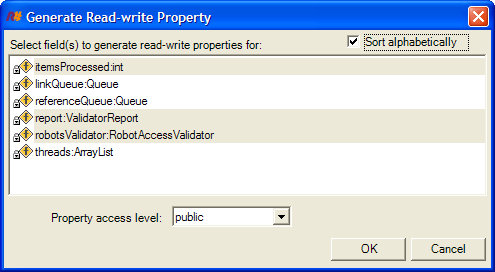
Figure: Code generation
-
Microsoft FxCop
FxCop is a code analysis tool that checks .NET managed code
assemblies for conformance to the Microsoft .NET Framework Design
Guidelines. It uses reflection, MSIL parsing, and callgraph
analysis to inspect assemblies for more than 200 defects in the
following areas:
- Library design
- Localization
- Naming conventions
- Performance
- Security
-
SSW Code Auditor
As a project or company grows, managing code standards throughout
your team becomes virtually impossible. But consistent code is
crucial to future development and maintenance. Built in C#, SSW
Code Auditor lets you take control of your code and automatically
review your web apps and projects - giving you more opportunity to
spend time where it really matters.
-
NUnit
NUnit is a unit-testing framework for all .NET languages.
Initially ported from
JUnit
, the current release, version 2.2, is the fourth major release of
this xUnit based unit testing tool for Microsoft .NET. It is
written entirely in C# and has been completely redesigned to take
advantage of many .NET language features, for example custom
attributes and other reflection related capabilities.
-
Jetbrains dotTrace Profiler
If you are looking to improve the performance of your .NET
application, and don't know where to start, you need this tool.
The dotTrace .NET Profiler from Jetbrains is an invaluable tool to
quickly determine where your application is slowest and which
methods are in dire need of optimization. Red-Gate's ANTs profiler
offers similar functionality. However, we have found .NET
profilers reports allow the developer to more quickly pinpoint
bottlenecks in code.
-
NDoc
NDoc generates class libraries documentation from .NET assemblies
and the XML documentation files generated by the C# compiler (or
an add-on tool for VB.NET such as
VBCommenter
).
NDoc uses add-on documenters to generate documentation in several
different formats, including the MSDN-style HTML Help format
(.chm), the Visual Studio .NET Help format (HTML Help 2), and
MSDN-online style web pages.
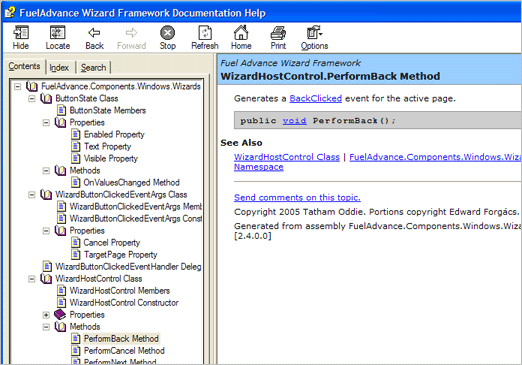
Figure: Rich CHM files
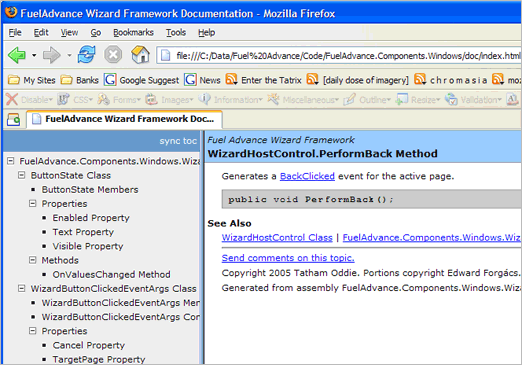
Figure: MSDN-online style webpages
NDoc

-
Sandcastle
Sandcastle, created by Microsoft, is a tool used for creating
MSDN-style documentation from .NET assemblies and their associated
XML comments files.
Sandcastle is command line based and has no GUI front-end, project
management features, or an automated build process. However
several Sandcastle users have created scripts and tools that
automate the documentation build process, e.g.
Sandcastle Help File Builder
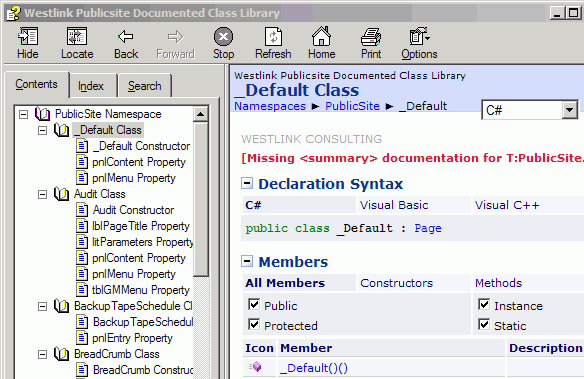
Figure: Rich CHM files
-
C# to VB.NET converter
Here is a tool to convert C# code to VB.NET. The tool is available
either as a Web site or an add-in for the VS IDE. Its available
here: Weve found that its extremely useful for VB developers that
struggle when they can only find C# examples/snippets.
-
VB.NET to C# converter
This is the best converter currently available for VB.NET to C#
conversions and has won many "best-of" awards. This can be found
at the link below
Figure: The VBConversion Converter
VB Conversions - VB.NET to C# converter
Here is a tool to convert VB.NET code C#. The tool is available
for Offline Use. Its extremely useful for C# developers that
struggle when they can only find VB.NET examples/snippets. This
Converter is still under testing, there has been a few flaws.
Figure: VB.NET to C# converter
BabbelFisken - VB.NET to C# converter
-
Combined VB.NET to C# and C# to VB.NET converter
This tool is great - you can point to a file or type your C# or
VB.NET code into the page and it will show you translated code -
as you type. See the tool in the link below
Carlos Ag Code Translator
-
SourceGear Vault
SourceGear vault mirrors all good things about Microsoft
SourceSafe's interface and integration, while scaling better to
enterprise level projects.
SourceGear Vault features:
-
Reliability. Many users do not trust VSS because of its
tendency to corrupt its own repositories. Vault's design
places a strong emphasis on the integrity of the repository.
The Vault repository is stored using Microsoft SQL Server
2000. Furthermore, Vault supports atomic check-in transactions
(change sets). When checking in a collection of files, the
entire check-in either succeeds or fails as an atomic unit.
-
Seamless transition from VSS. Vault includes a SourceSafe
import wizard which is painless and easy to use. Every version
of every file is imported, including change comments. Shares
and pins are properly maintained.
-
Familiar features and interface. VSS users will feel
comfortable using Vault. The client user interface very
closely resemble that of VSS and SourceOffSite all major
features of VSS are present.
-
.NET Architecture. Vault is built entirely on Microsoft's .NET
platform, including C#, IIS, and SQL Server 2000.
-
Open. The Vault Server is built as a collection of .NET Web
Services. The Vault Client API allows you to build custom
solutions using the same libraries on which the Vault clients
are built.
-
History Explorer. The use of SQL as a repository storage
allows Vault to easily provide more advanced ways of querying
the history of a project.
Other alternatives include:
- Perforce
- StarTeam
- Source Inegrity
-
Reflector Decompiler for .NET
Reflector is a class browser, decompiler and XML documentation
browser for .NET components (assemblies). If you want to see code
in other people's .NET applications (assuming it has not been
obfuscated) in C# or VB.NET, this is your tool.
-
Allocation Profiler
Allocation Profiler is a great tool for visualizing and analyzing
allocations on the Garbage Collection (GC) heap. It presents the
data from this log file in a variety of interesting and useful
views (histograms, graphical tree views) It can be used to verify
program execution (e.g. ensure you've allocated only the objects
you thought) and to detect possible memory leaks, and unclosed and
old objects within a process. Great for working out why that
application takes up 70MB in memory. This even works for .NET COM
Add-ins (just point to OUTLOOK.EXE instead). Simply launch AP,
point it at your EXE and click a button.
-
CLR Spy for COM Interop
COM-Interop is the most error prone aspect of .NET. If you do
anything with COM-Interop in .NET, this is an invaluable tool for
diagnosing and isolating any problems you might have. Optionally
logs probes to file.
-
Developer Express CodeRush
CodeRush is a developer productivity enhancement tool that
integrates Visual Studio .NET. CodeRush provides extensive
visualisation, selection, clipboard, navigation and template
tools, and works with both C# and Visual Basic .NET. Features
include:
-
Icons - Different types and members (for example, classes,
enums, structs, methods, properties, etc) with icons that allow
you to modify the accessibility
-
Structural highlighting - lines on the left hand side make it
easy to see the start and end of nested statement blocks. A
configurable line on the right allows you to ensure lines of
code don't become too long when developers use different screen
resolutions
-
Keyboard shortcuts allow you to expand, contract and comment
selections based on statement blocks
-
Documentor window - allows you to visualise complex XML
documentation markup
-
Smart cut and paste - automatically selects logical code blocks
when copying, and adapts pasted code to the situation. For
example, inside an if block, "=" will automatically be converted
to "==" in C#.
-
Advanced bookmarks - remember the column position as well as the
line and allow you to easily move between different locations
-
Templates - common blocks of code can easily be inserted with
keyboard shortcuts
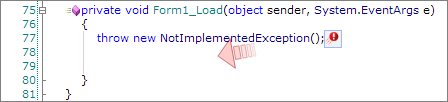
Figure: Visual indicators inside your code
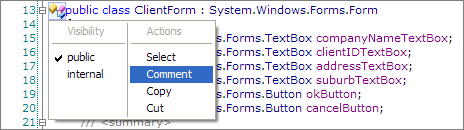
Figure: Visual accessibility modification in code view
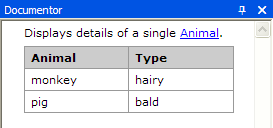
Figure: XML documentation previews

Figure: Automatically insert templates for commonly used code
CodeRush Web Site
-
Test Driven .NET
Test Driven integrates with a range of tools such as NUnit, MBUnit
and Visual Studio that allows you to run Unit Tests with the right
click button. Its key features include:
-
Run unit tests within any method, class, source file, namespace,
project or solution with a single-click
-
TestDriven.NET is the only add-in to work with all versions of
Visual Studio .NET
-
Supports multiple unit testing frameworks including NUnit,
MbUnit and MS Team System
- Runs in its own process for side-effect free testing.
- Allows you to easily debug tests or methods
- Supports all major .NET languages (C#, VB, C++ and J#)
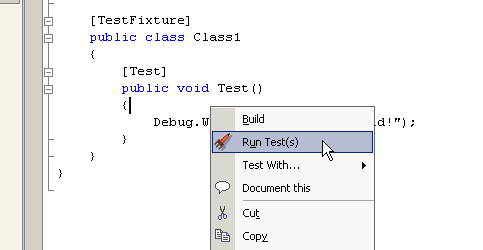
Figure: Run Unit Tests from the right click menu
Test Driven .NET Web Site
-
AspDB
Tornado is the DotNet version of
AspDB
. VS.NET is not required but remains a popular way to program
DotNet with Tornado as a library. If you have the DotNet Framework
installed, you basically need only one file (Tornado.dll) to get
going.
You can click via a code generator (Designer) to produce a
complete and acceptable Web DB application in several minutes.
-
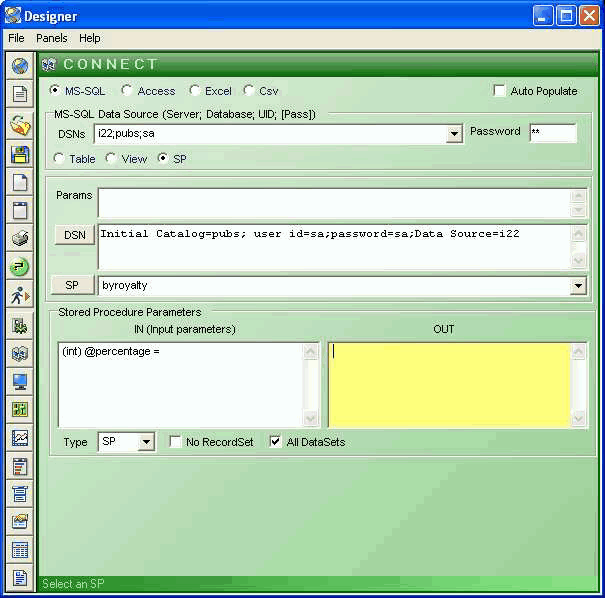
- Figure: Designer
-
BLinQ
Blinq
is a tool for generating ASP.NET websites for displaying,
creating, and manipulating data based on database schema, but it
is replaced by MVC. You don't need to write SQL queries to use
Blinq; LINQ will generate optimized queries for you that request
just the data you want to show.
The Blinq tool autogenerates web forms from database schema which
enable the following by default:
- Select, insert, update, and delete functionality
- Details and foreign key navigation
- Sorting and Pagination of records
-
A default style and design which provide a consistent layout
-
Elmah (Error Logging Modules and Handlers)
Once ELMAH has been dropped into a running web application and
configured appropriately, you get the following facilities without
changing a single line of your code:
- Logging of nearly all unhandled exceptions.
-
A web page to remotely view the entire log of recoded
exceptions.
-
A web page to remotely view the full details of any one logged
exception.
-
In many cases, you can review the original yellow screen of
death that ASP.NET generated for a given exception, even with
customErrors mode turned off.
-
An email notification of each error at the time it occurs.
- An RSS feed of the last 15 errors from the log.
-
EditPlus
EditPlus is a 32-bit text editor for the Microsoft Windows
operating system. The editor contains tools for programmers,
including syntax highlighting (and support for custom syntax
files), file type conversions, line ending conversion (between
Linux, Windows and Mac styles), regular expressions for
search-and-replace, keystroke, spell check, full support for
Unicode editing, customizable keyboard shortcuts, auto-completion,
code folding, and more. Files can be browsed and edited in tabs,
and an internal file browser is implemented in the software.
-
Notepad++
Notepad++ is a text editor and source code editor for Windows. One
advantage of Notepad++ over the built-in Windows text editor,
Notepad, is tabbed editing, which allows working with multiple
open files.
Notepad++ is distributed as free software. The project was hosted
on SourceForge.net, from where it has been downloaded over 27
million times and twice won the SourceForge Community Choice Award
for Best Developer Tool. To display and edit text and programming
language source code files, Notepad++ uses the Scintilla editor
component.
-
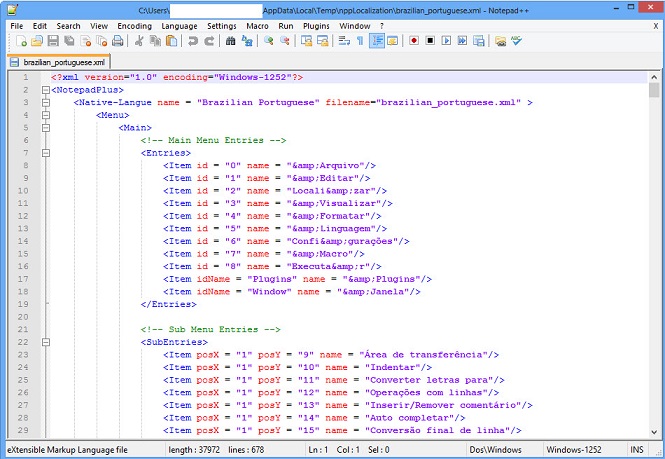
- Figure: Notepad++ in action
-
UltraEdit (IDM Computer Solutions Inc.)
UltraEdit is a simple text editing program that picks up the
functionality that Notepad leaves out.
UltraEdit will allow you to edit Text, Hex and HTML files in the
one user friendly environment. It has smart indenting for when
you're editing code, macro recording, advanced search and replace
functions. When you want to work on a .txt file, it's important to
associate it with a proper editor, UltraEdit is just such a tool.
There are other third-party editors about, but this is the one I
like the best.
-
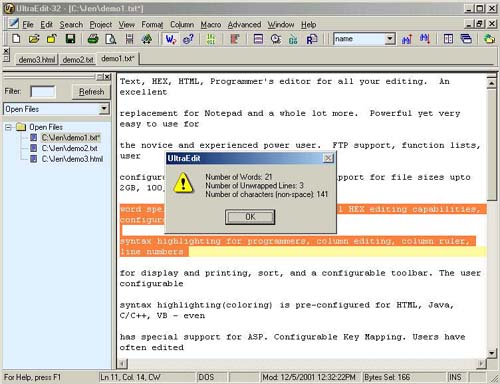
- Figure: UltraEdit
IDM Computer Solutions Inc Web Site